


New MazdaManiac BASE Calibrations


Something on your end.
EDIT - Lemme guess: you didn't follow the directions and right-click?
Last edited by MazdaManiac; Oct 5, 2009 at 05:13 PM.

Registered
Joined: May 2009
Posts: 178
Likes: 0


Lol... same here. I uninstalled everything, reinstalled both the Manager and Updater..still getting same message....
Total badass idea to have the links instead though..
For the compatibility issue, make sure you are downloading the most current calibration in the list, not one of your old ones. THere might be a compatibility issue there that I can resolve at a later time.
For those that are just having access issues, make sure you are doing the following:
OPEN THE E-MAIL
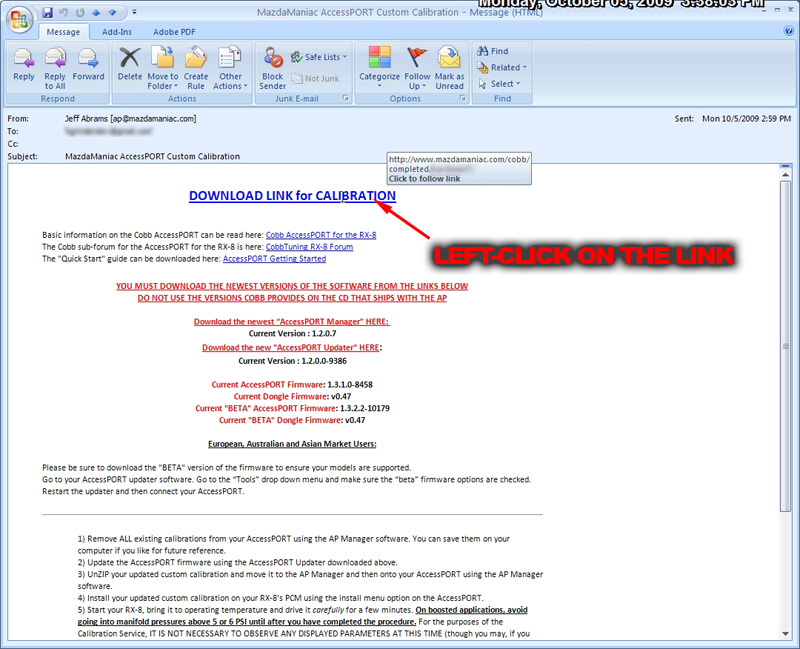
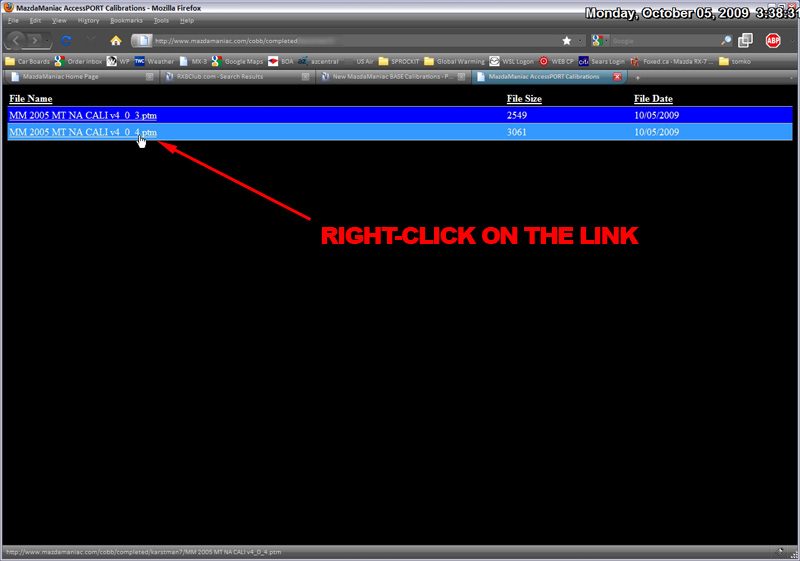
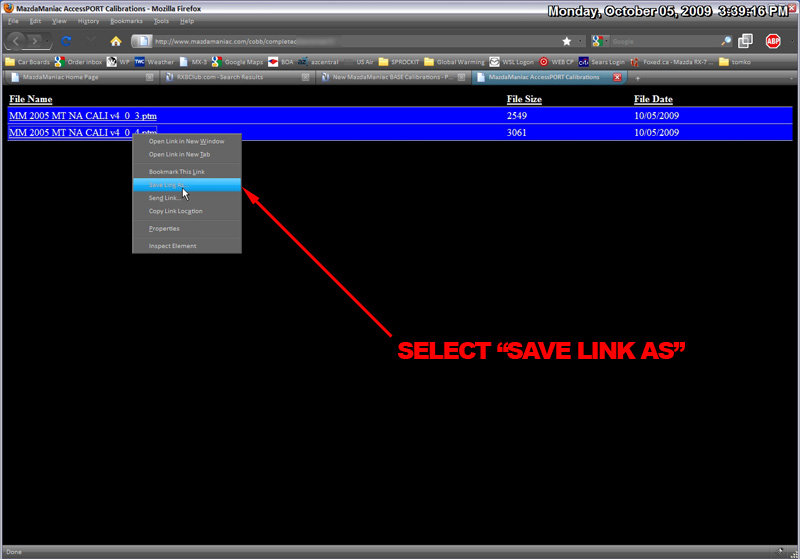
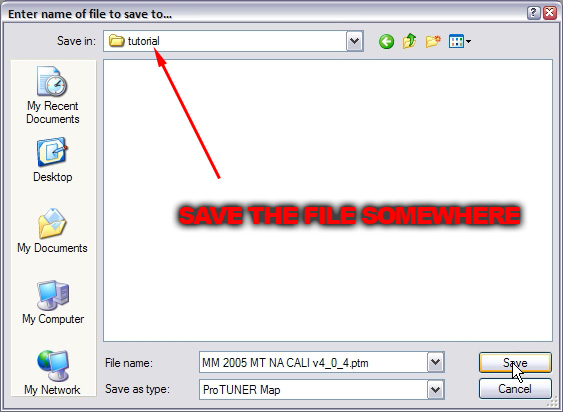
This was just verified with jsjjr's and l33sfpc's calibrations on 5 separate computers, 2 of which do NOT have the AP software on them.
The other three have a mix of old and new software.
For those that are just having access issues, make sure you are doing the following:
OPEN THE E-MAIL
This was just verified with jsjjr's and l33sfpc's calibrations on 5 separate computers, 2 of which do NOT have the AP software on them.
The other three have a mix of old and new software.
Last edited by MazdaManiac; Oct 5, 2009 at 05:54 PM.
Registered
Joined: May 2009
Posts: 178
Likes: 0
hmm i did that multiple times. Still says "the page cannot be displayed". It saves a page on the desktop that says the page cannot be found.
What should i do? all internet security is disabled.
edit: I also tried it on multiple computers, mac and a pc. same thing
What should i do? all internet security is disabled.
edit: I also tried it on multiple computers, mac and a pc. same thing
I dunno. I tried it in Netscape, IE, FireFox and Opera as well as the native browser on my phone and it always worked.
I'm calling other people around here to try it as well, but the two that have done it aren't having an issue.
Can you take screen-shots like I did to demonstrate the issue?
I'm calling other people around here to try it as well, but the two that have done it aren't having an issue.
Can you take screen-shots like I did to demonstrate the issue?

HAVOC
Joined: Jun 2008
Posts: 800
Likes: 0
From: Afghanistan
yeah im following those directions, and for some reason its saying the file does not exist. Its obviously on my end because i tried to do the same thing to other peoples files that were sucessful and all of them failed.
Update: used my roomates laptop with firefox and it worked fine.
Update: used my roomates laptop with firefox and it worked fine.
Last edited by WingleBeast; Oct 5, 2009 at 06:20 PM.
Everyone who can, try this:
CLICK ON THIS LINK AND FOLLOW THE DIRECTIONS ABOVE
(I promise you won't be Rick-Rolled - Its just a test link to a base calibration stored in the same sub-folder as everyone's calibrations.)
CLICK ON THIS LINK AND FOLLOW THE DIRECTIONS ABOVE
(I promise you won't be Rick-Rolled - Its just a test link to a base calibration stored in the same sub-folder as everyone's calibrations.)

⎝⏠⏝⏠⎠
Joined: Apr 2004
Posts: 8,625
Likes: 5
From: USA
the link is 404
http://www.mazdamaniac.com/cobb/comp...est/index.html
404 not found: http://www.mazdamaniac.com/cobb/comp...SDM%20v4_0.ptm
%20 translates to space.
http://www.mazdamaniac.com/cobb/comp...est/index.html
404 not found: http://www.mazdamaniac.com/cobb/comp...SDM%20v4_0.ptm
%20 translates to space.
Hey Jeff,
Still no go. I am able to click the 'test' link you provided above and see the file. I'm able to download it into a folder, but I get the same message as the most recent file. I've uninstalled and re-installed the updater and manager several times.. Not working for me..
Still no go. I am able to click the 'test' link you provided above and see the file. I'm able to download it into a folder, but I get the same message as the most recent file. I've uninstalled and re-installed the updater and manager several times.. Not working for me..
the link is 404
http://www.mazdamaniac.com/cobb/comp...est/index.html
404 not found: http://www.mazdamaniac.com/cobb/comp...SDM%20v4_0.ptm
%20 translates to space.
http://www.mazdamaniac.com/cobb/comp...est/index.html
404 not found: http://www.mazdamaniac.com/cobb/comp...SDM%20v4_0.ptm
%20 translates to space.
You have to right-click and save-as.
The only thing I can figure is that there is some sort of file association that is blocking your connection.
I guess I'll have to convert all of the files to ZIPs or RARs to ensure compatibility.
(BTW - Who the hell uses a Mac these days?)
I guess I'll have to convert all of the files to ZIPs or RARs to ensure compatibility.
(BTW - Who the hell uses a Mac these days?)

Registered
Joined: May 2006
Posts: 49
Likes: 0
From: Socal
Thanks Jeff, but sorry. I can't download the new map either when I click "save target/link as".
My error message reads "Internet Explorer was not able to open this internet site. The requested site is either unavailable or cannot be founr. Please try again later."
My error message reads "Internet Explorer was not able to open this internet site. The requested site is either unavailable or cannot be founr. Please try again later."

^ try firefox. mine said the same thing in IE but worked with firefox.
now it just says my newest map is an old version and can't be loaded into the ap manager... i'll investigate more tomorrow..
now it just says my newest map is an old version and can't be loaded into the ap manager... i'll investigate more tomorrow..
Registered
Joined: May 2006
Posts: 49
Likes: 0
From: Socal
I'm getting the above error message too now. Updated accessport an manager before I tried to add any maps.
Registered
Joined: May 2006
Posts: 49
Likes: 0
From: Socal

