CarPC and Stereo upgrade finished


I was looking to install a high end double din Eclipse unit with the Corksport kit..... but this is MUCH more flexible. Nav, DVD playing, bluetooth, PLUS Gigs of MP3 storage, WiFi, etc etc.
My main problems with this....
1)I feel like I HAVE to buy the transeflective display. I'm not spending $250 and then not being happy with it..... but buying $650 for a monitor is a large pill to swallow.
2)Honestly I don't think the non-motorized display holder looks very nice. Having a double din screen right in the dash looks much better. Having to manually pull it up....ehhhh...
My main problems with this....
1)I feel like I HAVE to buy the transeflective display. I'm not spending $250 and then not being happy with it..... but buying $650 for a monitor is a large pill to swallow.
2)Honestly I don't think the non-motorized display holder looks very nice. Having a double din screen right in the dash looks much better. Having to manually pull it up....ehhhh...

Thread Starter
Registered User
Joined: Jun 2006
Posts: 135
Likes: 0
From: South Florida
Because 2 and 3 need to be on all the time, would getting the P5V matters? How else can I tap power to 2 and 3 from? Is it the cnx-p2140
2)Honestly I don't think the non-motorized display holder looks very nice. Having a double din screen right in the dash looks much better. Having to manually pull it up....ehhhh...
Thats funny cause I thought the exact opposite I didn't like the look of the double din replacing the factory radio and getting the powered factory nav screen holder was so expensive.
Two things to keep in mind first off the CarPC is great but I have yet to find a bluetooth phone option that works well. Secondly the double din units have no stealth factor I know of several people that have had them stolen including one member of the forum.
Either option works pretty well keep us posted on which route you take

Last edited by kimota; Oct 3, 2007 at 10:16 AM.

Registered User
Joined: Sep 2006
Posts: 24
Likes: 0
I haven't started on the car yet. I am still waiting for some parts to arrive. Also, I am still unsure if I should go the mini add-a-circuit way since it only supports 10 amp (this is to get power through the passanger's side fuse box).
Registered User
Joined: Sep 2006
Posts: 24
Likes: 0
My installation is FINALLY done!
Trickiest parts (personally):
1. Deciding where to draw the power from: I followed Hedge suggestion of using 2 mini add-a-circuit gadgets (maac). I used one maac coming out from one of the 30 amp for door locks (for one of the red cables in the p2140) and the other ? amp from the ACC (for the ignition yellow cable in the p2140).
2. Deciding where to put the car PC: The RX-8 space is very limited. I went with the AOpen mp965-dr. I did not want to take it appart. I wanted to put it underneat any of the front seats but it was taking the feet space from the rear passanger seats. I ended up hanging the unit from the bottom metal sheet of the passenger's seat:
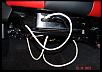
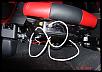
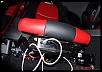
The white cable is the USB cable that conects to the p2140. I still need to fix it neatly.
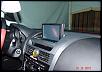
3. Fitting the retractable LCD. The darn thing did not want to go into place. After a couple of hours (instructions are in Japanese) I figured that the piece must be eastern fit for cars that have the driver's seat on the right hand side. I had to cut a clip on the bottom of the unit and cut a ledge on the left side of the actual dashboard cavity. After that, I was able to fit it in:
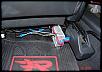
The p2140 is underneat the passenger's seat back side and touching the floor:
4. Getting the p2140 connected via USB to the car PC: I am running Vista Ultimate on the car PC. It turned out that the USB driver in Vista needs a power management feature disabled in the USB driver. To disabled it, go to device manager, p2140 device, properties, power management tab and uncheck the first check box.
Everything else ran smoothly. I've setup Vista to hibernate when the switch is off. when I turn the car back on, it takes about 5 secs for the pc to be up and running.
ONLY REGRET: I should've wait for the transflective screen which was out of stock at mp3car.com. I went with the Xenarc 700-TSV 2008 model and it does not do the trick for me. During bright day light is almost useless.
FUTURE CHALLENGES: I am still waiting for the DVD containing the navigation software for StreetDeck (SD). I've read a bit about some people having issues making it work on Vista. Also, the SD software is giving me an error of "Module is not available while car is running". The car is stopped and the GPS unit disconnected!! If anyone has some input, it will be much appreciated .
.
THANK YOU VERY VERY MUCH to Kimota who replied to me like crazy to all my questions. Also, Hedge helped a lot. THANKS GUYS!!!!
Trickiest parts (personally):
1. Deciding where to draw the power from: I followed Hedge suggestion of using 2 mini add-a-circuit gadgets (maac). I used one maac coming out from one of the 30 amp for door locks (for one of the red cables in the p2140) and the other ? amp from the ACC (for the ignition yellow cable in the p2140).
2. Deciding where to put the car PC: The RX-8 space is very limited. I went with the AOpen mp965-dr. I did not want to take it appart. I wanted to put it underneat any of the front seats but it was taking the feet space from the rear passanger seats. I ended up hanging the unit from the bottom metal sheet of the passenger's seat:
The white cable is the USB cable that conects to the p2140. I still need to fix it neatly.
3. Fitting the retractable LCD. The darn thing did not want to go into place. After a couple of hours (instructions are in Japanese) I figured that the piece must be eastern fit for cars that have the driver's seat on the right hand side. I had to cut a clip on the bottom of the unit and cut a ledge on the left side of the actual dashboard cavity. After that, I was able to fit it in:
The p2140 is underneat the passenger's seat back side and touching the floor:
4. Getting the p2140 connected via USB to the car PC: I am running Vista Ultimate on the car PC. It turned out that the USB driver in Vista needs a power management feature disabled in the USB driver. To disabled it, go to device manager, p2140 device, properties, power management tab and uncheck the first check box.
Everything else ran smoothly. I've setup Vista to hibernate when the switch is off. when I turn the car back on, it takes about 5 secs for the pc to be up and running.
ONLY REGRET: I should've wait for the transflective screen which was out of stock at mp3car.com. I went with the Xenarc 700-TSV 2008 model and it does not do the trick for me. During bright day light is almost useless.
FUTURE CHALLENGES: I am still waiting for the DVD containing the navigation software for StreetDeck (SD). I've read a bit about some people having issues making it work on Vista. Also, the SD software is giving me an error of "Module is not available while car is running". The car is stopped and the GPS unit disconnected!! If anyone has some input, it will be much appreciated
.THANK YOU VERY VERY MUCH to Kimota who replied to me like crazy to all my questions. Also, Hedge helped a lot. THANKS GUYS!!!!
Last edited by IsMao; Oct 15, 2007 at 07:00 PM.
Thread Starter
Registered User
Joined: Jun 2006
Posts: 135
Likes: 0
From: South Florida
Hey IsMao,
I was happy to help, you were the one actually doing all the hard work. You should have started your own thread an posted pics there 
Your CarPC is looking good nice job Ohh and as for the message in StreetDeck "Module is not available while car is running" thats a safety feature literally certain modules cannot be used while driving I.E video, creating Nav route etc.
Now for the good news there is a work around, "right click" your StreetDeck short cut then click "Properties" next to "Target" you will see this path "C:\Program Files\StreetDeck\streetdeck.exe", type "-testmode outside of the double quotes. This will run StreetDeck in testmode you can then use any module while driving but use at your own RISK
Below is exactly how the path should look with the -testmode switch
"C:\Program Files\StreetDeck\streetdeck.exe" -testmode
I was happy to help, you were the one actually doing all the hard work
. You should have started your own thread an posted pics there Your CarPC is looking good nice job Ohh and as for the message in StreetDeck "Module is not available while car is running" thats a safety feature literally certain modules cannot be used while driving I.E video, creating Nav route etc.
Now for the good news there is a work around, "right click" your StreetDeck short cut then click "Properties" next to "Target" you will see this path "C:\Program Files\StreetDeck\streetdeck.exe", type "-testmode outside of the double quotes. This will run StreetDeck in testmode you can then use any module while driving but use at your own RISK
Below is exactly how the path should look with the -testmode switch
"C:\Program Files\StreetDeck\streetdeck.exe" -testmode
IfYerNotWasted..TheDayIs
Joined: Jun 2006
Posts: 426
Likes: 0
From: NewBrunswick
This kind of stuff is sweet as hell... I always wanted this type of thing back a few years ago, always thought it would be cool to have the music playing with visualizations from PC programs (WinAmp would be one example, but it doesn't seem to be very responsive to the music... Sonique was wicked for visualizations, hasn't been a new release in years I don't believe but I preferred it to WinAmp by a long-shot)
Registered User
Joined: Sep 2006
Posts: 24
Likes: 0
Now for the good news there is a work around, "right click" your StreetDeck short cut then click "Properties" next to "Target" you will see this path "C:\Program Files\StreetDeck\streetdeck.exe", type "-testmode outside of the double quotes. This will run StreetDeck in testmode you can then use any module while driving but use at your own RISK
.I am not sure how the SD software determines the car is "moving" thou (my GPS was disconnected). I'd like to have the video feature on when the car is parked (which was my major concern) and not while drving. SD doesn't let me do that. It gives the error and locks me out. So your work around will help for sure.


Registered
Joined: Apr 2006
Posts: 143
Likes: 0
From: Singapore
Hi Bro IsMao, nice to hear that you have finished with your car pc. Arrrggghhhh! I am now facing with a power shortage. that I cant solve.
See I am using the Acer Veriton 1000 that requires an input of 19.5V and 7.1A. So together with my Econon monitor (that requires an input of 12V and 1.5A). The P2140 max out on the power consumption.
My PC never even got pass the bootup stage before the current gets cut off by the P2140.
Any solutions?
See I am using the Acer Veriton 1000 that requires an input of 19.5V and 7.1A. So together with my Econon monitor (that requires an input of 12V and 1.5A). The P2140 max out on the power consumption.
My PC never even got pass the bootup stage before the current gets cut off by the P2140.
Any solutions?


I recruit for USMC.
Joined: Dec 2007
Posts: 50
Likes: 0
From: San Diego
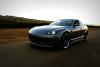
I have a carpc but its in my wrx.
here is a small video I made. http://www.youtube.com/watch?v=-8lfWmp-hes
I'll post pics in a bit.
here is a small video I made. http://www.youtube.com/watch?v=-8lfWmp-hes
I'll post pics in a bit.
Thread Starter
Registered User
Joined: Jun 2006
Posts: 135
Likes: 0
From: South Florida
Heya Fellas
jin kazama sounds like a good idea with the Mac mini I've met a guy that uses one as a CarPC its a nice solution. Be sure to check out Mp3car.com forums tons of info on Mac mini installs. Keep us posted
The Columbian video looks good, nice WRX with a Car PC. I use RR too some times but just love the look and functionality of Streetdeck(not saying its perfect). I only use my touch pad to control PC, and the gestures work great in Streetdeck as well as the voice command. There's also a add in thats going to be released by one voice the will literally let you play songs just by saying the name of the artist or song. I've contacted a one voice reseller who said the same funtionality will be applied to all modules including Nav so you can simply say the street name, state etc and the PC will recognize it
Heres a video of one voice on StreetDeck (one voice plugin hasn't been released yet)
jin kazama sounds like a good idea with the Mac mini I've met a guy that uses one as a CarPC its a nice solution. Be sure to check out Mp3car.com forums tons of info on Mac mini installs. Keep us posted
The Columbian video looks good, nice WRX with a Car PC. I use RR too some times but just love the look and functionality of Streetdeck(not saying its perfect). I only use my touch pad to control PC, and the gestures work great in Streetdeck as well as the voice command. There's also a add in thats going to be released by one voice the will literally let you play songs just by saying the name of the artist or song. I've contacted a one voice reseller who said the same funtionality will be applied to all modules including Nav so you can simply say the street name, state etc and the PC will recognize it
Heres a video of one voice on StreetDeck (one voice plugin hasn't been released yet
)
Last edited by kimota; Jan 4, 2008 at 12:55 AM.
I have a carpc but its in my wrx.
here is a small video I made. http://www.youtube.com/watch?v=-8lfWmp-hes
I'll post pics in a bit.
here is a small video I made. http://www.youtube.com/watch?v=-8lfWmp-hes
I'll post pics in a bit.

I recruit for USMC.
Joined: Dec 2007
Posts: 50
Likes: 0
From: San Diego
How much did your car pc cost? How do you like it because I am thinking about getting it for the 8. Do you know of anyone who has done it yet, so I could find some more info for our cars? Also, did you have to install any software, or was it already installed? Thanks.
Thread Starter
Registered User
Joined: Jun 2006
Posts: 135
Likes: 0
From: South Florida
Hi Rx8 Fanatic
IsMao, myself a few other members have already installed CarPc's in the RX8, just read the first and second page of thread you will see some install information.
Now if you really want a LOT of information go to the Mp3car.com forums all your question will be answered.
Keep in mind a CarPc in not a straight plug and play install like most head units it will require a lot of tinkering and TONS of research for successful install.
How much did your car pc cost? How do you like it because I am thinking about getting it for the 8. Do you know of anyone who has done it yet, so I could find some more info for our cars? Also, did you have to install any software, or was it already installed? Thanks.
you will see some install information.Now if you really want a LOT of information go to the Mp3car.com forums all your question will be answered.
Keep in mind a CarPc in not a straight plug and play install like most head units it will require a lot of tinkering and TONS of research for successful install.
Hi Rx8 Fanatic
IsMao, myself a few other members have already installed CarPc's in the RX8, just read the first and second page of thread you will see some install information.
Now if you really want a LOT of information go to the Mp3car.com forums all your question will be answered.
Keep in mind a CarPc in not a straight plug and play install like most head units it will require a lot of tinkering and TONS of research for successful install.
IsMao, myself a few other members have already installed CarPc's in the RX8, just read the first and second page of thread
you will see some install information.Now if you really want a LOT of information go to the Mp3car.com forums all your question will be answered.
Keep in mind a CarPc in not a straight plug and play install like most head units it will require a lot of tinkering and TONS of research for successful install.
Thread Starter
Registered User
Joined: Jun 2006
Posts: 135
Likes: 0
From: South Florida
I know of 2 prebuilt units being sold both using the Infill G4 hardware but with different software packages one is available from Mp3car.com the other from HIPePC both of these are double din units and would require a kit such as a corksport for install in the RX8.
Keep in mind with the prebuilt systems mentioned above the installation will be much more straight forward, and the software will be preloaded. But they are still a PC running on a windows platform and will occasionally suffer the same quirks as with any PC.
A CarPC can be very robust but it is definitely NOT like most after market head units where after the initial install your are pretty much done. After the CarPC install you will have a steep learning curve with whatever front end you choose.
I'm not trying to turn you off from installing a CarPC just trying to let you know what you will be getting into. If your the kind of person that enjoys tinkering with a PC go for it but if your looking at CarPC like an aftermarket head unit install you will be very disappointed.
Keep in mind with the prebuilt systems mentioned above the installation will be much more straight forward, and the software will be preloaded. But they are still a PC running on a windows platform and will occasionally suffer the same quirks as with any PC.
A CarPC can be very robust but it is definitely NOT like most after market head units where after the initial install your are pretty much done. After the CarPC install you will have a steep learning curve with whatever front end you choose.
I'm not trying to turn you off from installing a CarPC just trying to let you know what you will be getting into. If your the kind of person that enjoys tinkering with a PC go for it but if your looking at CarPC like an aftermarket head unit install you will be very disappointed.
Last edited by kimota; Jan 5, 2008 at 11:57 AM.

Registered User
Joined: Apr 2007
Posts: 26
Likes: 0
From: Baltimore, MD
Congrats on that setup.
I had a PC in my last car. Its a cool thing to do, and gets a lot of attention. I found over the years that I had the PC in the car, that I only used it for music, and very very very rarely searched for songs. I'd just let it play, if the song sucked, I'd just skip it.
Although it was a nice concept to be able to maybe do car diagnostics with it, or GPS, or internet, I never did any of that.
So, when I got my 8, I contemplated doing the carPC thing again, then gave up on the thought, when I considered the $$$ investment. I went with an IPOD and the Axxess controller instead. Does everything I need it to do.
But congrats on your install. I know how much work it can be. And even though your post says its done, I bet you aren't done in your mind. I'm sure there's lots of stuff you still want to do. hehe It never really ends......
John
I had a PC in my last car. Its a cool thing to do, and gets a lot of attention. I found over the years that I had the PC in the car, that I only used it for music, and very very very rarely searched for songs. I'd just let it play, if the song sucked, I'd just skip it.
Although it was a nice concept to be able to maybe do car diagnostics with it, or GPS, or internet, I never did any of that.
So, when I got my 8, I contemplated doing the carPC thing again, then gave up on the thought, when I considered the $$$ investment. I went with an IPOD and the Axxess controller instead. Does everything I need it to do.
But congrats on your install. I know how much work it can be. And even though your post says its done, I bet you aren't done in your mind. I'm sure there's lots of stuff you still want to do. hehe It never really ends......
John