


Mazdaedit


If you ever need a pic of an S2 map or something for reference or whatever shoot me a note.

tIme to ask questions ! :) :) :) :)
Ok, I got myself a test mule today, read the flash off the ECU, opened it ...


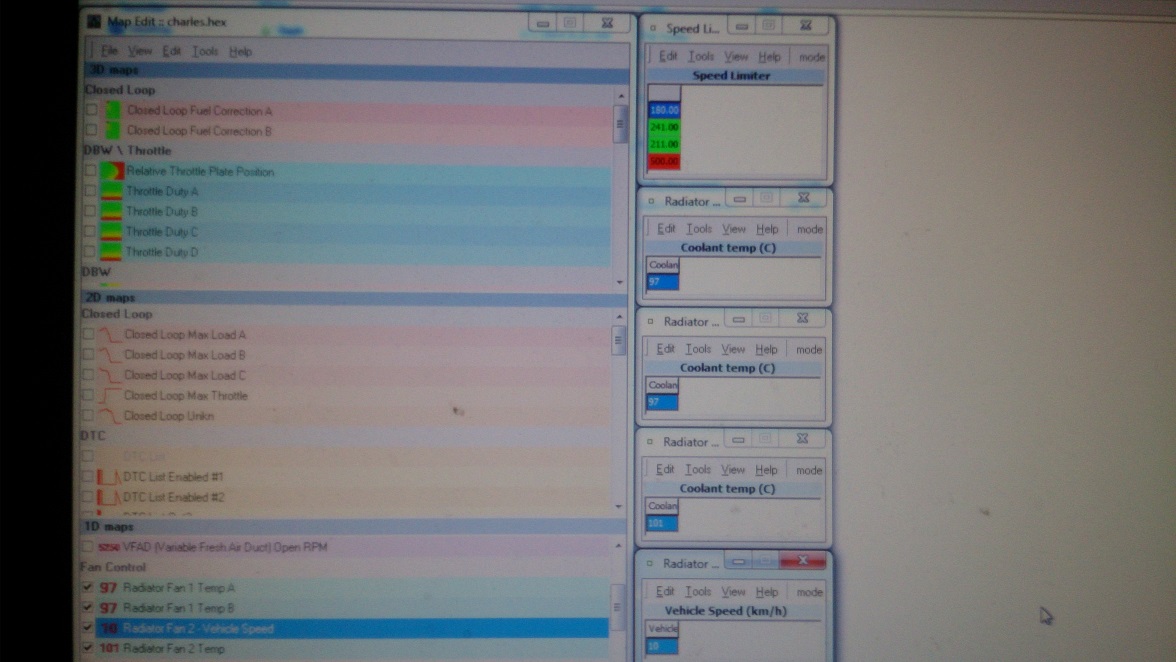
so for these items :
Speed limiter, I see 4 blocks, 180, 241, 211, and 500 (??), this is a JDM car so this is Kilometers(kmh), 180 Limiter is "well known" for all JDM cars, so if I want to "remove" this limit, what should I touch ?
for the Radiator Fan Speed part :
- I assume the Radiator Fan 1 Temp A and Radiator Fan 1 Temp B means "Fan 1 and 2, Low speed Fan On Temp", right ?
- The Last one, Radiator Fan 2 Temp means "high speed" ?
- what I don't get is the 3rd one, Radiator Fan 2 - Vehicle Speed, Does this one means "when car at xxx speed, turn the fan OFF" ?
Thx for the feedback guys, n00bie here
so for these items :
Speed limiter, I see 4 blocks, 180, 241, 211, and 500 (??), this is a JDM car so this is Kilometers(kmh), 180 Limiter is "well known" for all JDM cars, so if I want to "remove" this limit, what should I touch ?
for the Radiator Fan Speed part :
- I assume the Radiator Fan 1 Temp A and Radiator Fan 1 Temp B means "Fan 1 and 2, Low speed Fan On Temp", right ?
- The Last one, Radiator Fan 2 Temp means "high speed" ?
- what I don't get is the 3rd one, Radiator Fan 2 - Vehicle Speed, Does this one means "when car at xxx speed, turn the fan OFF" ?
Thx for the feedback guys, n00bie here
Last edited by nycgps; Mar 14, 2014 at 09:46 AM.

Thread Starter
Boosted Kiwi
iTrader: (2)
Joined: Apr 2006
Posts: 20,856
Likes: 1,807
From: Y-cat-o NZ
so for these items :
Speed limiter, I see 4 blocks, 180, 241, 211, and 500 (??), this is a JDM car so this is Kilometers(kmh), 180 Limiter is "well known" for all JDM cars, so if I want to "remove" this limit, what should I touch ?
for the Radiator Fan Speed part :
- I assume the Radiator Fan 1 Temp A and Radiator Fan 1 Temp B means "Fan 1 and 2, Low speed Fan On Temp", right ?
- The Last one, Radiator Fan 2 Temp means "high speed" ?
- what I don't get is the 3rd one, Radiator Fan 2 - Vehicle Speed, Does this one means "when car at xxx speed, turn the fan OFF" ?
Thx for the feedback guys, n00bie here

These are the numbers i found on a car with no limiter and are what i use ... 320,330,350,500
Fan : yes
fan vehicle speed : yes I think so although I have not verified.

hey, working on S2, I updated the Fan on temp, cuz it seems that its on at 85 and 105 ?
I left the first value as is (85), but I changed the 105 to 92, here is my question, I thought RX8 S2 has 3 fan speed now? what happened to the mid speed ?
As for Speed limiter, which has 5 value instead of 4 on S1, the first 1 is same old 180, the other 3 is something like 200, the last one is still 500. I changed all first 4 to 300, last one I left it at 500.
write it back, everythign seems fine.
now I can't communicate the Module. Not even with Mazda's own IDS, I can't even force it to do As Built because it always saids communication error.
Back to Mazdaedit, now I can't even read it from Mazda edit, it just saids
[0.000] loading kernel from file C:\Program Files (x86)\mazdaEdit v3\kernels\mazda_rx8.bin
[0.000] 19664 byte kernel read
[0.031] found OpenPort 2.0 (J2534) cable
[0.000] program version: 3.3.8.926
[0.936] CAN init...
[0.047] ECU SW partnumber: N3R3EK00013H60A0
[0.031] ECU VIN: SE3Pxxxxxx(I changed this lol)
[0.000] starting session...
[0.031] requesting challenge...
[0.016] sending challenge...
[0.031] can: invalid cmd response [7F2735]
[0.000] unable to read response
[0.015] challenge is not accepted
[0.032] Errors occured
So does it mean the ECU is brick?
I can somehow access it with IDS and it a bunch of Uxxxx code now, the car starts and drives fine. but I think the CEL gonna show up on next drive cycle, and there is no way I can leave the car like this.
Now the only way I can dump the ECU is thru the Flashwriter's Read ECU from epifanSoftware. but of course I can't access anything else.
I just emailed epifan soft for this, but does anyone here knows why ?
thx
I left the first value as is (85), but I changed the 105 to 92, here is my question, I thought RX8 S2 has 3 fan speed now? what happened to the mid speed ?
As for Speed limiter, which has 5 value instead of 4 on S1, the first 1 is same old 180, the other 3 is something like 200, the last one is still 500. I changed all first 4 to 300, last one I left it at 500.
write it back, everythign seems fine.
now I can't communicate the Module. Not even with Mazda's own IDS, I can't even force it to do As Built because it always saids communication error.
Back to Mazdaedit, now I can't even read it from Mazda edit, it just saids
[0.000] loading kernel from file C:\Program Files (x86)\mazdaEdit v3\kernels\mazda_rx8.bin
[0.000] 19664 byte kernel read
[0.031] found OpenPort 2.0 (J2534) cable
[0.000] program version: 3.3.8.926
[0.936] CAN init...
[0.047] ECU SW partnumber: N3R3EK00013H60A0
[0.031] ECU VIN: SE3Pxxxxxx(I changed this lol)
[0.000] starting session...
[0.031] requesting challenge...
[0.016] sending challenge...
[0.031] can: invalid cmd response [7F2735]
[0.000] unable to read response
[0.015] challenge is not accepted
[0.032] Errors occured
So does it mean the ECU is brick?
I can somehow access it with IDS and it a bunch of Uxxxx code now, the car starts and drives fine. but I think the CEL gonna show up on next drive cycle, and there is no way I can leave the car like this.
Now the only way I can dump the ECU is thru the Flashwriter's Read ECU from epifanSoftware. but of course I can't access anything else.
I just emailed epifan soft for this, but does anyone here knows why ?
thx
Last edited by nycgps; Mar 15, 2014 at 06:29 AM.

New Member
Joined: Mar 2013
Posts: 3
Likes: 0
[0.000] loading kernel from file C:\Program Files (x86)\mazdaEdit v3\kernels\mazda_rx8.bin
[0.000] 19664 byte kernel read
[0.031] found OpenPort 2.0 (J2534) cable
[0.000] program version: 3.3.8.926
[0.936] CAN init...
[0.047] ECU SW partnumber: N3R3EK00013H60A0
[0.031] ECU VIN: SE3Pxxxxxx(I changed this lol)
[0.000] starting session...
[0.031] requesting challenge...
[0.016] sending challenge...
[0.031] can: invalid cmd response [7F2735]
[0.000] unable to read response
[0.015] challenge is not accepted
[0.032] Errors occured
thx
[0.000] 19664 byte kernel read
[0.031] found OpenPort 2.0 (J2534) cable
[0.000] program version: 3.3.8.926
[0.936] CAN init...
[0.047] ECU SW partnumber: N3R3EK00013H60A0
[0.031] ECU VIN: SE3Pxxxxxx(I changed this lol)
[0.000] starting session...
[0.031] requesting challenge...
[0.016] sending challenge...
[0.031] can: invalid cmd response [7F2735]
[0.000] unable to read response
[0.015] challenge is not accepted
[0.032] Errors occured
thx

Registered
Joined: Jun 2009
Posts: 492
Likes: 2
From: Toronto, Canada
Its a security feature. Once you write a map, it can no longer be read. You can only write a map after that. It's to avoid people copying your work. So basically you should have your map your working on saved as well as your original in case you want it back to stock for some reason.
thewird
thewird
Last edited by thewird; Mar 15, 2014 at 09:12 AM.

Its a security feature. Once you write a map, it can no longer be read. You can only write a map after that. It's to avoid people copying your work. So basically you should have your map your working on saved as well as your original in case you want it back to stock for some reason.
thewird
thewird
I was stupid enough to make a stupid mistake ----- I forgot to backup the original bin file and overwrite the mod to it, he can make a new stock bin file for me but I think I'm ok at this point.
Anyway, Now I wanna ask something about the S2 maps.
on S2, I know there is a slight change on the FAN on temp, there should be 3 fan speed (low, mid, high), but on the map description I see these:
85 Radiator Fan 1 Temp A
0 Radiator Fan 1 Temp B
10 Raadiator Fan 2 - Vehicle Speed
105 Radiator Fan 2 Temp
So my question is is this even right ? at 105 ?
What about the 2nd line, it's "0" by default, So I left that one as is.
I tried to change the 3rd one to 92 yesterday, but it doesn't seem to effect the Fan On high speed temprature, it goes to high speed (loud Fan sound) at around 106 Celsius. Does anybody figure this part out yet ?
Another part is the Speed Limiter, on S1 there are 4 blocks of data, but on S2 there are 5, so I just fill it with 330 except the last block which is 500. Does that sound right ?
Thx.
Thread Starter
Boosted Kiwi
iTrader: (2)
Joined: Apr 2006
Posts: 20,856
Likes: 1,807
From: Y-cat-o NZ
85 Radiator Fan 1 Temp A
0 Radiator Fan 1 Temp B
10 Raadiator Fan 2 - Vehicle Speed
105 Radiator Fan 2 Temp
So my question is is this even right ? at 105 ?
What about the 2nd line, it's "0" by default, So I left that one as is.
I tried to change the 3rd one to 92 yesterday, but it doesn't seem to effect the Fan On high speed temprature, it goes to high speed (loud Fan sound) at around 106 Celsius. Does anybody figure this part out yet ?
.
0 Radiator Fan 1 Temp B
10 Raadiator Fan 2 - Vehicle Speed
105 Radiator Fan 2 Temp
So my question is is this even right ? at 105 ?
What about the 2nd line, it's "0" by default, So I left that one as is.
I tried to change the 3rd one to 92 yesterday, but it doesn't seem to effect the Fan On high speed temprature, it goes to high speed (loud Fan sound) at around 106 Celsius. Does anybody figure this part out yet ?
.
S1 is 101C - maybe Mazda view that final stage as a last ditch attempt to prevent damage and don't want it to come on in normal use ...

sounds ok to me .

Registered
Joined: Jul 2009
Posts: 425
Likes: 4
From: Whangarei, New Zealand

Anyway, Now I wanna ask something about the S2 maps.
on S2, I know there is a slight change on the FAN on temp, there should be 3 fan speed (low, mid, high), but on the map description I see these:
85 Radiator Fan 1 Temp A
0 Radiator Fan 1 Temp B
10 Raadiator Fan 2 - Vehicle Speed
105 Radiator Fan 2 Temp
So my question is is this even right ? at 105 ?
What about the 2nd line, it's "0" by default, So I left that one as is.
I tried to change the 3rd one to 92 yesterday, but it doesn't seem to effect the Fan On high speed temprature, it goes to high speed (loud Fan sound) at around 106 Celsius. Does anybody figure this part out yet ?
Another part is the Speed Limiter, on S1 there are 4 blocks of data, but on S2 there are 5, so I just fill it with 330 except the last block which is 500. Does that sound right ?
Thx.
How about this for a theory
85 Radiator Fan 1 Temp A - The 85 is a set point of which the rest is based around, and it is probably 85 degrees C.
0 Radiator Fan 1 Temp B - The 0 is not a temperature setting, but a time interval setting. For example if the setting was 1 ( 1 min ), then after the fan has been activated once, it will not be activated again until 1 minute has passed, - even if the temp set point has been tripped. In most cases you would set this to zero.
10 Raadiator Fan 2 - Vehicle Speed - The 10 is also not a temp setting, but a Hysteresis point, in other words this sets the difference in temp between the switch on and switch off . So the fan would actually be turned on at 85 + 10 = 95C and off again at 85 - 10 = 75C.
105 Radiator Fan 2 Temp - The 105 is the set point for the second fan and so the same as the first fan set at 105 degrees C.
Then the computer would also set the turn on and off for the second fan according to the other two points.
Anyway that a theory and is used in quite a lot of timer-temperature switches nowadays.
Gives you something to think about anyway.
Rotaman
Last edited by Rotaman; Mar 24, 2014 at 11:55 PM.
Thread Starter
Boosted Kiwi
iTrader: (2)
Joined: Apr 2006
Posts: 20,856
Likes: 1,807
From: Y-cat-o NZ
How about this for a theory
85 Radiator Fan 1 Temp A - The 85 is a set point of which the rest is based around, and it is probably 85 degrees C.
0 Radiator Fan 1 Temp B - The 0 is not a temperature setting, but a time interval setting. For example if the setting was 1 ( 1 min ), then after the fan has been activated once, it will not be activated again until 1 minute has passed, - even if the temp set point has been tripped. In most cases you would set this to zero.
10 Raadiator Fan 2 - Vehicle Speed - The 10 is also not a temp setting, but a Hysteresis point, in other words this sets the difference in temp between the switch on and switch off . So the fan would actually be turned on at 85 + 10 = 90C and off again at 85 - 10 = 75C.
105 Radiator Fan 2 Temp - The 105 is the set point for the second fan and so the same as the first fan set at 105 degrees C.
Then the computer would also set the turn on and off for the second fan according to the other two points.
Anyway that a theory and is used in quite a lot of timer-temperature switches nowadays.
Gives you something to think about anyway.
Rotaman
85 Radiator Fan 1 Temp A - The 85 is a set point of which the rest is based around, and it is probably 85 degrees C.
0 Radiator Fan 1 Temp B - The 0 is not a temperature setting, but a time interval setting. For example if the setting was 1 ( 1 min ), then after the fan has been activated once, it will not be activated again until 1 minute has passed, - even if the temp set point has been tripped. In most cases you would set this to zero.
10 Raadiator Fan 2 - Vehicle Speed - The 10 is also not a temp setting, but a Hysteresis point, in other words this sets the difference in temp between the switch on and switch off . So the fan would actually be turned on at 85 + 10 = 90C and off again at 85 - 10 = 75C.
105 Radiator Fan 2 Temp - The 105 is the set point for the second fan and so the same as the first fan set at 105 degrees C.
Then the computer would also set the turn on and off for the second fan according to the other two points.
Anyway that a theory and is used in quite a lot of timer-temperature switches nowadays.
Gives you something to think about anyway.
Rotaman
Hi Roger ,
good to see you are still posting
hysteresis on the s1 is only 3C so I don't think the 10 is hysteresis .ME just has not shown any of hysteresis figures.
The description they gave it (vehicle speed) is more than likely correct although I haven't tested it. Maybe next time you are down we can strap you to the bonnet and see ?
Last edited by Brettus; Mar 24, 2014 at 11:00 PM.
Registered
Joined: Jul 2009
Posts: 425
Likes: 4
From: Whangarei, New Zealand
Brett you are probably right, it was just a theory as the numbers sort of looked like it could work that way.
But I must admit the 10 for a Hysteresis point would be quite large.
A couple of different controls I'm using for intercooler sprayer and oil cooler fans, I have set a hysteresis point of 3 degrees C.
Being strapped to the bonnet, I guess that would be thrilling, I'll bring plenty of duck tape.
Rotaman
But I must admit the 10 for a Hysteresis point would be quite large.
A couple of different controls I'm using for intercooler sprayer and oil cooler fans, I have set a hysteresis point of 3 degrees C.
Being strapped to the bonnet, I guess that would be thrilling, I'll bring plenty of duck tape.
Rotaman
Thread Starter
Boosted Kiwi
iTrader: (2)
Joined: Apr 2006
Posts: 20,856
Likes: 1,807
From: Y-cat-o NZ

Registered
Joined: Sep 2004
Posts: 581
Likes: 0
From: Europe
Hi,
I had a look at the thread here and it looks like this reprog tool is quite complete. Nice!
Would some be kind enough to do a screen capture of the listing of maps related to crank fuel? I'd be interested to check what's really available on this tool.
Cheers,
Fabrice
I had a look at the thread here and it looks like this reprog tool is quite complete. Nice!
Would some be kind enough to do a screen capture of the listing of maps related to crank fuel? I'd be interested to check what's really available on this tool.
Cheers,
Fabrice
Last edited by Rasputin; Mar 25, 2014 at 07:59 AM.
Thread Starter
Boosted Kiwi
iTrader: (2)
Joined: Apr 2006
Posts: 20,856
Likes: 1,807
From: Y-cat-o NZ
Hi,
I had a look at the thread here and it looks like this reprog tool is quite complete. Nice!
Would some be kind enough to do a screen capture of the listing of maps related to crank fuel? I'd be interested to check what's really available on this tool.
Cheers,
Fabrice
I had a look at the thread here and it looks like this reprog tool is quite complete. Nice!
Would some be kind enough to do a screen capture of the listing of maps related to crank fuel? I'd be interested to check what's really available on this tool.
Cheers,
Fabrice
I have tried to mess with the fueling tables to see if that influenced cranking fuel in the past ... without any conclusive results.
If you are having an issue , I would suggest you look for a solution elsewhere.
Registered
Joined: Sep 2004
Posts: 581
Likes: 0
From: Europe
OK, Epifan think they found the Base Crank Fuel table. I bought the Personal version from them to check it out. But I still need to order the compatible hardware.
Any info about compatibility with another ECU programmer? The EFI Dude / sCANalyser Pro Tuner, for example?
Cheers,
Fabrice
Any info about compatibility with another ECU programmer? The EFI Dude / sCANalyser Pro Tuner, for example?
Cheers,
Fabrice
Thread Starter
Boosted Kiwi
iTrader: (2)
Joined: Apr 2006
Posts: 20,856
Likes: 1,807
From: Y-cat-o NZ
OK, Epifan think they found the Base Crank Fuel table. I bought the Personal version from them to check it out. But I still need to order the compatible hardware.
Any info about compatibility with another ECU programmer? The EFI Dude / sCANalyser Pro Tuner, for example?
Cheers,
Fabrice
Any info about compatibility with another ECU programmer? The EFI Dude / sCANalyser Pro Tuner, for example?
Cheers,
Fabrice
Also : Why are you so fixated on the crank fuel table ?

Registered
Joined: Sep 2004
Posts: 581
Likes: 0
From: Europe
For the reason behind my fixation, read here (first post is enough) :
https://www.rx8club.com/series-i-eng...l-maps-251894/
I was asking about compatibility because I already own a few OBD-port programming tools. But Epifan tols me I must buy Openport 2.0 which I'll do as soon as he comes back to me with the RX-8 calibration files.
Thanks for your help in finding the crank tables. Although it was not my request you do so, I really appreciate your help and I hope I'll be able to help you in the future in another tuning issue.
Fabrice
Thread Starter
Boosted Kiwi
iTrader: (2)
Joined: Apr 2006
Posts: 20,856
Likes: 1,807
From: Y-cat-o NZ
Hi Brettus,
For the reason behind my fixation, read here (first post is enough) :
https://www.rx8club.com/series-i-eng...l-maps-251894/
I was asking about compatibility because I already own a few OBD-port programming tools. But Epifan tols me I must buy Openport 2.0 which I'll do as soon as he comes back to me with the RX-8 calibration files.
Thanks for your help in finding the crank tables. Although it was not my request you do so, I really appreciate your help and I hope I'll be able to help you in the future in another tuning issue.
Fabrice
For the reason behind my fixation, read here (first post is enough) :
https://www.rx8club.com/series-i-eng...l-maps-251894/
I was asking about compatibility because I already own a few OBD-port programming tools. But Epifan tols me I must buy Openport 2.0 which I'll do as soon as he comes back to me with the RX-8 calibration files.
Thanks for your help in finding the crank tables. Although it was not my request you do so, I really appreciate your help and I hope I'll be able to help you in the future in another tuning issue.
Fabrice
The table Epifan has identified does look like the right one for crank pulsewidth but there is nothing for decay . Will try a few things over the weekend ....
Registered
Joined: Sep 2004
Posts: 581
Likes: 0
From: Europe
Excellent, thanks. It's not an easy one to find as it probably is just a multiplier as a function of god knows what : ECT, or cycle n°, or both, i.e. there are 2 x 2-dim tables.
Can you post the Crank Table?
Let me know if I can help.
Fab
Can you post the Crank Table?
Let me know if I can help.
Fab
Thread Starter
Boosted Kiwi
iTrader: (2)
Joined: Apr 2006
Posts: 20,856
Likes: 1,807
From: Y-cat-o NZ

Registered
Joined: Sep 2004
Posts: 581
Likes: 0
From: Europe
I feel your frustration. It might bu just a single parameter, valid at all ECT and constantly across the cranking cycles. That said, if it is the case, then there must be a parameter or table limiting the decay so that the crank fuel PW don't reach zero!
I will ask a friend at Denso UK if he can give me some hint on this.
Fabrice
I will ask a friend at Denso UK if he can give me some hint on this.
Fabrice