


Baseline Automated Tuning Beta Now Available for Download


package failure. downloading another free trial access for the xp. taking forever.
i'm hoping to have some preliminary m values by tomorrow night, and this weekend i'll take a bunch more logs to clean things up more.
good things come to those who wait, i guess.
weird about vista.
i'm hoping to have some preliminary m values by tomorrow night, and this weekend i'll take a bunch more logs to clean things up more.
good things come to those who wait, i guess.
weird about vista.


success! my log has been massaged!
tonight i'll have the 1st 17 logs imported.
so, i'm supposed to click scale the maf, then multiply maf values by the m values in racetuner. correct?
that should make a new map. I need to flash that, then check to make sure i'm getting the afrs i enter. then i can make whatever fuel map i want, right?
oh, for the "throttle position" slot on the import log screen, should i use relative throttle position or accelerator position? AP logs both. so far i've been using relative throttle so i hope that's right.
tonight i'll have the 1st 17 logs imported.
so, i'm supposed to click scale the maf, then multiply maf values by the m values in racetuner. correct?
that should make a new map. I need to flash that, then check to make sure i'm getting the afrs i enter. then i can make whatever fuel map i want, right?
oh, for the "throttle position" slot on the import log screen, should i use relative throttle position or accelerator position? AP logs both. so far i've been using relative throttle so i hope that's right.
Last edited by myriadshalaks; Jun 12, 2009 at 11:47 AM.
Since the accel fueling is not as of yet done; that won't matter for now.
Yeah you take your M Values to multiply the MAF at those voltages - reload the log and re run the MAF scaler; as you do this the M values should go DOWN... anything less than 3% is basically perfect and less than 5% is ok.
Yeah you take your M Values to multiply the MAF at those voltages - reload the log and re run the MAF scaler; as you do this the M values should go DOWN... anything less than 3% is basically perfect and less than 5% is ok.
no yeah i meant once i get the maf scaled properly, i should just be able to plug in and get whatever i want using the fuel map in racetuner.
so i don't need to check it by flashing a new map with that maf scale? if it's within range in baseline, i can just start making the new fuel table in racetuner?
suppose baseline doesn't come back with voltages that match what's changeable in racetuner? how to round?
so i don't need to check it by flashing a new map with that maf scale? if it's within range in baseline, i can just start making the new fuel table in racetuner?
suppose baseline doesn't come back with voltages that match what's changeable in racetuner? how to round?
Last edited by myriadshalaks; Jun 12, 2009 at 12:43 PM.
Damn chase - that ain't bad.
Short answer to your question is yes.... numbers higher than 1 are "lean" and lower than one are "rich"...
But overall it isn't bad man! Load MAF scale and verify before you start tuning.
Short answer to your question is yes.... numbers higher than 1 are "lean" and lower than one are "rich"...
But overall it isn't bad man! Load MAF scale and verify before you start tuning.

Chase is working it - and I have started on J.Cab's (he might have mechanical issues).
But the folks using Vista are getting some weird *** error.
Seems like 1.5 with the MAF tool is the one that got everyone here moving - LOL
But the folks using Vista are getting some weird *** error.
Seems like 1.5 with the MAF tool is the one that got everyone here moving - LOL
yeah, i'm pretty well dialed in now. just watching the afrs, i'm probably within 1 or 2 percent of my targets with this new map. i haven't run it back through baseline to see if the maf is still off anywhere, but i'd say i'm pretty much done.
awesome. thanks, kane!
awesome. thanks, kane!
i'll have to wait till i get some logs for it. i've just been watching it so far. ambient temp is in the high 90s and into the 100s this whole weekend, so I think i'm gonna wait till i have more comparable data to what i had before.
everything feels real smooth though.
everything feels real smooth though.
that's cool that you can view the maps like that.
i just opened up baseline to play with the old map and make some before graphs, but for some reason i was reverted back to before i entered my logs to get the maf scale i'm running now.
I must not have saved. FML.
I guess loading the logs again isn't that hard.
i can do a sort of idiots guide to using baseline with AP if you want. It's not hard at all -- just a little unneccesarily tedious.
i just opened up baseline to play with the old map and make some before graphs, but for some reason i was reverted back to before i entered my logs to get the maf scale i'm running now.
I must not have saved. FML.
I guess loading the logs again isn't that hard.
i can do a sort of idiots guide to using baseline with AP if you want. It's not hard at all -- just a little unneccesarily tedious.

okay, well here's a rough draft.
Using Baseline 1.5 to Scale Your MAF with AP: Easy Version
1. Flash a map to your car using AP. Go take many logs -- 30 sec cruise at every RPM if you want. WOT pulls in every gear. The more, the better.
2. Take your accesport to the computer and open the AP Manager. Go to advanced view and download your logs. Name them simply 1,2,3,4, etc. You'll thank me later.
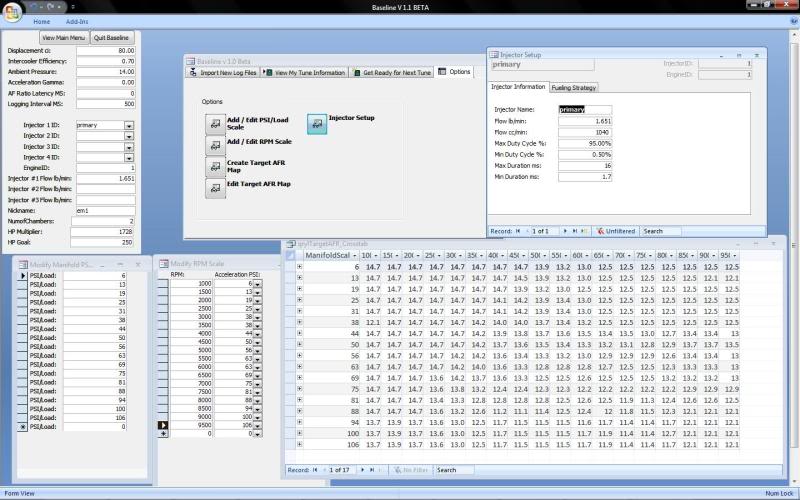
3. Open baseline and set up your engine. if you're NA, it's gonna look like this (after you go through the PITA wizard). Although your air fuel table will be different, everything else should be the same.
4. In the "get ready for next tune" screen, click "back up old log files". Now import your logs, and MAKE SURE you "massage log" after each time you upload (there won't be a tune name). Now you'll thank me. p.s. "ctrl v" is your friend.
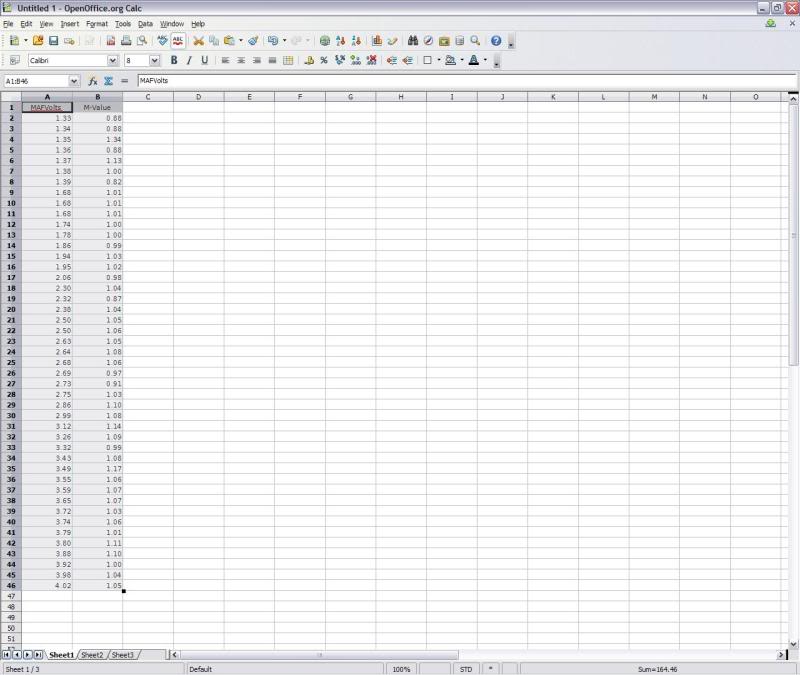
5. Find the button that says "scale maf" and click it. You'll get something that looks like this, call this the M values.
6. Save your M values in something else like excel so you have them to the side.
7. You'll now need to open racetuner and load the map you had flashed when you made your logs. Pull up the "maf calibration" table and make it where both that and your M values are visible on your screen.
8. Find voltage points on your calibration table that correspond to those in you M value page.
9. Right click those and multiply them by the corresponding M values. Like this.
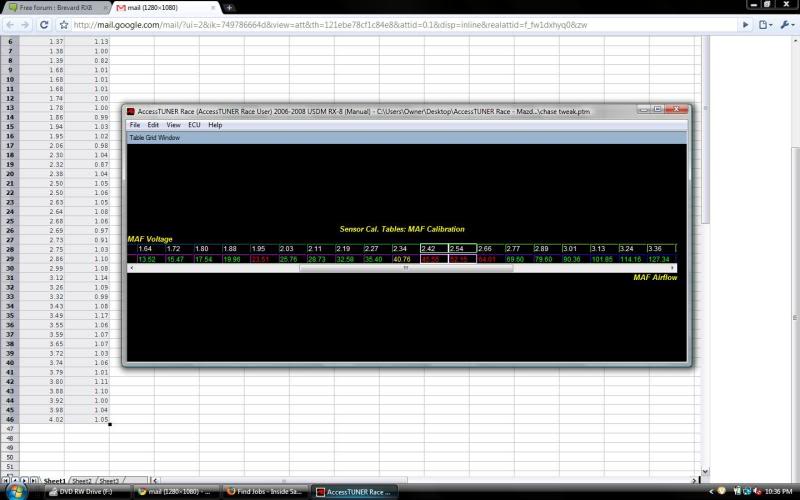
--When there is a gap in corresponding voltages, you just have to make a sort of intuitive guess.
10. Save the map. you may want to change your fuel map before you save here (update the map in baseline too if you do this). you should be able to get pretty close to the values you want now that your maf is scaled. here's what i did. It's pretty conservative.

I make the map in excel then copy and paste into racetuner. RT automatically adjusts it from, say, 12.5 to 12.52. Not sure why.
11. Open AP Manager. Import Map. Upload Map to AP.
12. Flash map. Drive.
13. Repeat until satisfied.
hOW'S ThAT? ?
?
PICS ATTACHED IN ORDER
Using Baseline 1.5 to Scale Your MAF with AP: Easy Version
1. Flash a map to your car using AP. Go take many logs -- 30 sec cruise at every RPM if you want. WOT pulls in every gear. The more, the better.
2. Take your accesport to the computer and open the AP Manager. Go to advanced view and download your logs. Name them simply 1,2,3,4, etc. You'll thank me later.
3. Open baseline and set up your engine. if you're NA, it's gonna look like this (after you go through the PITA wizard). Although your air fuel table will be different, everything else should be the same.
4. In the "get ready for next tune" screen, click "back up old log files". Now import your logs, and MAKE SURE you "massage log" after each time you upload (there won't be a tune name). Now you'll thank me. p.s. "ctrl v" is your friend.
5. Find the button that says "scale maf" and click it. You'll get something that looks like this, call this the M values.
6. Save your M values in something else like excel so you have them to the side.
7. You'll now need to open racetuner and load the map you had flashed when you made your logs. Pull up the "maf calibration" table and make it where both that and your M values are visible on your screen.
8. Find voltage points on your calibration table that correspond to those in you M value page.
9. Right click those and multiply them by the corresponding M values. Like this.
--When there is a gap in corresponding voltages, you just have to make a sort of intuitive guess.
10. Save the map. you may want to change your fuel map before you save here (update the map in baseline too if you do this). you should be able to get pretty close to the values you want now that your maf is scaled. here's what i did. It's pretty conservative.
I make the map in excel then copy and paste into racetuner. RT automatically adjusts it from, say, 12.5 to 12.52. Not sure why.
11. Open AP Manager. Import Map. Upload Map to AP.
12. Flash map. Drive.
13. Repeat until satisfied.
hOW'S ThAT?
?PICS ATTACHED IN ORDER
Last edited by myriadshalaks; Jun 17, 2009 at 10:11 AM.
oops. yeah i need to do that too. lol.
should i make it a new thread?
you need some more tags for the searching purposes.
should i make it a new thread?
you need some more tags for the searching purposes.
Last edited by myriadshalaks; Jun 17, 2009 at 10:16 AM.
Once your MAF is scaled and your target AFR's are in and good then you can use the % to add or subtract map to help identify any holes in your tune.
If you want a separate one JUST for the Cobb AP and PPO2 then that is probably not bad idea.
If you want a separate one JUST for the Cobb AP and PPO2 then that is probably not bad idea.