


AccesTuner Race....Questions & Discussion

3-wheeler
Joined: Dec 2005
Posts: 2,734
Likes: 1
From: Phoenix
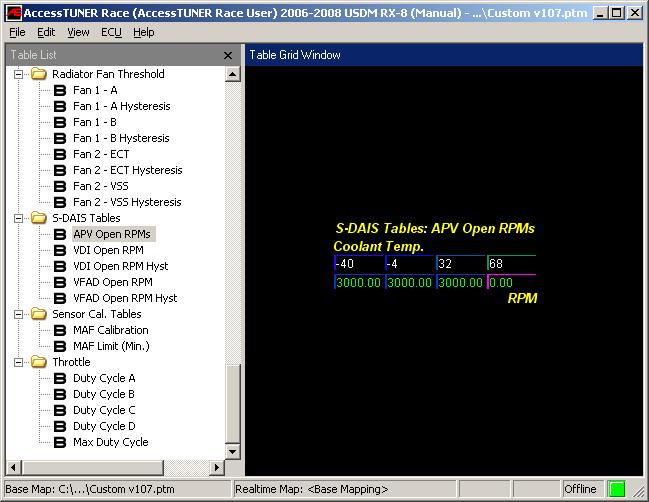
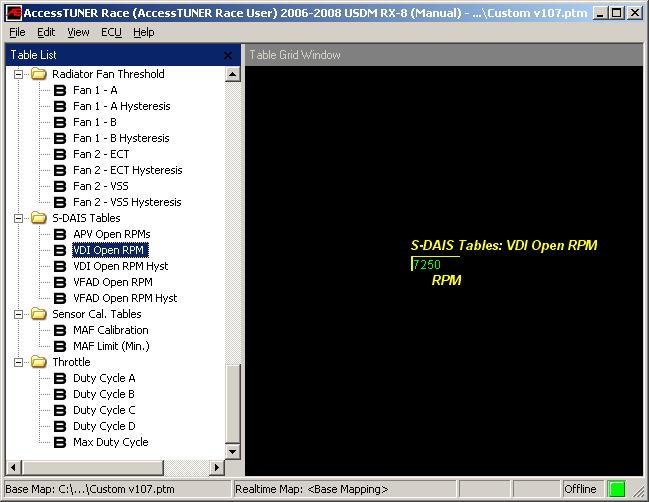
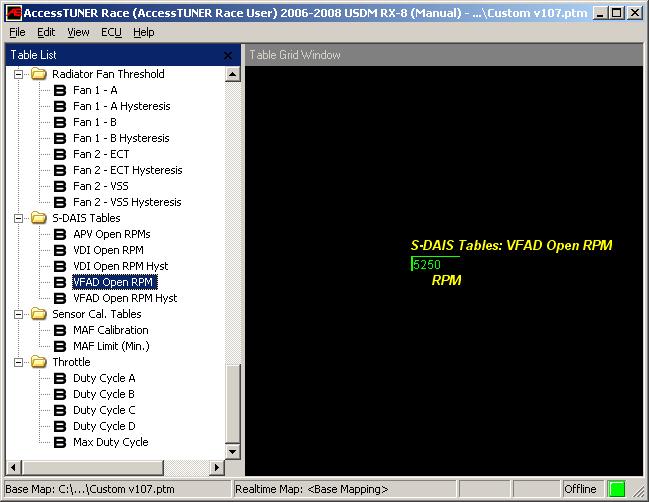
Is this a false readout? Technically there shouldn't be any alterations to open loop but I'm curious if the PCM can cheat.

Registered
Joined: Feb 2007
Posts: 59
Likes: 0
From: Destrehan, LA
Sore Forehead
I have been beating my head against the wall trying to get the new AccessTuner Race to connect LIVE to my ECU. I have an '04 6-Speed. I've opened the newest versions of the Cobb Stock and Modified Maps in ATR, and saved them under a new filename. I then flashed them (one at a time) to my ECU. Problem is that when I try to connect to the ECU I get an error something like "Cannot connect to live ECU". I've tried may different versions of the AP Dongle driver, and it shows up in Windows Device Manage. I'm running a plain Jain Windows XP SP2. I've even tried several different computers, thinking it might be a configuration issue.
ATR works great to edit maps, and they seem to work well when I flash them onto my car. There are tons of options and tweaks..probably enough to be quite dangerous.
So, Does anyone have some advice on how to get this sucker to work???
Help would be appreciated....and YES I did search quite a bit here and over on the Cobb Forums, and found nothing that helped.
Thanks
ATR works great to edit maps, and they seem to work well when I flash them onto my car. There are tons of options and tweaks..probably enough to be quite dangerous.
So, Does anyone have some advice on how to get this sucker to work???
Help would be appreciated....and YES I did search quite a bit here and over on the Cobb Forums, and found nothing that helped.
Thanks


U-Stink-But-I-♥-U
iTrader: (1)
Joined: Mar 2005
Posts: 2,004
Likes: 2
From: 12 o'clock on the Beltway.
Originally Posted by Huzer21
09-23-2008, 08:34 AM
Well, for any Cobb users, AccessTUNER Race is available. You can create your own maps, datalog, etc, etc. To datalog, you also have to download the dongle driver (not my words) for it to connect to your car. So the easy steps:
Download the AccessPORT Updater (http://www.accessecu.com/cgi-bin/dow...ORTUpdater.exe). Not needed for the tuner software, but it's an easier way to keep the firmware on the AP updated. Think of it as a live updater, almost.
Download the newest AP Manager (http://www.accessecu.com/support/AP-Mgr-Setup.exe). Not needed for this, but there's a newer one out there. Install is typical rambo click.
Download AccessTUNER Race (http://cobbtuning.com/info/?id=4214). Short survey you have to fill it, then they email you the link. Typical easy install, once again.
Download the dongle drivers (http://www.accessecu.com/support/Don...verInstall.exe) from Cobb.
And you're good to go. The page Cobb updates with new info for the RX-8, other than the forums, is http://www.cobbtuning.com/info/?ID=3873. I actually ran through some datalogging this morning just to check it out. When I tried last night, ran into a few issues. The OBD2/USB cable was broken...it would work just enough to get power to the AP, but wouldn't communicate to the car. My Blackberry USB cable fixed that. And, I had to search for the dongle drivers, those weren't included or mentioned at all in the Tuner install instructions, nor is anything about connection for datalogging in the PDF at all. All in all, a fun new toy to play with. Watching the 3D graphs and charts update in realtime is wild stuff.
Well, for any Cobb users, AccessTUNER Race is available. You can create your own maps, datalog, etc, etc. To datalog, you also have to download the dongle driver (not my words) for it to connect to your car. So the easy steps:
Download the AccessPORT Updater (http://www.accessecu.com/cgi-bin/dow...ORTUpdater.exe). Not needed for the tuner software, but it's an easier way to keep the firmware on the AP updated. Think of it as a live updater, almost.
Download the newest AP Manager (http://www.accessecu.com/support/AP-Mgr-Setup.exe). Not needed for this, but there's a newer one out there. Install is typical rambo click.
Download AccessTUNER Race (http://cobbtuning.com/info/?id=4214). Short survey you have to fill it, then they email you the link. Typical easy install, once again.
Download the dongle drivers (http://www.accessecu.com/support/Don...verInstall.exe) from Cobb.
And you're good to go. The page Cobb updates with new info for the RX-8, other than the forums, is http://www.cobbtuning.com/info/?ID=3873. I actually ran through some datalogging this morning just to check it out. When I tried last night, ran into a few issues. The OBD2/USB cable was broken...it would work just enough to get power to the AP, but wouldn't communicate to the car. My Blackberry USB cable fixed that. And, I had to search for the dongle drivers, those weren't included or mentioned at all in the Tuner install instructions, nor is anything about connection for datalogging in the PDF at all. All in all, a fun new toy to play with. Watching the 3D graphs and charts update in realtime is wild stuff.


U-Stink-But-I-♥-U
iTrader: (1)
Joined: Mar 2005
Posts: 2,004
Likes: 2
From: 12 o'clock on the Beltway.
the RPM that the secondary shutter valve opens. Hell, I would be happy with an uneditable window that confirms the RPM that it opens.
Dont get me wrong; the software is free, so I am not complaining.
Dont get me wrong; the software is free, so I am not complaining.
Registered
Joined: Feb 2007
Posts: 59
Likes: 0
From: Destrehan, LA
Arrrgg
Read THIS.
Course Cobb is not much help, since this is Beta software. Even when you install the dongle drivers, they say "device not connected, can't update drivers", even though the dongle is hooked to the car, and the car is on (IGN). NO Joy.
Say on a whole different note, does anyone know which pin on the Greddy Emanage Ultimate option ports the +5 volts from the WBO2 sensor goes. I've searched for hours and come up with several different answers (center or left) and I know it's not the right bin, because it's black and has a direct connection to ground?
Thanks for the help...Still waiting on my 4.0.1 map from MM so I can finnaly start driving my Turbo8
Later!
U-Stink-But-I-♥-U
iTrader: (1)
Joined: Mar 2005
Posts: 2,004
Likes: 2
From: 12 o'clock on the Beltway.
Two things first:
One of my computers completely refuses to load the AP drivers. Period. It simply will not play nice. The other one works, so maybe you need a different computer. Cobb was very helpful on this issue but could not solve (then they banned me from their forum; go figure.)
The other thing is that I have not played with the live ecu. I am pretty sure it works, but I cant speak from experience. I will try it tomorrow and let you know.
Having said that, did you run the ap updater AFTER you ran the dongle driver install? I am pretty sure you have to do that.
One of my computers completely refuses to load the AP drivers. Period. It simply will not play nice. The other one works, so maybe you need a different computer. Cobb was very helpful on this issue but could not solve (then they banned me from their forum; go figure.)
The other thing is that I have not played with the live ecu. I am pretty sure it works, but I cant speak from experience. I will try it tomorrow and let you know.
Having said that, did you run the ap updater AFTER you ran the dongle driver install? I am pretty sure you have to do that.
U-Stink-But-I-♥-U
iTrader: (1)
Joined: Mar 2005
Posts: 2,004
Likes: 2
From: 12 o'clock on the Beltway.
I need to admit here that despite posting info, I cant get my ATR to datalog live either
So in the interests of full disclosure, I fail. But I am still trying
So in the interests of full disclosure, I fail. But I am still trying
U-Stink-But-I-♥-U
iTrader: (1)
Joined: Mar 2005
Posts: 2,004
Likes: 2
From: 12 o'clock on the Beltway.
In reference to the ATR's use of barometric pressure in several tables:
What are the units (when the option is selected for standard units) that the ATR uses for Baro?
Alternatively, what is equivalent to pressure at sea level?
What are the units (when the option is selected for standard units) that the ATR uses for Baro?
Alternatively, what is equivalent to pressure at sea level?


Put me on the cannot get data logging to work list.
(details, EeePC 4g running XP)
I've spent the entire day thus far searching and reading the Cobb-Forums and the RX8 forums, this shouldn't be this hard. Good chance is that I'm just a moron but there is some comfort that others are having problems to, or the world is just full of morons.
I've tried several methods to install the Dongle update software:
- with the AP unit attached to pc
- with the AP unit not connected to pc
- PC connected to dongle while plugged into ODBII receptacle
- PC connected to dongle not connect to ODBII receptacle
Each time I run through the install I get an error "The device is not plugged, cannot update the driver."
So I'm guessing this has something to do with it. That or the fact that I currently have a MazdaManiac map loaded in to the cars PCM so that maybe blocking the logging function.
I will switch things up later to see what happens.
Back to searching......
(details, EeePC 4g running XP)
I've spent the entire day thus far searching and reading the Cobb-Forums and the RX8 forums, this shouldn't be this hard. Good chance is that I'm just a moron but there is some comfort that others are having problems to, or the world is just full of morons.
I've tried several methods to install the Dongle update software:
- with the AP unit attached to pc
- with the AP unit not connected to pc
- PC connected to dongle while plugged into ODBII receptacle
- PC connected to dongle not connect to ODBII receptacle
Each time I run through the install I get an error "The device is not plugged, cannot update the driver."
So I'm guessing this has something to do with it. That or the fact that I currently have a MazdaManiac map loaded in to the cars PCM so that maybe blocking the logging function.
I will switch things up later to see what happens.
Back to searching......
Last edited by wcs; May 31, 2009 at 01:53 PM. Reason: typo


Registered
Joined: Feb 2004
Posts: 1,802
Likes: 10
From: QLD .au
I had a feeling it was either bar or atmosphere the calibration goes up to the thousands from memory.

