


What's the trick to get temperature knob setting to appear on LED Display?


Thread Starter
Registered User
Joined: Jul 2005
Posts: 127
Likes: 0
From: Sacramento, CA, USA
What's the trick to get temperature **** setting to appear on LED Display?
I took my RX-8 to the dealer for a laundry list of things, one of which is the fact that my heater doesn't work. The **** turns and does not appear to be broken as per the service bulletin.
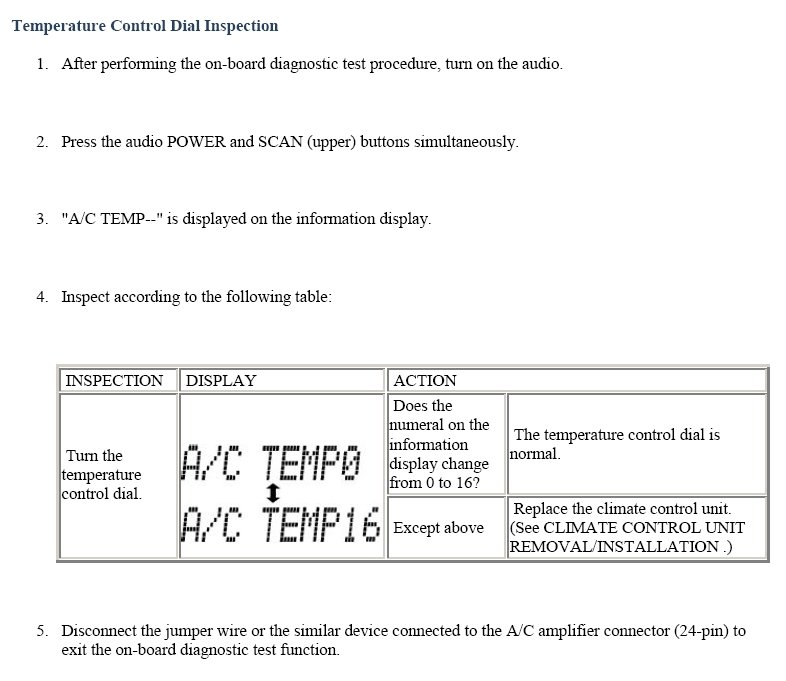
During the road test with the tech, he had me turn the ignition key to "Run" while he pressed the "Scan ^" button and the power buttons on the stereo simultaneously. That caused the LED display to show something like "TEMP: 0" and he fiddled with the temperature control ****. It's a variable resister that's supposed to cause that number to change from 0 to 16, but it was pretty much stuck on zero. He fiddled with it some more until he could get it to "stand" on a number other than zero (he managed to get 13), and sure enough, I had heat!
He said the whole A/C control interface thingy was bad and had to be replaced. Unfortunately, they had to order the part, which means I'll continue not having heat until sometime next week, or later!
I called him back today to get the details on the exact procedure he followed to get that "mode" enabled. He recalled the procedure I described, but he said he often has to mess with it for about five minutes or so until he gets the thing to "take." He said he was just lucky that it happened so quickly when we were starting our drive.
Does anyone have the exact procedure? I can handle the chills, but my wife can't!
During the road test with the tech, he had me turn the ignition key to "Run" while he pressed the "Scan ^" button and the power buttons on the stereo simultaneously. That caused the LED display to show something like "TEMP: 0" and he fiddled with the temperature control ****. It's a variable resister that's supposed to cause that number to change from 0 to 16, but it was pretty much stuck on zero. He fiddled with it some more until he could get it to "stand" on a number other than zero (he managed to get 13), and sure enough, I had heat!
He said the whole A/C control interface thingy was bad and had to be replaced. Unfortunately, they had to order the part, which means I'll continue not having heat until sometime next week, or later!
I called him back today to get the details on the exact procedure he followed to get that "mode" enabled. He recalled the procedure I described, but he said he often has to mess with it for about five minutes or so until he gets the thing to "take." He said he was just lucky that it happened so quickly when we were starting our drive.
Does anyone have the exact procedure? I can handle the chills, but my wife can't!

II SOCIETY
Joined: Nov 2006
Posts: 1,077
Likes: 0
From: The Bay Area
I don't know anything about that...sounds like the procedure to reset the ECU but maybe for the HVAC. Some on here know all the little secrets that the dealership don't tell us. I wish it was all in the manual!
side bar--
On the info. display, you can faintly see a icon of a fan and some knotches after it. I assume its the intesity of, either, heater or AC fan. Nothing I do can make that icon luminate.
Does anyone know about this icon, either?
P.S.
Sharward,
Hope you don't mind me piggybacking on your thread?
side bar--
On the info. display, you can faintly see a icon of a fan and some knotches after it. I assume its the intesity of, either, heater or AC fan. Nothing I do can make that icon luminate.
Does anyone know about this icon, either?
P.S.
Sharward,
Hope you don't mind me piggybacking on your thread?
Last edited by Phantom Menace; Nov 22, 2006 at 08:38 PM.

Registered User
Joined: May 2005
Posts: 94
Likes: 0
From: The City
sharward,
If I'm not mistaken the HVAC unit can be programmed independently of the ECU. For example, there is a procedure to have your AC default to recycle air instead of allowing warmer, fresh air into the cabin.
Phantom Menace,
The fan icon that doesn't illuminate is for automatic climate control. U.S. vehicles do not have this option. AFAIK, there is nothing you can do to get the display to illuminate.
If I'm not mistaken the HVAC unit can be programmed independently of the ECU. For example, there is a procedure to have your AC default to recycle air instead of allowing warmer, fresh air into the cabin.
Phantom Menace,
The fan icon that doesn't illuminate is for automatic climate control. U.S. vehicles do not have this option. AFAIK, there is nothing you can do to get the display to illuminate.
Last edited by Argento Otto; Nov 22, 2006 at 08:55 PM.

the stig is my hero
Joined: Feb 2006
Posts: 701
Likes: 0
From: NC
If I'm not mistaken, that fan icon is functional on european models that have climate control. Ours in the states only have manual control, which has 4 numbered fan settings, rather than a "plus" or "minus" setting.
II SOCIETY
Joined: Nov 2006
Posts: 1,077
Likes: 0
From: The Bay Area
Originally Posted by Argento Otto
sharward,
If I'm not mistaken the HVAC unit can be programmed independently of the ECU. For example, there is a procedure to have your AC default to recycle air instead of allowing warmer, fresh air into the cabin.
Phantom Menace,
The fan icon that doesn't illuminate is for automatic climate control. U.S. vehicles do not have this option. AFAIK, there is nothing you can do to get the display to illuminate.
If I'm not mistaken the HVAC unit can be programmed independently of the ECU. For example, there is a procedure to have your AC default to recycle air instead of allowing warmer, fresh air into the cabin.
Phantom Menace,
The fan icon that doesn't illuminate is for automatic climate control. U.S. vehicles do not have this option. AFAIK, there is nothing you can do to get the display to illuminate.
NOOOOOOOOOOOOOOOOOOOOOOOOOOOOOOOOOOO!
I was afraid it'd be somthing like that....NOOOOOOOOOOOOOOOOOOOOO!


Thread Starter
Registered User
Joined: Jul 2005
Posts: 127
Likes: 0
From: Sacramento, CA, USA
Thanks for posting the procedure, MazdaManiac! None of my previous attempts at searching for it worked.
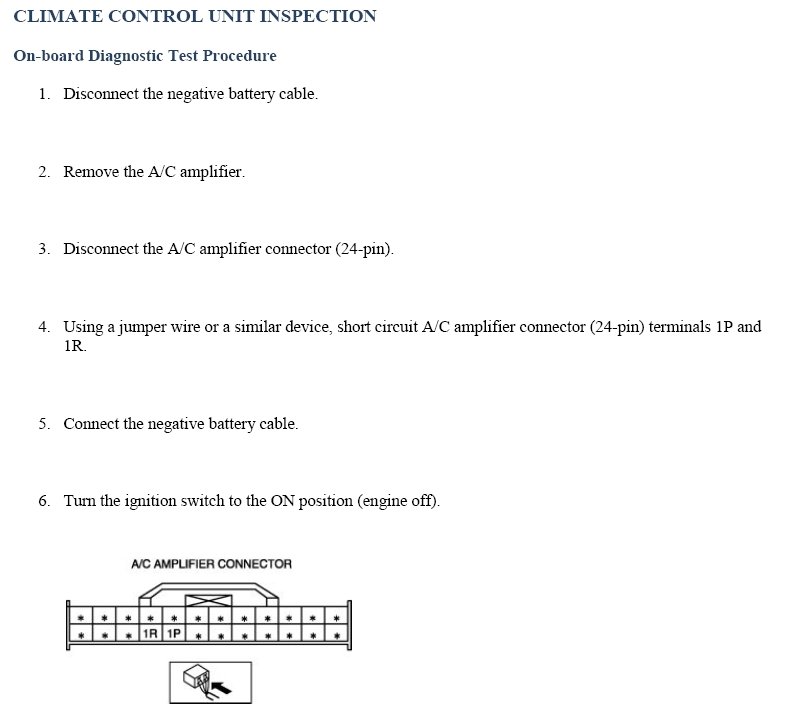
Unfortunately, it still doesn't work for me, no matter how hard I try... :-(
Is there a trick to getting it to work? I've tried literally hundreds of times, to no avail.
Unfortunately, it still doesn't work for me, no matter how hard I try... :-(
Is there a trick to getting it to work? I've tried literally hundreds of times, to no avail.
Thread Starter
Registered User
Joined: Jul 2005
Posts: 127
Likes: 0
From: Sacramento, CA, USA
Hmmm... That's weird. The tech definitelty didn't do that, yet he got it to work... Although he said it's tough to do. He said he usually has to mess with it for a frustratingly long five minutes or so, practically throwing things at it in anger before it will "catch." I was hoping someone knew how to give it the "magic touch..."

Lubricious
Joined: Oct 2003
Posts: 3,425
Likes: 4
From: SF Bay Area, California
Originally Posted by sharward
Hmmm... That's weird. The tech definitelty didn't do that, yet he got it to work... Although he said it's tough to do. He said he usually has to mess with it for a frustratingly long five minutes or so, practically throwing things at it in anger before it will "catch." I was hoping someone knew how to give it the "magic touch..."
Thread Starter
Registered User
Joined: Jul 2005
Posts: 127
Likes: 0
From: Sacramento, CA, USA
Thanks for the reply... Andyes, that's true. :-) The thing is, it takes a lot of fiddling to get heat, and the last few trips, I was a fiddle failure. Having the readout would be very helpful in the short term, as I could fiddle and fiddle, until I get a decently high number, then leave it alone... The heat follows in 3 to 5 seconds. Unfortunately, the connection is so flaky that it's nearly impossible without instant feedback as to the variable resistor's setting when the circuit closes.
It must be a bad solder connection on the curcuitboard...
I hear the replacement units are remanufactured... Hopefully with a really solid connection that will last a hundred thousand miles or two!
It must be a bad solder connection on the curcuitboard...
I hear the replacement units are remanufactured... Hopefully with a really solid connection that will last a hundred thousand miles or two!

Thread
Thread Starter
Forum
Replies
Last Post
JimmyBlack
Series I Major Horsepower Upgrades
273
Feb 10, 2020 10:23 PM