


New JDM OEM Nav dash panel for aftermarket systems



Originally Posted by nycgps
I really hate those Garmin and TomTom GPS, they look like **** (At least in the US market)
I was checking around and found this one.
http://www.tigerdirect.com/applicati...487005&CatId=0
Its made by a Korean Company called DVS. It seems ok, 7 in screen, size is 7.48"W x 4.92 L X 1.46 H. the spec could be found on the site, parts of the site has english but the rest .... so Im not even sure if I get this and something goes wrong, am I be a ble to get any support ? 1.25 LBs weight. Its going to be a quite slow Navigation unit since it only has 64 MB SDram and 1GB SD .... with Samsung Arm9 core @ 300MHz. Integrate GPS receiver SiRFstarIII .... I dont think this is going to fit the Dash.
I was checking around and found this one.
http://www.tigerdirect.com/applicati...487005&CatId=0
Its made by a Korean Company called DVS. It seems ok, 7 in screen, size is 7.48"W x 4.92 L X 1.46 H. the spec could be found on the site, parts of the site has english but the rest .... so Im not even sure if I get this and something goes wrong, am I be a ble to get any support ? 1.25 LBs weight. Its going to be a quite slow Navigation unit since it only has 64 MB SDram and 1GB SD .... with Samsung Arm9 core @ 300MHz. Integrate GPS receiver SiRFstarIII .... I dont think this is going to fit the Dash.

Attracts tree branches
Joined: Jun 2004
Posts: 5,940
Likes: 3
Originally Posted by r0tor
not sure if it would fit your needs, but HP has the new HP RX5915 PDA coming out which has an integrated GPS with Tom Tom software and Windows media 5 O/S with bluetooth (say for an AutoEnginuity bluetooth CAn reader), and wireless internet for <$600


Attracts tree branches
Joined: Jun 2004
Posts: 5,940
Likes: 3
Great choice 
The N.I.C.E. is this one correct? I read great reviews about it and how it has a video mode so you can hook up dvd/game systems. Works with backup cameras, plays mp3s off of its 20 gig hard drive and is portable...you can bring it hiking if you want...cool.

The N.I.C.E. is this one correct? I read great reviews about it and how it has a video mode so you can hook up dvd/game systems. Works with backup cameras, plays mp3s off of its 20 gig hard drive and is portable...you can bring it hiking if you want...cool.
Last edited by truemagellen; Oct 16, 2006 at 01:15 AM.


Registered Lunatic
iTrader: (1)
Joined: Aug 2003
Posts: 3,591
Likes: 49
From: SF Bay Area, California
Originally Posted by truemagellen
Nice thing is you can take it and use the suction cup thing when you road trip in other cars when not in the 8
I still want a built-in solution (preferably a car PC 'cause it can do a lot more things than GPS) in the 8 though
Attracts tree branches
Joined: Jun 2004
Posts: 5,940
Likes: 3
Originally Posted by DreRX8
The N.I.C.E. need an ac cord like Tom Tom or can I hard wire it?

Originally Posted by truemagellen
Great choice
The N.I.C.E. is this one correct? I read great reviews about it and how it has a video mode so you can hook up dvd/game systems. Works with backup cameras, plays mp3s off of its 20 gig hard drive and is portable...you can bring it hiking if you want...cool.
The N.I.C.E. is this one correct? I read great reviews about it and how it has a video mode so you can hook up dvd/game systems. Works with backup cameras, plays mp3s off of its 20 gig hard drive and is portable...you can bring it hiking if you want...cool.
This device is VERY cool, but I would not buy it because it disables video vieiwing when the gps detects movement.

Greek Power
Joined: Jul 2003
Posts: 439
Likes: 0
From: Greece
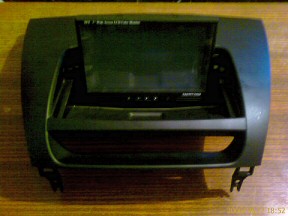
Well, it seems like I'm the first one to actually assemble and install one of these babies 
The panel comes complete with everything you need for assembly and installation. It will take an average technical-savy person about 1-1,5 hours to assemble. A bit of tinkering might be in order, because some bits don't quite fit every TFT out there (i.e. holes for TFT cable might not be big enough for the usually custom plug).
As it turns out, the whole movement is by hand, and is only two actions: uncover the TFT by dragging the upper cover, and then rotating the screen until it clicks in the vertical position. The reverse obviously for retracting it and hiding it under the cover.
Some night shots (before and after):
The panel comes complete with everything you need for assembly and installation. It will take an average technical-savy person about 1-1,5 hours to assemble. A bit of tinkering might be in order, because some bits don't quite fit every TFT out there (i.e. holes for TFT cable might not be big enough for the usually custom plug).
As it turns out, the whole movement is by hand, and is only two actions: uncover the TFT by dragging the upper cover, and then rotating the screen until it clicks in the vertical position. The reverse obviously for retracting it and hiding it under the cover.
Some night shots (before and after):
Attracts tree branches
Joined: Jun 2004
Posts: 5,940
Likes: 3
Looks Great, thanks Ace! So everyone knows we only have limited stock on hand since the latest shipment to arrive was mostly pre-bought:
http://www.mazdaparts.com/ProductDet...000-1159943707
More will be ordered to accomodate demand.
http://www.mazdaparts.com/ProductDet...000-1159943707
More will be ordered to accomodate demand.
Originally Posted by The Ace
Well, it seems like I'm the first one to actually assemble and install one of these babies
The panel comes complete with everything you need for assembly and installation. It will take an average technical-savy person about 1-1,5 hours to assemble. A bit of tinkering might be in order, because some bits don't quite fit every TFT out there (i.e. holes for TFT cable might not be big enough for the usually custom plug).
As it turns out, the whole movement is by hand, and is only two actions: uncover the TFT by dragging the upper cover, and then rotating the screen until it clicks in the vertical position. The reverse obviously for retracting it and hiding it under the cover.
Some night shots (before and after):
The panel comes complete with everything you need for assembly and installation. It will take an average technical-savy person about 1-1,5 hours to assemble. A bit of tinkering might be in order, because some bits don't quite fit every TFT out there (i.e. holes for TFT cable might not be big enough for the usually custom plug).
As it turns out, the whole movement is by hand, and is only two actions: uncover the TFT by dragging the upper cover, and then rotating the screen until it clicks in the vertical position. The reverse obviously for retracting it and hiding it under the cover.
Some night shots (before and after):
Last edited by truemagellen; Oct 22, 2006 at 05:28 PM.

Attracts tree branches
Joined: Jun 2004
Posts: 5,940
Likes: 3
There is a 7inch portable media player on woot.com right now for super cheap. Unknown if it will fit the dash piece (size is 209 x 107 x 19 mm) and good only October 23 while supplies last (I am in no way affiliated with Woot or Archos btw).

Last edited by truemagellen; Oct 23, 2006 at 12:18 AM.

^NieL
Joined: Oct 2005
Posts: 2,560
Likes: 1
From: santa clara ,ca
i used a lilliput screen and i worked fine after a little work.
http://store.mp3car.com/ProductDetai...Code=MON%2D016
http://store.mp3car.com/ProductDetai...Code=MON%2D016

Registered User
Joined: Aug 2006
Posts: 83
Likes: 0
From: Wahiawa, HI
Originally Posted by The Ace
As it turns out, the whole movement is by hand, and is only two actions: uncover the TFT by dragging the upper cover, and then rotating the screen until it clicks in the vertical position. The reverse obviously for retracting it and hiding it under the cover.
Some night shots (before and after):
Some night shots (before and after):
 Thats why i never get anywhere.
Greek Power
Joined: Jul 2003
Posts: 439
Likes: 0
From: Greece
Originally Posted by ph0tic
*sniff*... diy on mechanizing it? That would be the super cool effect. I know, i'm a picky loser Thats why i never get anywhere.
Thats why i never get anywhere.This panel also has what the motorised NAV panel hasn't: small plastic stops, where the whole rotating mechanism locks in place, so the screen doesn't move/jitter
 So the motor will need to overcome the resistance of these small stops (in order to click in place)...
Attracts tree branches
Joined: Jun 2004
Posts: 5,940
Likes: 3
This is worth repeating (btw it can probably fit larger than this but no one has tested yet)
For reference:
Converted to inches:
Pana1: 7.95 w x 4.60 h x 1.61 d
Pana2: 7.44in x 5.00in x 1.29in
Pioneer: 7.64in x 5.03in x 1.54in
Popular Carpc/Video Screens:
Xenarch 700 series 7 inch: 7.75W x 4.75H x 1.38D
Lilliput 7incher: 7.87in x 5.90in x 1.57in
This does in fact mean carpc vga/videoscreens/etc. will fit there.
Originally Posted by Japan8
The Panasonic screen is 202mm×117mm×41mm (Wx Hx D) according to the
Another Panasonic screen is 189 mm×127 mm×33 mm (Wx Hx D).
The Pioneer monitor is 194 mm(W)×128 mm(H)×39 mm(D).
That should give you guys of what size will fit.
Another Panasonic screen is 189 mm×127 mm×33 mm (Wx Hx D).
The Pioneer monitor is 194 mm(W)×128 mm(H)×39 mm(D).
That should give you guys of what size will fit.
Converted to inches:
Pana1: 7.95 w x 4.60 h x 1.61 d
Pana2: 7.44in x 5.00in x 1.29in
Pioneer: 7.64in x 5.03in x 1.54in
Popular Carpc/Video Screens:
Xenarch 700 series 7 inch: 7.75W x 4.75H x 1.38D
Lilliput 7incher: 7.87in x 5.90in x 1.57in
This does in fact mean carpc vga/videoscreens/etc. will fit there
.
Greek Power
Joined: Jul 2003
Posts: 439
Likes: 0
From: Greece
Finally!! My PC is installed and operational.
If someone wants a video of how this panel works, let me know. But it's quite simple: push the cover upwards, rotate the screen until vertical. To close, rotate screen until horizontal, close cover.
Some pics:
If someone wants a video of how this panel works, let me know. But it's quite simple: push the cover upwards, rotate the screen until vertical. To close, rotate screen until horizontal, close cover.
Some pics:

