


Need help with in-dash custom Carputer

Thread Starter
Hi guys! My name is Tony.
Joined: May 2008
Posts: 490
Likes: 0
From: San Francisco Bay Area 94542, USA. Earth. Solar System. Milky Way
Need help with in-dash custom Carputer
From looking around this forums, I guess in-dash carputer is not so popular.
I am starting to order parts for my custom build.
My questions are
- My in-dash carputer will replace OEM stereo. How can I connect the audio to OEM speakers? What type of build-in amp do I need?
- Do I need a Corksport kit to keep AC display working? (well, I need their face plate anyway, right?)
- How can I utilize wheel controler? Do I need PC-2-Car adapter?
- Does rx-8 has radio antenna? What type of jack is it? I would like to connect FM/AM radio to the car for better reception.
Thanks in advance,
Tony
I am starting to order parts for my custom build.
My questions are
- My in-dash carputer will replace OEM stereo. How can I connect the audio to OEM speakers? What type of build-in amp do I need?
- Do I need a Corksport kit to keep AC display working? (well, I need their face plate anyway, right?)
- How can I utilize wheel controler? Do I need PC-2-Car adapter?
- Does rx-8 has radio antenna? What type of jack is it? I would like to connect FM/AM radio to the car for better reception.
Thanks in advance,
Tony

goal = perfect rx8
Joined: Mar 2008
Posts: 42
Likes: 0
From: virginia
Integrating with the OEM speakers is possible, but difficult. The Bose amp controls the speakers and does not interface well with a non-OEM head unit. Most people, if I'm not mistaken, have replaced their whole sound system when doing a car PC. Then you can have an amp that's made for the speakers while a sophisticated audio card controls it on your computer.
I would look at the Metra kit (search forums...there's one long one about it and a few others I believe), which comes out very soon, instead of the corksport. It will fit better, retain use of A/C controls and screen, and have a double-din slot for your touchscreen.
Corksport does make a wheel controller kit, but it's designed to link to an aftermarket head unit and is not what you want. I think your best bet is to try and hook up some wires from the wheel control panel to a USB port and then program the buttons to do what you want them to through your front end. There is software designed to incorporate external controls like that, but I forget the name.
The RX-8 does have a radio antenna (it's centered in your rear windshield), but I've only heard of people getting a new AM/FM controller for a car PC setup. These typically fit right in with the computer assembly, but can be placed elsewhere. The stock antenna is a pain to access and you'll be better off with a new one anyway. You could get XM or Sirius while you're at it.
As a general reference, mp3car.com is a tremendous resource that has a lot of in-depth information about car computers and electronics. There are a couple RX-8s on it. A few of them are members here but, as you said, car computers aren't discussed all that often. Good luck on your build.
I would look at the Metra kit (search forums...there's one long one about it and a few others I believe), which comes out very soon, instead of the corksport. It will fit better, retain use of A/C controls and screen, and have a double-din slot for your touchscreen.
Corksport does make a wheel controller kit, but it's designed to link to an aftermarket head unit and is not what you want. I think your best bet is to try and hook up some wires from the wheel control panel to a USB port and then program the buttons to do what you want them to through your front end. There is software designed to incorporate external controls like that, but I forget the name.
The RX-8 does have a radio antenna (it's centered in your rear windshield), but I've only heard of people getting a new AM/FM controller for a car PC setup. These typically fit right in with the computer assembly, but can be placed elsewhere. The stock antenna is a pain to access and you'll be better off with a new one anyway. You could get XM or Sirius while you're at it.
As a general reference, mp3car.com is a tremendous resource that has a lot of in-depth information about car computers and electronics. There are a couple RX-8s on it. A few of them are members here but, as you said, car computers aren't discussed all that often. Good luck on your build.
Last edited by eastcoastrotary; Sep 5, 2008 at 09:21 AM.

From looking around this forums, I guess in-dash carputer is not so popular.
I am starting to order parts for my custom build.
My questions are
- My in-dash carputer will replace OEM stereo. How can I connect the audio to OEM speakers? What type of build-in amp do I need?
- Do I need a Corksport kit to keep AC display working? (well, I need their face plate anyway, right?)
- How can I utilize wheel controler? Do I need PC-2-Car adapter?
- Does rx-8 has radio antenna? What type of jack is it? I would like to connect FM/AM radio to the car for better reception.
Thanks in advance,
Tony
I am starting to order parts for my custom build.
My questions are
- My in-dash carputer will replace OEM stereo. How can I connect the audio to OEM speakers? What type of build-in amp do I need?
- Do I need a Corksport kit to keep AC display working? (well, I need their face plate anyway, right?)
- How can I utilize wheel controler? Do I need PC-2-Car adapter?
- Does rx-8 has radio antenna? What type of jack is it? I would like to connect FM/AM radio to the car for better reception.
Thanks in advance,
Tony
Remember Metra is coming out with an alternative to Corksport. Yes, you will need one of the modules to maintain the display up there. In fact removing the stock head unit will render the entire A/C useless.
Sure you can use the a car2pc thing but that thing is very limited. It's all based around the drivers that are made for it and how friendly the software you want to use it with was made. At the best you'll maybe get the forward/rewind/volume buttons working.
You could always extend and relocate the OEM head unit so you don't have to deal with replacing the amp and speakers. Then you just run an aux-in from the headunit and plug the carpc into it. You could also mount your LCD on the dash with a nav dash tray holder, a jdm nav hood, or the oem hood. This way you keep the most stock like look without going through a wiring nightmare... which you're going to go through anyway just running the cables for the computer.

mp3car.com rocks my socks. Yes you will need the Metra or Corksport kit to retain A/C and for the double din dash piece. Yes you will need a separate piece to retain your steering wheel controls.
As for the Bose system... for starters if you're short on money and happy with the Bose system now. You can snag up a few of these:

They're just RCA to speaker wire connections. RCA ends to your sound card and then run the speaker wires back to the Bose amp. Splice them into the amp's input for each speaker. Quite certain it would work, but if it doesn't or you're simply not happy with it, big deal. $10 and a couple hours lost. Replace with aftermarket gear.
As for the Bose system... for starters if you're short on money and happy with the Bose system now. You can snag up a few of these:
They're just RCA to speaker wire connections. RCA ends to your sound card and then run the speaker wires back to the Bose amp. Splice them into the amp's input for each speaker. Quite certain it would work, but if it doesn't or you're simply not happy with it, big deal. $10 and a couple hours lost. Replace with aftermarket gear.

IstanbulNotConstantinople
Joined: Jul 2004
Posts: 513
Likes: 0
From: Fontana (but in the good part, by Rancho), CA
I'm purchasing stuff for my carpc.
I bought this for an AM/FM and HD Radio.
http://www.gooddeals18.com/product/DMHD1000?meta=FRG
It's $69.99 and there is a $50 rebate so it's $19.99
Plus, over at Mp3car.com, there is a guy that made an interface cable for this radio that connects to your carpc for an interface.
http://www.mp3car.com/vbulletin/user...les-ready.html
As far as putting it in your dash, the metra kit (not quite out yet), looks better than the corksport version.
It's also cheaper, and has better fitment.
I bought this for an AM/FM and HD Radio.
http://www.gooddeals18.com/product/DMHD1000?meta=FRG
It's $69.99 and there is a $50 rebate so it's $19.99
Plus, over at Mp3car.com, there is a guy that made an interface cable for this radio that connects to your carpc for an interface.
http://www.mp3car.com/vbulletin/user...les-ready.html
As far as putting it in your dash, the metra kit (not quite out yet), looks better than the corksport version.
It's also cheaper, and has better fitment.




ಠ_ಠ
Joined: Aug 2007
Posts: 2,228
Likes: 6
From: Under the Dumbarton Bridge
mp3car.com rocks my socks. Yes you will need the Metra or Corksport kit to retain A/C and for the double din dash piece. Yes you will need a separate piece to retain your steering wheel controls.
As for the Bose system... for starters if you're short on money and happy with the Bose system now. You can snag up a few of these:
They're just RCA to speaker wire connections. RCA ends to your sound card and then run the speaker wires back to the Bose amp. Splice them into the amp's input for each speaker. Quite certain it would work, but if it doesn't or you're simply not happy with it, big deal. $10 and a couple hours lost. Replace with aftermarket gear.
As for the Bose system... for starters if you're short on money and happy with the Bose system now. You can snag up a few of these:
They're just RCA to speaker wire connections. RCA ends to your sound card and then run the speaker wires back to the Bose amp. Splice them into the amp's input for each speaker. Quite certain it would work, but if it doesn't or you're simply not happy with it, big deal. $10 and a couple hours lost. Replace with aftermarket gear.
Exactly. The investment is very little and you're not going to ruin anything with this. Hell, if you lived near me, I'd give them to you for free. I've got probably 20 pairs lying around my shop.
EDIT: Hell, if you lived near me, I'd help you with the install. lol
EDIT: Hell, if you lived near me, I'd help you with the install. lol
Thread Starter
Hi guys! My name is Tony.
Joined: May 2008
Posts: 490
Likes: 0
From: San Francisco Bay Area 94542, USA. Earth. Solar System. Milky Way
Oh and I dont have Bose. So I might go with this config.
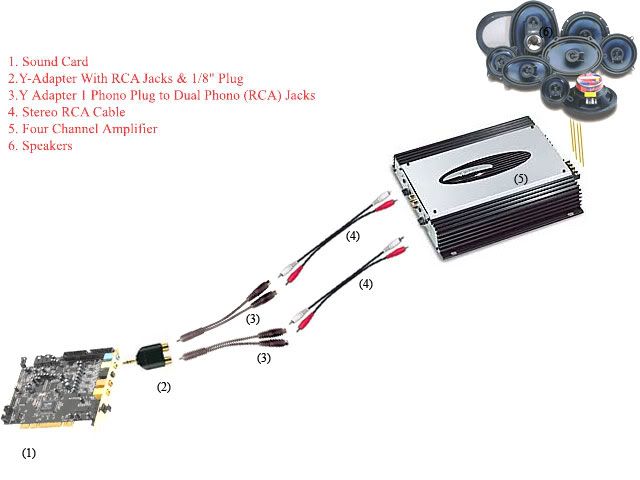
http://www.mp3car.com/vbulletin/faq-...tereo-amp.html
Thread Starter
Hi guys! My name is Tony.
Joined: May 2008
Posts: 490
Likes: 0
From: San Francisco Bay Area 94542, USA. Earth. Solar System. Milky Way
It's not worth the effort to try to interface with the stock Bose .......
You could always extend and relocate the OEM head unit so you don't have to deal with replacing the amp and speakers. Then you just run an aux-in from the headunit and plug the carpc into it. You could also mount your LCD on the dash with a nav dash tray holder, a jdm nav hood, or the oem hood. This way you keep the most stock like look without going through a wiring nightmare... which you're going to go through anyway just running the cables for the computer.
You could always extend and relocate the OEM head unit so you don't have to deal with replacing the amp and speakers. Then you just run an aux-in from the headunit and plug the carpc into it. You could also mount your LCD on the dash with a nav dash tray holder, a jdm nav hood, or the oem hood. This way you keep the most stock like look without going through a wiring nightmare... which you're going to go through anyway just running the cables for the computer.

Thread Starter
Hi guys! My name is Tony.
Joined: May 2008
Posts: 490
Likes: 0
From: San Francisco Bay Area 94542, USA. Earth. Solar System. Milky Way
Thread Starter
Hi guys! My name is Tony.
Joined: May 2008
Posts: 490
Likes: 0
From: San Francisco Bay Area 94542, USA. Earth. Solar System. Milky Way
Thread Starter
Hi guys! My name is Tony.
Joined: May 2008
Posts: 490
Likes: 0
From: San Francisco Bay Area 94542, USA. Earth. Solar System. Milky Way
Yeah that is the same motherboard I have.. it is 2+2 meaning you can configure it (via software) so the other line-in acts as line out for 2 more channels.. it's basically 4 channel. Therefore you don't need to have that Y adapter there.


Registered User
Joined: Aug 2005
Posts: 4
Likes: 0
From: Germantown, MD
haven't gone to install my carpc yet but since I only want the pc in there for music and gps I am going to just install an AUX port on the head unit and run a cable from the computer to the AUX port and have that handle the audio portion

Thread
Thread Starter
Forum
Replies
Last Post
Sakebomb Garage
Vendor Classifieds
0
Sep 6, 2015 03:30 PM
