


Baseline Automated Tuning Beta Now Available for Download



A - I know I said a new version would be out... forgive me I worked all weekend.
B - CLick the button that says create MAF scale on the Form, not the fuel maps one and tell me what happens?
B - CLick the button that says create MAF scale on the Form, not the fuel maps one and tell me what happens?

Registered
Joined: Apr 2010
Posts: 75
Likes: 0
Hey Kane....
When I click the "90 degree ruler" button "Scale the MAF sensor. The little black arrows sroll from top to bottom on the left and right hand side, until it says "MAF scaling is complete"
I do notice from time to time the (program stops responding) shows up in the upper top left of Access, but then recovers and says complete. Not always, but sometimes. Also happens when I go to create the "New Maps" button as well.
If I repeat the process, it will complete wihout the "not responding" issue.
Could my Access be messed up? I have tried this on two computers now... and both are doing this, and give me the same results.
Thanks,
When I click the "90 degree ruler" button "Scale the MAF sensor. The little black arrows sroll from top to bottom on the left and right hand side, until it says "MAF scaling is complete"
I do notice from time to time the (program stops responding) shows up in the upper top left of Access, but then recovers and says complete. Not always, but sometimes. Also happens when I go to create the "New Maps" button as well.
If I repeat the process, it will complete wihout the "not responding" issue.
Could my Access be messed up? I have tried this on two computers now... and both are doing this, and give me the same results.
Thanks,
Registered
Joined: Apr 2010
Posts: 75
Likes: 0
Kewl... Thanks.
When I try and import my log, it pops up with a "Enter Parameter Value" Ign# Tim# Lead# Coil (0)
Options are OK or Cancel
If I hit OK then the same type of box shows up with "Enter Parameter Value" Ign# Tim# Trail# Coil (0)
Options are OK or Cancel
What am I supposed to put in those two boxes?
Thanks.
When I try and import my log, it pops up with a "Enter Parameter Value" Ign# Tim# Lead# Coil (0)
Options are OK or Cancel
If I hit OK then the same type of box shows up with "Enter Parameter Value" Ign# Tim# Trail# Coil (0)
Options are OK or Cancel
What am I supposed to put in those two boxes?
Thanks.
Registered
Joined: Apr 2010
Posts: 75
Likes: 0
Figured it out!!!! Finally
I was using the wrong date format when importing my log file.
i was entering 09/01/2010 instead of 01/09/2010
now it appears to be working...
Now I have to go away and figure out what all that stuff it spits out means... ha ha ha...
Thanks guys for the help...
Talk soon.
i was entering 09/01/2010 instead of 01/09/2010
now it appears to be working...
Now I have to go away and figure out what all that stuff it spits out means... ha ha ha...
Thanks guys for the help...
Talk soon.
Registered
Joined: Apr 2010
Posts: 75
Likes: 0
I spoke to soon....
Well... I cleared out my old tunes...as there a bunch that did not work... and have tried to load in a new logfile... all appears to load fine, and I am back to not getting any data to show up when I view selected Cell's or try and create maps.
I dunno... did work on both my PC's Just a few mins back.. but now both get nothing.
WTF???
Crazy... :-(
I dunno... did work on both my PC's Just a few mins back.. but now both get nothing.
WTF???
Crazy... :-(
Registered
Joined: Apr 2010
Posts: 75
Likes: 0
Thanks Kane
I will look at it in a few hours... off to work.
I am getting the imports to work now... think i figured out the process that seems to work for me.
I will post later once I confirm... might be a bug?
Talk soon,
I am getting the imports to work now... think i figured out the process that seems to work for me.
I will post later once I confirm... might be a bug?
Talk soon,
Registered
Joined: Apr 2010
Posts: 75
Likes: 0
MAF Scale...
Hey Kane...
Ya... I get how that works now... The scalled AFR table does not pop up the new MAF scale like before, you have to apply it, then go into the "View my tune information" tab and view it in there!!!
Baseline Progy seems to be working fine for me now???... Not really sure what I am doing differently from before????
I was not getting any data, now all my log files seem to work fine.
I dunno.... Windowz!!!! ha ha ha
One Question... Does the latest version still require us to change the "time" into milliseconds etc..?
I need to play with my desired AFR tables... and then run some more data and see where I fall....
I also need to load the stock map back on the car and work with those data points as a starter as well.
Right now I am running a modded map that is throwing the numbers a bit out of wack....
Great work Kane!!! I can now see how this will help us "home tuners" get to the end result much faster than trying to do all these calculations my hand.
Thanks for your efforts.
I will post my progress shortly...
:-)
Ya... I get how that works now... The scalled AFR table does not pop up the new MAF scale like before, you have to apply it, then go into the "View my tune information" tab and view it in there!!!
Baseline Progy seems to be working fine for me now???... Not really sure what I am doing differently from before????
I was not getting any data, now all my log files seem to work fine.
I dunno.... Windowz!!!! ha ha ha
One Question... Does the latest version still require us to change the "time" into milliseconds etc..?
I need to play with my desired AFR tables... and then run some more data and see where I fall....
I also need to load the stock map back on the car and work with those data points as a starter as well.
Right now I am running a modded map that is throwing the numbers a bit out of wack....
Great work Kane!!! I can now see how this will help us "home tuners" get to the end result much faster than trying to do all these calculations my hand.
Thanks for your efforts.
I will post my progress shortly...
:-)


Yeah!!!!!
You don't need to change the LOG itself into milliseconds, but the engine parameters needs to know it....so like AFR latency is 500ms and logging interval is say 50ms... you're good, you can leave the logs themselves alone.
You don't need to change the LOG itself into milliseconds, but the engine parameters needs to know it....so like AFR latency is 500ms and logging interval is say 50ms... you're good, you can leave the logs themselves alone.
Registered
Joined: Apr 2010
Posts: 75
Likes: 0
Dissapearing Target AFR Map
I noticed that I have lost my Taget AFR Map settings now twice after closing down the Access Databae file.
This is what was causing me the grief with blank map info all along I bet!!!!
I am almost 100% sure that I did not hit the button to creat a new one, as that wipes it out as well.
Has anyone else noticed that piece of the database dissapearing?
It sux, as that takes the longest to populate. :-(
Kane.... BUG?
Office 2007, Windows 7 32 bit Ultimate.
Thanks.
This is what was causing me the grief with blank map info all along I bet!!!!
I am almost 100% sure that I did not hit the button to creat a new one, as that wipes it out as well.
Has anyone else noticed that piece of the database dissapearing?
It sux, as that takes the longest to populate. :-(
Kane.... BUG?
Office 2007, Windows 7 32 bit Ultimate.
Thanks.


Registered
Joined: Apr 2010
Posts: 75
Likes: 0
Injector Sizes
Hey guys....
Hope this is ok to ask in this thread...
Trying to calibrate my total injector size for my first rotor in Baseline and want to make sure it is correct in AccessPort Race tuner.
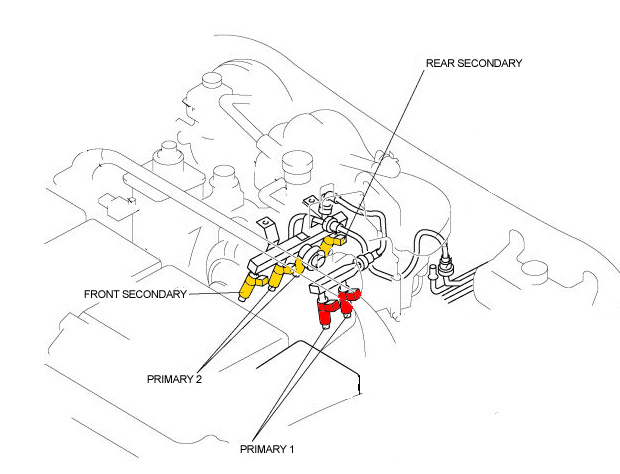
Do I just add up the Red and Blue injectors for my 4 port motor: Total 770cc? See Picture below I found on this forum:
If I look in my AcceesTuner Race at the Injector Scales, they have different numbers than MM listed:
Bank 1 Injector Size is: 369
Bank 2 Injector Size is: 626
At a loss what numbers I should be using?
Fuel Injector Info
I wanted to put all of this in one place for reference.
PRIMARY INJECTORS
RED 290cc
6-PORT SECONDARY INJECTORS & PRIMARY 2 INJECTORS
YELLOW 380cc
4-PORT SECONDARY INJECTORS
BLUE 480cc
Injectors are Bosh disc-type, high impedance (13 ohm) with a Denso connector.
Hope this is ok to ask in this thread...
Trying to calibrate my total injector size for my first rotor in Baseline and want to make sure it is correct in AccessPort Race tuner.
Do I just add up the Red and Blue injectors for my 4 port motor: Total 770cc? See Picture below I found on this forum:
If I look in my AcceesTuner Race at the Injector Scales, they have different numbers than MM listed:
Bank 1 Injector Size is: 369
Bank 2 Injector Size is: 626
At a loss what numbers I should be using?
Fuel Injector Info
I wanted to put all of this in one place for reference.
PRIMARY INJECTORS
RED 290cc
6-PORT SECONDARY INJECTORS & PRIMARY 2 INJECTORS
YELLOW 380cc
4-PORT SECONDARY INJECTORS
BLUE 480cc
Injectors are Bosh disc-type, high impedance (13 ohm) with a Denso connector.
I noticed that I have lost my Taget AFR Map settings now twice after closing down the Access Databae file.
This is what was causing me the grief with blank map info all along I bet!!!!
I am almost 100% sure that I did not hit the button to creat a new one, as that wipes it out as well.
Has anyone else noticed that piece of the database dissapearing?
It sux, as that takes the longest to populate. :-(
Kane.... BUG?
Office 2007, Windows 7 32 bit Ultimate.
Thanks.
This is what was causing me the grief with blank map info all along I bet!!!!
I am almost 100% sure that I did not hit the button to creat a new one, as that wipes it out as well.
Has anyone else noticed that piece of the database dissapearing?
It sux, as that takes the longest to populate. :-(
Kane.... BUG?
Office 2007, Windows 7 32 bit Ultimate.
Thanks.
I haven't seen it - only when I press engine wizard, or create new target af ratio map. I'll look into it - as you are right, it suuuuuucks to have to redo this.
October
Hey guys....
Hope this is ok to ask in this thread...
Trying to calibrate my total injector size for my first rotor in Baseline and want to make sure it is correct in AccessPort Race tuner.
Do I just add up the Red and Blue injectors for my 4 port motor: Total 770cc? See Picture below I found on this forum:
If I look in my AcceesTuner Race at the Injector Scales, they have different numbers than MM listed:
Bank 1 Injector Size is: 369
Bank 2 Injector Size is: 626
At a loss what numbers I should be using?
Hope this is ok to ask in this thread...
Trying to calibrate my total injector size for my first rotor in Baseline and want to make sure it is correct in AccessPort Race tuner.
Do I just add up the Red and Blue injectors for my 4 port motor: Total 770cc? See Picture below I found on this forum:
If I look in my AcceesTuner Race at the Injector Scales, they have different numbers than MM listed:
Bank 1 Injector Size is: 369
Bank 2 Injector Size is: 626
At a loss what numbers I should be using?
Read my help fiel on the website, it makes it easier I think.
Registered
Joined: Apr 2010
Posts: 75
Likes: 0
Thanks Kane...
Ya... I figured that out last night as well... If you redo the engine wizard it removes all the AFR scaling as well. ...Ya... suuuuucks!! ha ha
Other than that... I think I got it figured out... Gonna try a bit more today and let you know if I see anything else wierd pop up...
Thanks again!
:-)
Ya... I figured that out last night as well... If you redo the engine wizard it removes all the AFR scaling as well. ...Ya... suuuuucks!! ha ha
Other than that... I think I got it figured out... Gonna try a bit more today and let you know if I see anything else wierd pop up...
Thanks again!
:-)
Registered
Joined: Apr 2010
Posts: 75
Likes: 0
New Error
Hey Kane...
I started from scratch inserting real info and real base map data logs this morning...
all goes well until I try and view cells.
I get a new error message.
"The OpenForm action was cancelled"
I have tried twice, doing everything the same as before??? no idea?
Thoughts?
Thanks.
screenshot included.
I started from scratch inserting real info and real base map data logs this morning...
all goes well until I try and view cells.
I get a new error message.
"The OpenForm action was cancelled"
I have tried twice, doing everything the same as before??? no idea?
Thoughts?
Thanks.
screenshot included.
Last edited by chonniedotcom; Apr 27, 2013 at 12:10 AM.
Registered
Joined: Apr 2010
Posts: 75
Likes: 0
Wierd....
The Version 1.5 still works, but this 1.6 gives me that error...
i will look at your link...see if it works...
I tried 1.6 in virtual xp on my windows 7 box, still same error...
I will let ya know.
If ya like, I can email ya the file? see if it works for you?
The Version 1.5 still works, but this 1.6 gives me that error...
i will look at your link...see if it works...
I tried 1.6 in virtual xp on my windows 7 box, still same error...
I will let ya know.
If ya like, I can email ya the file? see if it works for you?