Notices
Series I Engine Tuning Forum EMS (Flash Tuning, Interceptor, Piggy Back, Stand Alone)

Accessport compatibility issue......

Old Dec 15, 2014 | 09:16 PM
  #1  
DillonTaylor300's Avatar
Thread Starter
2006 GT Whitewater Pearl
iTrader: (3)
 
Joined: Jun 2012
Posts: 30
Likes: 1
From: Denver, NC
NC Accessport compatibility issue......

Hey guys, I've searched the forums here and didn't find anyone else having my specific problem so I'm sorry if it's been posted already!

I have a v2 accessport for my 2006 AT. I've been using it with a windows 7 PC and have had no issues. Got a new laptop running Windows 8.1, installed the same version of AP Manager, plugged in the AP, and got an error message stating the firmware of the AP wasn't updated enough to be compatible with Windows 8.1, and would have to be updated on an older PC. So, plugged my AP back into my old laptop, tried to update it, and it tells me that my current version is the most updated version! Not sure what to do here, need help!

Current AP firmware is v1.6.1.1-13820, running AP Manager 2.1.1.8 on both PCs.
Reply
Old Dec 16, 2014 | 12:26 AM
  #2  
NgoRX8's Avatar
Registered
iTrader: (1)
 
Joined: Oct 2004
Posts: 10,239
Likes: 4
From: CA, Rowland Hts.
Our AP does not work with windows 8.1. It's a connection issue and Cobb no longer supports the rx8, so they will not update the firmware. Windows 8 works, but not 8.1.
Reply
Old Dec 16, 2014 | 09:51 AM
  #3  
wcs's Avatar
wcs
no agenda
iTrader: (2)
 
Joined: Feb 2005
Posts: 5,210
Likes: 66
From: Ontario
Oh crap.
My new laptop is 8.1

Glad I've still got an old Windoze 7 desktop PC around ... humphf
Reply
Old Dec 16, 2014 | 12:17 PM
  #4  
wcs's Avatar
wcs
no agenda
iTrader: (2)
 
Joined: Feb 2005
Posts: 5,210
Likes: 66
From: Ontario
No love here.
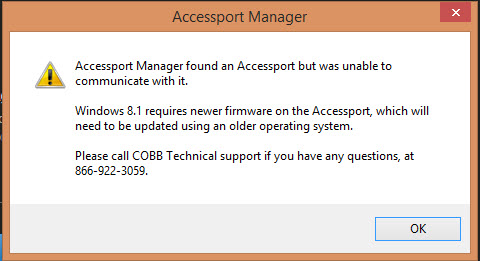
I went and installed the latest AP Software from Cobb Tuning on my new Win8.1 laptop

AP would not connect. Failed with following message.
Name:  AP_Fail_Win81_zps72aaba27.jpg
Views: 378
Size:  47.3 KB

So off to my Win 7 box --- plug in, fire up AP Manager, get updates including setting the option for beta updates. Everything good.

Plug in to my Win 8.1 laptop and fail.

I even tried the compatibility modes and running as Admin
Reply
Old Dec 16, 2014 | 12:58 PM
  #5  
DillonTaylor300's Avatar
Thread Starter
2006 GT Whitewater Pearl
iTrader: (3)
 
Joined: Jun 2012
Posts: 30
Likes: 1
From: Denver, NC
Exactly what happened to me wcs....... Oh well
Reply
Old Dec 16, 2014 | 01:12 PM
  #6  
9krpmrx8's Avatar
SARX Legend
iTrader: (46)
 
Joined: Jan 2007
Posts: 33,788
Likes: 462
From: San Antonio, Texas
Hmmm, maybe my firmware was never updated. I guess I won't mess with it,
Reply
Old Dec 16, 2014 | 01:15 PM
  #7  
DillonTaylor300's Avatar
Thread Starter
2006 GT Whitewater Pearl
iTrader: (3)
 
Joined: Jun 2012
Posts: 30
Likes: 1
From: Denver, NC
You suck 9k! Lol
Reply
Old Mar 2, 2015 | 12:36 PM
  #8  
TeamRX8's Avatar
Registered
iTrader: (25)
 
Joined: Apr 2005
Posts: 26,932
Likes: 2,137
Originally Posted by 9krpmrx8
I have 8.1 and mine works
sorry, gonna call BS ...

ATR is fine, AP Manager cannot find/communicate with the hand-held device on W8.1+ OS


.
Reply
Old Mar 2, 2015 | 01:29 PM
  #9  
9krpmrx8's Avatar
SARX Legend
iTrader: (46)
 
Joined: Jan 2007
Posts: 33,788
Likes: 462
From: San Antonio, Texas
TX

Originally Posted by TeamRX8
sorry, gonna call BS ...

ATR is fine, AP Manager cannot find/communicate with the hand-held device on W8.1+ OS

.

Well, I guess I better check and make sure the last time I transferred a tune 8.1 was installed but I am pretty sure it was. I will check when I get home.
Reply
Old Mar 2, 2015 | 01:32 PM
  #10  
TeamRX8's Avatar
Registered
iTrader: (25)
 
Joined: Apr 2005
Posts: 26,932
Likes: 2,137
should only work on 8.1+ if you have virtual machine running an earlier Windows OS since there never was a firmware update for our AP devices to make them 8.1 compatibile
Reply
Old Mar 2, 2015 | 02:10 PM
  #11  
9krpmrx8's Avatar
SARX Legend
iTrader: (46)
 
Joined: Jan 2007
Posts: 33,788
Likes: 462
From: San Antonio, Texas
I may have it running in compatibility mode.
Reply
Old Mar 2, 2015 | 02:29 PM
  #12  
TeamRX8's Avatar
Registered
iTrader: (25)
 
Joined: Apr 2005
Posts: 26,932
Likes: 2,137
That doesn't work. The issue is the hand-held AP firmware .... but don't be afraid to correct my noobish ways if you mastered it somehow ....


.
Reply
Old Mar 3, 2015 | 07:45 AM
  #13  
wcs's Avatar
wcs
no agenda
iTrader: (2)
 
Joined: Feb 2005
Posts: 5,210
Likes: 66
From: Ontario
<waits intently for 9k to skool us>

Hope you've figured out a work around Scott.
Reply
Old Mar 3, 2015 | 04:18 PM
  #14  
9krpmrx8's Avatar
SARX Legend
iTrader: (46)
 
Joined: Jan 2007
Posts: 33,788
Likes: 462
From: San Antonio, Texas
forgot all about it damn it.
Reply
Old Mar 4, 2015 | 12:10 PM
  #15  
TeamRX8's Avatar
Registered
iTrader: (25)
 
Joined: Apr 2005
Posts: 26,932
Likes: 2,137
I figured this went the same way as the aluminum exhaust thread ....
Reply
Old Mar 5, 2015 | 12:47 AM
  #16  
9krpmrx8's Avatar
SARX Legend
iTrader: (46)
 
Joined: Jan 2007
Posts: 33,788
Likes: 462
From: San Antonio, Texas
Damn you guys are right. I opened AP manager and immediately got an option to update and after the update I just get this, it never changes and no matter how I run it, it doesn't work. I waited a while to go from 8.0 to 8.1 and I guess Steve and I have not done a tune change since I was on 8.1. Time to reformat my laptop and go Windows 7 for tuning duties.


Reply
Old Mar 5, 2015 | 06:40 AM
  #17  
wcs's Avatar
wcs
no agenda
iTrader: (2)
 
Joined: Feb 2005
Posts: 5,210
Likes: 66
From: Ontario
Thanks 9k

I was hoping you had found a work-around whether it was by accident or on purpose.

I'll try it today using a VM of Windoze 7 ... it should work.

VM Player is free and if I can find a free to use copy of Windoze maybe easier than a reformat and install. Then all the dreaded updates.
Reply
Old Mar 5, 2015 | 09:16 AM
  #18  
9krpmrx8's Avatar
SARX Legend
iTrader: (46)
 
Joined: Jan 2007
Posts: 33,788
Likes: 462
From: San Antonio, Texas
Hmm, I am pretty sure I have some Windows 7 discs laying around, I will check out VM player. but I also have an extra laptop I don't use, might as well install it on that. Thanks.
Reply
Old Mar 5, 2015 | 09:29 PM
  #19  
Harlan's Avatar
Registered
iTrader: (3)
 
Joined: Mar 2011
Posts: 1,041
Likes: 5
From: Bay City Tx
Probably the signature on the driver. I've had that issue on friends computers running old hardware. The OS is capable of loading the driver it just refuses because the driver is unsigned or an old signature. Here is a workaround that might do the trick:
How to Disable Driver Signature Verification on 64-Bit Windows 8.1 (So That You Can Install Unsigned Drivers)

Sorry if this isn't the problem, I'm completely speculating because I won't let windows 8 anywhere near my machines.
Reply
Old Mar 5, 2015 | 10:05 PM
  #20  
9krpmrx8's Avatar
SARX Legend
iTrader: (46)
 
Joined: Jan 2007
Posts: 33,788
Likes: 462
From: San Antonio, Texas
Tried it, no go. Thank for the tip though.
Reply
Old Mar 7, 2015 | 07:59 PM
  #21  
TeamRX8's Avatar
Registered
iTrader: (25)
 
Joined: Apr 2005
Posts: 26,932
Likes: 2,137
His theory doesn't account for it being a firmware issue in the handheld device.
Reply
Old Mar 7, 2015 | 08:38 PM
  #22  
Harlan's Avatar
Registered
iTrader: (3)
 
Joined: Mar 2011
Posts: 1,041
Likes: 5
From: Bay City Tx
If the firmware works on one OS but not another then it is a driver issue. Either the OS isn't loading the driver properly, or it isn't letting the driver do something required to function. If it was firmware it wouldn't work regardless of the OS. Windows 8 is having a lot of these issues with older hardware. New firmware might be able to work around this issue (with a new driver as well) but that's a bandaid around Microsoft imposed incompatibility.
Reply
Old Mar 7, 2015 | 08:44 PM
  #23  
Harlan's Avatar
Registered
iTrader: (3)
 
Joined: Mar 2011
Posts: 1,041
Likes: 5
From: Bay City Tx
Just checked some Subie forums. New firmware does solve the problem with them. So it's probably some sort of low level access that window 8 won't allow. Probably used to verify the AP is what it claims to be (or for the AP to verify the computer is what it claims to be). Wouldn't want people to be able to unmarry their AP from their PC after all...

Edit straight from the horses mouth, it's a windows issue:
"In Windows 8.1, Microsoft changed how the drivers communicate with programs. Therefore, older Accessports must be updated on a non 8.1 computer before being able to communicate with Windows 8.1"
https://cobbtuning.zendesk.com/hc/en...ws-8-1-Support

Last edited by Harlan; Mar 7, 2015 at 09:10 PM.
Reply
Old Mar 8, 2015 | 02:26 PM
  #24  
TeamRX8's Avatar
Registered
iTrader: (25)
 
Joined: Apr 2005
Posts: 26,932
Likes: 2,137
Yes, but Cobb is not motivated to update the firmware for discontinued devices. Therefore it only works in a pre-W8.1 environment.

theories always look great when you don't understand that the basis of your assumptions are all wrong ...
Reply
Old Mar 8, 2015 | 03:25 PM
  #25  
Harlan's Avatar
Registered
iTrader: (3)
 
Joined: Mar 2011
Posts: 1,041
Likes: 5
From: Bay City Tx
Originally Posted by TeamRX8
theories always look great when you don't understand that the basis of your assumptions are all wrong ...
You miss the point again. This is a Microsoft imposed restriction on hardware causing incompatibility, nothing more. There are probably a few people with similar hardware problems and some of them may have found a solution. Saying "it's just incompatible" and waiting for an update that will never happen is silly.

Reply

Thread Tools
Rate This Thread
Rate This Thread:
You have already rated this thread Rating: Thread Rating: 0 votes,  average.


All times are GMT -5. The time now is 12:16 AM.