When you click on links to various merchants on this site and make a purchase, this can result in this site earning a commission. Affiliate programs and affiliations include, but are not limited to, the eBay Partner Network.
My AUX port stopped working after replacing the battery and a firmware update. Is there some sort of reset I can do to get it working?
I was having minor issues with it before, but I'm pretty sure it was the crappy cord I was using before. And it worked most of the time. Since the battery replacement and firmware update it doesn't work at all. I've now tried 3 different cords and two different mp3 players so its definitely the car now.
MakeR, I am having a similar issue with my '09 r3. I haven't done the battery disconnect idea yet but my aux has sh*t the bed as well. Won't even let me try to play my mp3 player like I don't have an aux cable hooked up to the input. Switched it with another aux cable which didn't correct the issue.
Hopefully someone who had this issue can help us out with a possible fix.
Same problem here, what are these things on self destruct? Mine started having intermittent issues and now nothing. Pushing the media button on the radio normally makes the display say "aux" but now nothing happens. I wonder if it's the plug in the console that's the problem or the actual radio.
EDIT: Did some more testing and it appears the problem is the aux port/circuit board. The PN is D655-66-DFX (thanks ASH8) - unfortunately this is a $60 part. However, I'm pretty sure I can fix this with some wire and solder for free. I will report back later.
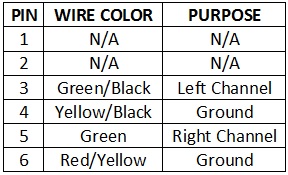
I've figured out how to verify that the input jack is the problem and how to repair/replace it. See the pin-out/wire color table at the bottom of this post for reference.
Diagnostic
Disassemble the panel mount under armrest (very easy, no tools required)
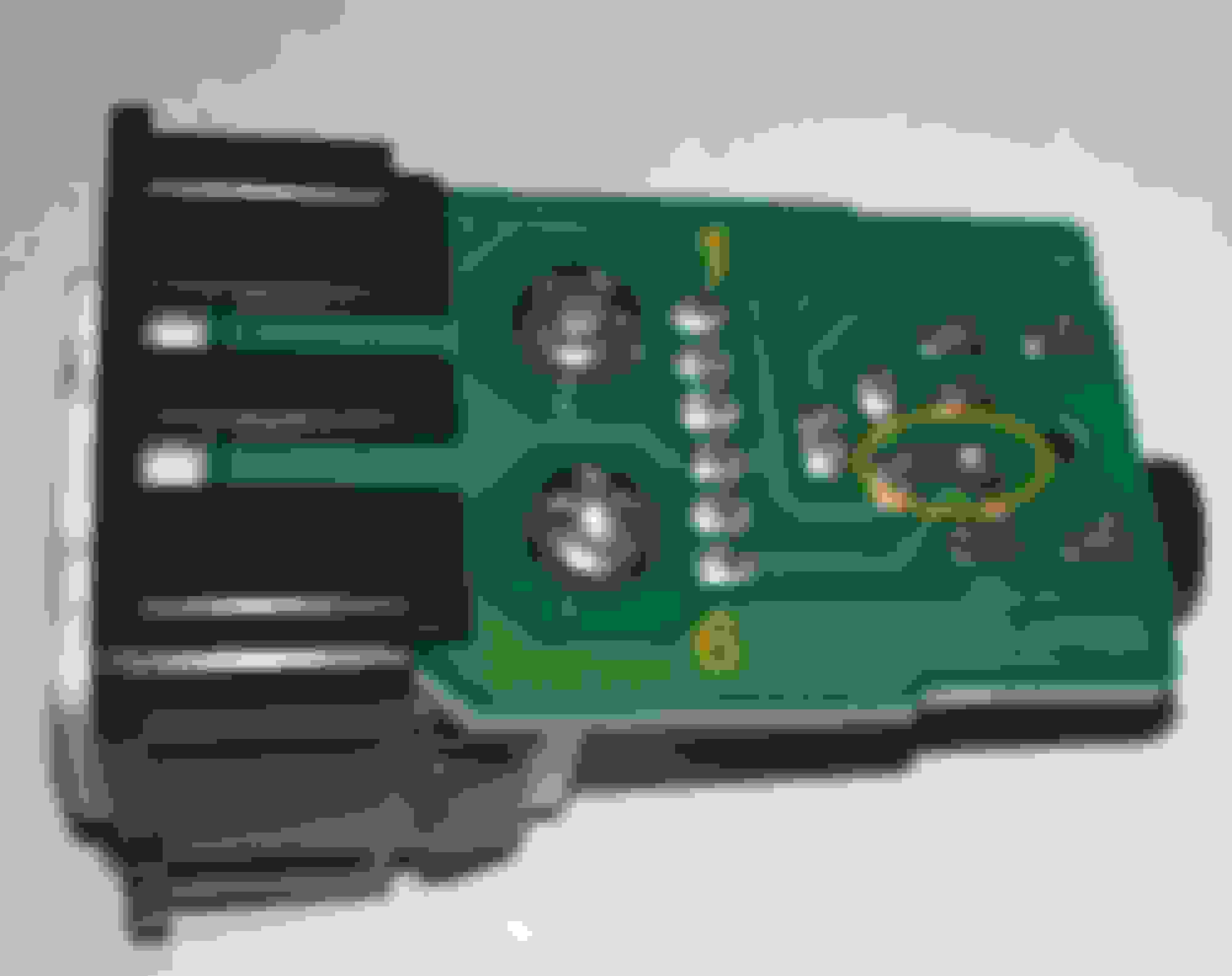
Once you can see the circuit board that the wire harness plugs into, temporarily bridge pins 4 and 6 together (a paperclip works well)
With these two contacts connected, you should now be able to select AUX by pressing MEDIA on the stereo. If not, then the radio or the wiring leading to the radio is the problem
Repair
If after temporarily bridging pins 4 and 6 together, you get music from both the left and right speakers, then all you have to do is solder a permanent bridge between those two contacts. In my case this was all that was needed, as the circuit board must have developed a hairline stress crack between these contacts which prevented the radio from knowing a device was plugged in.
Replace
If you are unable to repair the module, you will need to replace it. You have two choices:
OEM Part: Order PN # D655-66-DFX from dealer for ~$60
DIY for $6: Buy a 3.5mm Stereo Mount and wire it according to the table below
I don't have a photo for you, but all you need to do is remove the little piece of fabric at the bottom of the center console where the aux input is. You will then be able to see the bottom edge of the plastic piece that houses the aux input and 12v power output. There is also a little square hole which is where you would lift up from. The plastic panel just snaps out, no screws or anything.
Thanks, I open up the plastic panel, but did not see any circuit board but a 5 wires cable hook to aux in port assembly. I unhook the cable and wonder if the D655-66-DFX or circuit board is housed in the assembly and I need to dislodge it from the panel as well to see it?
I've figured out how to verify that the input jack is the problem and how to repair/replace it. See the pin-out/wire color table at the bottom of this post for reference.
Absolutely brilliant. I've been having the same issue lately where the stereo wouldn't switch to media. Had I known it was so easy to fix, I wouldn't have waited as long as I did. I just globbed on some solder to connect pins 4 and 6 (they're adjacent under the 3.5 mm jack) and it works a treat. The only unintended consequence is it'll switch to media with nothing plugged into it, but I prefer that anyway. Thanks for the straightforward tutorial.
Awesome!! Works like a charm. I followed El C's advice and applied a tiny bit of solder on the bottom side where pins 4&6 come close to each other. Just trace away from the pins numbers toward the headphone plug on the side opposite that shown in the pics above. Thanks again everyone!
Edit: Picture attached now
Last edited by keertib; Jun 13, 2017 at 12:52 AM.
Reason: Added picture
After years of the aux port not working, I did some research and came back to this post.
Purchased the part: D655-66-DFX, installed it and the media button is still not working. Any ideas on how to fix this issue?
Sorry for reviving this old thread.
I just want a working auxiliary port again.
Just updating an old thread in case anyone else has this issue. My AUX stopped working and I tried the jumper method suggested here but no luck. So I decided to risk it and replace the part for $59. My car is 2011 and the part number was different from what is noted here. The number is DL40-66-DFX and is on the side of the black case. I confirmed it with the Mazda dealer and ordered the part. It is now working fine.
Awesome!! Works like a charm. I followed El C's advice and applied a tiny bit of solder on the bottom side where pins 4&6 come close to each other. Just trace away from the pins numbers toward the headphone plug on the side opposite that shown in the pics above. Thanks again everyone!
Edit: Picture attached now
this saved me thanks alot, I was using a bad cable and I guess it messed it up, got a new cable and did this, works perfectly