


Accessport compatibility issue......


Here is a definite possibility, it takes some of the hardware restrictions:
https://technet.microsoft.com/en-us/.../dn481258.aspx
https://technet.microsoft.com/en-us/.../dn481258.aspx

n3rd
Joined: Aug 2009
Posts: 2,133
Likes: 49
From: in my mind
Here is a definite possibility, it takes some of the hardware restrictions:
https://technet.microsoft.com/en-us/.../dn481258.aspx
https://technet.microsoft.com/en-us/.../dn481258.aspx


The known solution is an earlier WOS running on VM. Silly seems to be what you're doing, but I'm patient enough to sit back and see ... I was able to workaround Adobe8 on W8.x, this one seems like more of a stretch
I still think it comes down to how the AP authenticates with the PC. MS changed a lot of security and device management from Windows 8 to 8.1 but if we had a smoking gun for what broke the AP there might be a workaround. I'm still looking, but I have no horse in this race.
n3rd
Joined: Aug 2009
Posts: 2,133
Likes: 49
From: in my mind

Vulnerability is relative. You would be no more vulnerable than before windows 8.1. In theory you could get hit by software specifically looking for an unsecured copy of Windows 8.1, but in practice it's very unlikely. I'd be more worried about new exploits that security updates have created. There have already been a couple bad zero day exploits found with more to follow.



This morning I have setup my Win 8.1 system to run my AP manager and ATR.
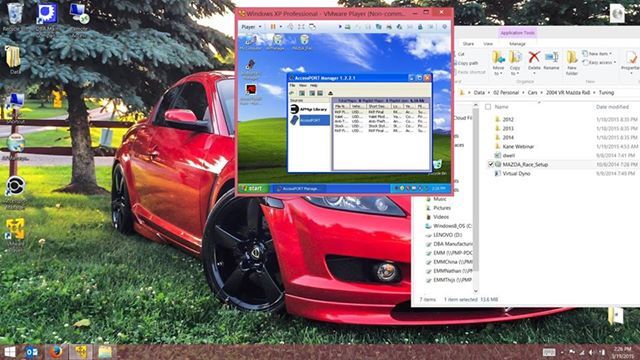
Download and install the non-comercial free version of VMware Player
Virtual Machines & Multiple Operating Systems: VMware Player Pro | United States
Then secure an ISO (Or hard copy disk) of whatever operating system you want ( I prefer XP Pro) and install it, I partitioned 20GB dedicated to the VM.
Once the OS installs, install your copy of ATR (Do not install the latest version of AP Manager, Install ATR only and click yes when it asks to install the AP manager. The new AP Manager will not support our AP).
Download and install the non-comercial free version of VMware Player
Virtual Machines & Multiple Operating Systems: VMware Player Pro | United States
Then secure an ISO (Or hard copy disk) of whatever operating system you want ( I prefer XP Pro) and install it, I partitioned 20GB dedicated to the VM.
Once the OS installs, install your copy of ATR (Do not install the latest version of AP Manager, Install ATR only and click yes when it asks to install the AP manager. The new AP Manager will not support our AP).
Last edited by Carbon8; Mar 19, 2015 at 02:01 PM.
hmmm, gonna give this a try ....
Forget The End Of Life Woes: Windows 8 Has An XP Mode
http://www.makeuseof.com/tag/downloa...-microsoft-si/
.
Forget The End Of Life Woes: Windows 8 Has An XP Mode
http://www.makeuseof.com/tag/downloa...-microsoft-si/
.
Last edited by TeamRX8; Apr 10, 2015 at 09:37 PM.
n3rd
Joined: Aug 2009
Posts: 2,133
Likes: 49
From: in my mind
 Couldn't resist
On a serious note though appreciate your info. FWIW if you are going to run a VM anyway you can run Unity mode on VMware Workstation and get the same effect. With less PITA factor IMHO...
I believe the free VMware Player and VirtualBox also has this functionality.

Last edited by slash128; Apr 11, 2015 at 08:09 PM.


Technically I don't have a copy of XP or other suitable OS disc. The methods above indicate how to get it through Microsoft in the process of setting up a virtual drive (Oracle VirtualBox) again using Microsoft sources. The pita for me was figuring out the VM configuration etc. was a first for me.
.
.
Last edited by TeamRX8; Apr 11, 2015 at 08:36 PM.
n3rd
Joined: Aug 2009
Posts: 2,133
Likes: 49
From: in my mind
That was the "good info" part
It is good legit option for those who don't have a copy.
n3rd
Joined: Aug 2009
Posts: 2,133
Likes: 49
From: in my mind
Likewise on my X1. I didn't even know it had a touch screen until I tried to wipe off a bit of dust. I was quite surprised when the screen moved haha...
So it looks like Parallels connects up the AP just fine? I haven't bothered to try. Good to know.
So it looks like Parallels connects up the AP just fine? I haven't bothered to try. Good to know.
yeah... works fine. it has been some time since I've used it for anything other than reference though. I moved on to MEP and sold my AP a couple years ago.
But when I flashed with it, I used AP Manager and Race originally in an XP VM and later on a Win7 one with no issues.
But when I flashed with it, I used AP Manager and Race originally in an XP VM and later on a Win7 one with no issues.
The process in the link below proved to be an interesting way to handle an ATR installation on a W8.1 OS if anyone is so inclined. Since W8.1 won't allow communication with the handheld device you can still load ATR on your W8.1 OS computer and perform tuning changes etc. there rather than on a virtual server. You will still need to perform your hand-held device communications on the virtual drive, but being able to handle the rest of it on my normal computer setup works better for me. Also, since I occasionally tune for other people it didn't lock into my serial number since the handheld device is not used for installation. Not sure yet if the other person can use it directly or will still have to open it and then save using their ATR program to update the tune with their serial number
How to: Cobb tuner race bypass: Get atr to work w/o driver install - evolutionm.net
.
How to: Cobb tuner race bypass: Get atr to work w/o driver install - evolutionm.net
.
Last edited by TeamRX8; Apr 29, 2015 at 09:55 AM.
n3rd
Joined: Aug 2009
Posts: 2,133
Likes: 49
From: in my mind
Another option that doesn't require any software manipulation via third party applications: install ATR and AP manager normally on the VM then copy the installed directory out of "Program Files" on the VM to "Program Files (x86)" on the Win81 host. You can then run ATR natively on Win81 and just use the VM for AP transfers.
EDIT: technically it doesn't seem to matter where you copy it to on the host.
Also, this works for tuning for other people on different versions
EDIT: technically it doesn't seem to matter where you copy it to on the host.
Also, this works for tuning for other people on different versions
Last edited by slash128; May 1, 2015 at 03:28 PM.