When you click on links to various merchants on this site and make a purchase, this can result in this site earning a commission. Affiliate programs and affiliations include, but are not limited to, the eBay Partner Network.
I managed to fix this, finally. All the antennas are sealed pretty well within the body work, with the exception of the one under the rear bumper. I removed the bumper and discovered the antenna covered in dust and possibly road-salt. I removed the antenna and cleaned it and the electrical connector, and it's been fine since.
Where or what part of the back bumper is it? What does it look like? Any insight would be greatly appreciated...
It's an easy fix that could take anywhere for 15 to 20 minutes. Although it took me about a week to figure this out. Most of the time it's an issue with the rear antenna because it is located outside of the car. The company that makes the antennas went a little cheap on the plug design. It was crimped and soldered poorly and even though it has rubber seals it still corrodes where the wires connect to the plug so it will look as if nothing is wrong. If your alright with cleaning the plug and re soldering the connection go for it. But if you want a quick fix so that it will never happen again relocate it to the trunk.
Dummy proof directions
After removing internal trunk covers and rear bumper (Rear Bumper not necessary if you buy new antenna from ebay or anywhere any should work I used a spare trunk antenna)
Step 1: Follow the Pink and Brown Wires back inside the trunk. When standing looking in to the trunk they should appear on the left side.
Step 2: Cut the Pink and Brown wires and strip the ends of the wires.
Step 3: Do the same for the antenna. ***Do not cut the wires too close to the antenna make sure you have as much wire as possible sticking out of it***
Step 4:Connect the Pink and White wires together with a wire nut
Step 5:Connect the Brown and Black wires together with a wire nut
Step 5 1/2: If you want you can connect it to a ground. It will still work even if its not.
Step 6: Test to see if it works. (It should work right away if not you may need to pull the 30amp fuse to reset).
Step 7: put everything else back together and you should be good to go. If it didn't fix the problem it is possible that one of the other antennas is bad.
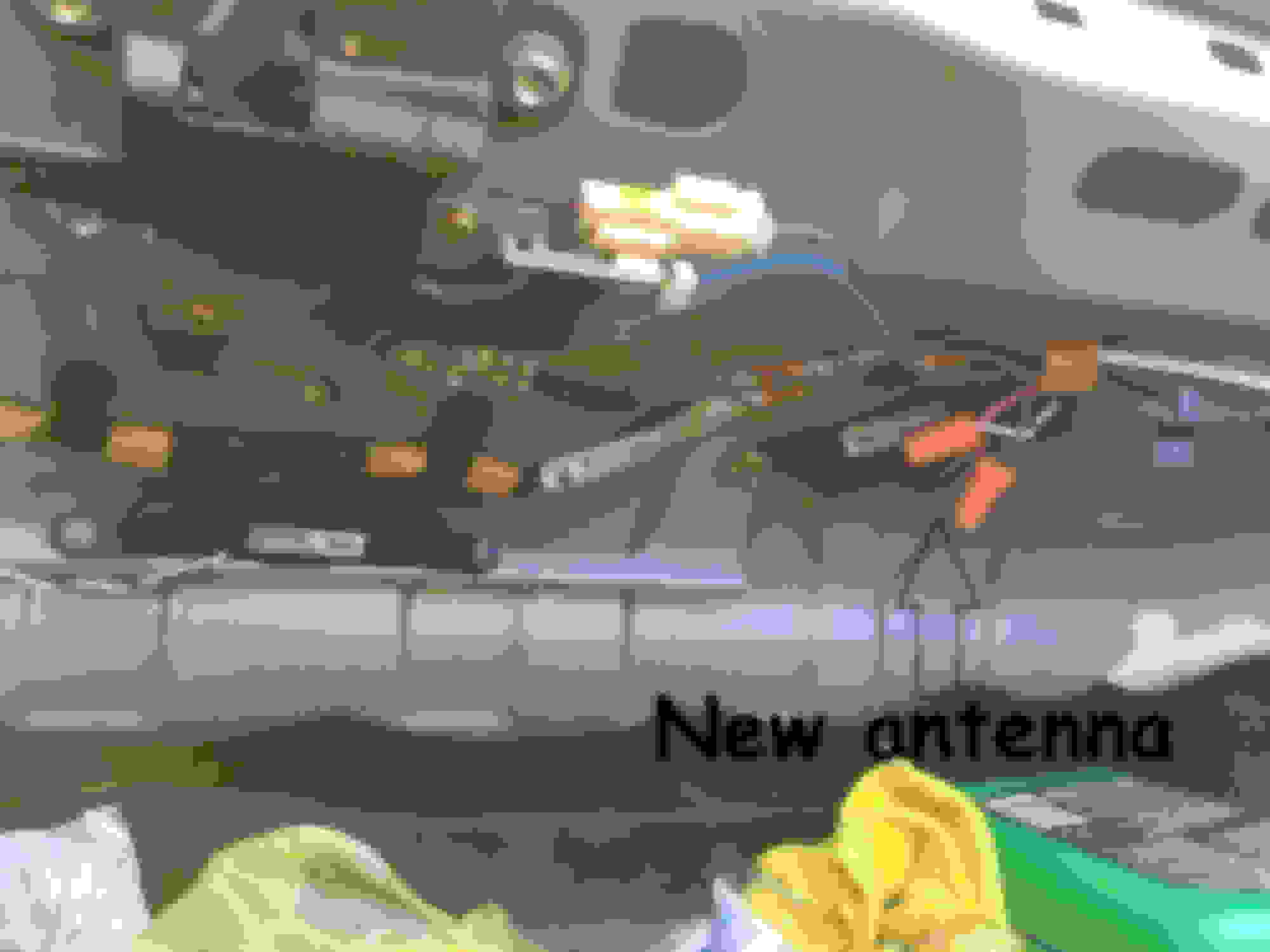
This is how mine looks after I fixed the problem
Did any one try this? I bought the trunk sensor to use it in place of the rear bumper sensor by just cutting thr connectors. I was worried about the RKE module and wanted to confirm if someone else tried that.
Thanks
Fixed! I ended up not needing a new antenna thankfully, because it is indeed an expensive part. I checked the antenna with a multimeter and it seemed to be fine. I cleaned up the contacts some more, and then disconnected the battery. Reconnected and voila! It's back up and running again.
I will probably give it one final cleaning and then put the bumper back on. The dealer wanted $450 to fix this, I did it with a $5 can of contact cleaner and some time.
Hello new member here. I was getting the red key light on the dash and none of the external buttons were working on my 07 rx8.
I took the bumper off and cleaned the antenna with no luck. I was curious what a proper reading you were getting with your multimeter? Mine is open with continuity. The sensor inside the trunk, when measured is not showing continuity. Im wondering which one is accurate without having to take the door panel off again to test a third one.
The remote is brand new. The battery in the remote and in the car are brand new. I just had it programmed. When I push the button on the door handle, the red light on the key flashes as if it's receiving the signal but no dice. All of the other functions of the remote work fine for lock/unlock.
Fixed! I ended up not needing a new antenna thankfully, because it is indeed an expensive part. I checked the antenna with a multimeter and it seemed to be fine. I cleaned up the contacts some more, and then disconnected the battery. Reconnected and voila! It's back up and running again.
I will probably give it one final cleaning and then put the bumper back on. The dealer wanted $450 to fix this, I did it with a $5 can of contact cleaner and some time.
Just curious as I have the dreaded red key light and a B1131 code pointing to the antenna under the bumper - how did you test with a multimeter?
I tried cleaning the contacts on mine but no luck. I want to be 100% sure the antenna itself is faulty before I drop the money on a new one.
I don't think you can test that antenna with a mutimeter. Better to just buy the part. Check flea bay they show up from time to time. Where that antenna is located isn't great. Will get road spray and such no matter what.
It's an easy fix that could take anywhere for 15 to 20 minutes. Although it took me about a week to figure this out. Most of the time it's an issue with the rear antenna because it is located outside of the car. The company that makes the antennas went a little cheap on the plug design. It was crimped and soldered poorly and even though it has rubber seals it still corrodes where the wires connect to the plug so it will look as if nothing is wrong. If your alright with cleaning the plug and re soldering the connection go for it. But if you want a quick fix so that it will never happen again relocate it to the trunk.
Dummy proof directions
After removing internal trunk covers and rear bumper (Rear Bumper not necessary if you buy new antenna from ebay or anywhere any should work I used a spare trunk antenna)
Step 1: Follow the Pink and Brown Wires back inside the trunk. When standing looking in to the trunk they should appear on the left side.
Step 2: Cut the Pink and Brown wires and strip the ends of the wires.
Step 3: Do the same for the antenna. ***Do not cut the wires too close to the antenna make sure you have as much wire as possible sticking out of it***
Step 4:Connect the Pink and White wires together with a wire nut
Step 5:Connect the Brown and Black wires together with a wire nut
Step 5 1/2: If you want you can connect it to a ground. It will still work even if its not.
Step 6: Test to see if it works. (It should work right away if not you may need to pull the 30amp fuse to reset).
Step 7: put everything else back together and you should be good to go. If it didn't fix the problem it is possible that one of the other antennas is bad.
This is how mine looks after I fixed the problem
Would it not work if you just spliced the back antenna wires into the trunk antenna so have 2 sets of wires going to the one antenna
Update tested on my car and works great
Last edited by mawalburger; Sep 19, 2022 at 03:22 AM.
Like many of you, I am looking at the red KEY light problem. Try as I might, I cannot find a Coder Reader that will actually ready the B Codes. Anyone out there have a reader they can recommend?
Hey there. I know it's an old topic but I was wander how did you diagnose that the antenas was ok with the multimeter? What test did you did to confirm that it wasn't faulty? I'm having trouble with my keyless entry on my RX-8 from 2007 and I got a second antenna for the rear bumper but the problem still there. Wanted to know if the part that I bought was in fact good or not and also check if the old antena was fine and I need to look in something else that might be causing the problem.
Cheers
Thanks for the quick response.
Still can't find what it's the problem so I leave a history of what I think cause the problem and what I have done to try to fix it.
After a road trip the car got very dirty so I went to a carwash, and after rinsing the soap of the car I realized that my girlfriend went under the rear bumper and sprayed all around because it was still dirty. After that I noticed that the buttons on the side doors were not working and the "KEY" light of the panel what's on all the time. fob still works fine; all button do what they mean to do.
Came across this post and figured out that we might have got the antenna wet so that was the problem. Months passed and I found a spare part from other car but not sure if it's functional or not. I installed on my car but nothing happened.
Also did try unplugging the battery from the car for a few minutes to reset the system and that seems to work...ish. This is what drives me nuts. So car locked, battery unplug for few minutes and then plugged again and the green "Key" light show up. All the buttons of fob work perfectly and same for the side buttons of the doors and trunk. Nevertheless as soon as one doors or trunk its open and closed again seems the problem comes back. I got tired of trying stuff so I went to a Mazda dealership and told them the same story.
The service sheet says "vehicle loosing memory. Carried out code check found code B1131 rear antenna corcuit low frequency. Suspected faulty rear antenna." And they said it's $900 to get the part so I made way way out of there as fast as I could.
That's the whole story of this.
Anything else that could I try or shall I live without the keyless thing working?
Thanks again to all
Would it not work if you just spliced the back antenna wires into the trunk antenna so have 2 sets of wires going to the one antenna
Update tested on my car and works great
I can also verify that this works. I spent $130 to have Mazda tell me that I had a B1131 body code. Then they quoted me $891.62 to replace the rear bumper antenna. No thanks!
Here's a picture of my splice into the trunk antenna. This seems to work just fine. No red key light on dash anymore and all outside buttons work, as well as fob and key.
This would be a very useful hack, to bypass the faulty antenna unit.
For the less technically inclined among us, could you explain exactly what you did?
What is the black module you spliced into?...is that an 'inside' antenna?
This would be a very useful hack, to bypass the faulty antenna unit.
For the less technically inclined among us, could you explain exactly what you did?
What is the black module you spliced into?...is that an 'inside' antenna?
S
Yes, that's the trunk antenna. Just a caveat on the following explanation - this worked for Mawalburger and myself. It doesn't mean it's a magic bullet for the red key light on the dash. Also, my RX8 is a series one. Will it work on series 2/3? Not sure, but maybe this is not an issue for the later models anyway?
First step is to confirm that the rear antenna is faulty. This can be done by reading the Body code. If it comes up with "B1131 Liftgate/trunk low frequency antenna circuit failure", then you're good to continue. Body codes cannot be read by a standard OBDII scanner. You'll need to find someone who has a reader for the Mazda Body codes, or bite the bullet and pay the outrageous $130 that the Mazda dealer is likely to charge you. Sorry, but I don't have a way to bypass that part of the fix.
Disconnect the battery before you start. Open the trunk and remove the plastic cover that holds your jack winding handle (picture below). This is done by removing the 4 retaining clips - get a fingernail behind the centre part of the clip and pull it gently backwards. I have also attached a picture of one of the clips, removed with the centre part pulled back, so you can see how it works. Don't force it, you'll break it. Then pull straight up on the plastic cover and it should come out.
View from inside the trunk, looking at the plastic cover that holds the jack winder. This has to be removed.
Retainer clip, with centre part pulled back. Sorry about the gnarly fingers...
Behind the cover plate, on the (North American) drivers side, you'll see 4 wires going through a small hole to the exterior from the trunk. The pink wire with black band and the brown wire go to the (faulty) antenna that's behind the bumper. You can verify that by looking through the hole just above the license plate (picture below) and you'll see those 2 wires terminating into a connector that in turn goes to the rear antenna. I had already cut mine some time back, so unfortunately I don't have a photo of what it originally looked like. The 2 photos below should suffice to explain though...
Looking up, above the license plate, you can see the "rear end" antenna on the right. If you zoom in, you can see the part number written on it.
Looking back to the left, you can see the connector that used to be attached to the rear end antenna. You don't need to touch any of this. Leave it as is. This just shows the wire colours, that you're looking for in the trunk.
For everything below, refer to my previous picture (attached again below).
In the trunk, cut the pink wire with the black band and the brown wire, where they exit to the exterior. The exterior side of the cut wires can be abandoned - they simply go to the faulty antenna, so will have no current passing through them.
Attach a short length (long enough to get over to the trunk antenna) of similar gauge wire (I think it's about 20 gauge) to the cut ends of the brown and pink/black band wires, at the point just before they get tied into the wiring harness (shown in photo below). I used small wire nuts, as I didn't have any small enough crimp style connectors on hand. I also used double insulated wires (brown and blue wire running in a white sheath), again, because it was what I had on hand. Not necessary to have double insulated in a 12 volt application, but it doesn't hurt.
Locate the trunk antenna (shown in the photo below) and cut the black and brown wires that run between the white connector and the antenna. Then splice as follows:
white wire from the connector, rejoin to white wire from trunk antenna and also join in the pink/black band wire (which, I'm sorry, is the blue wire in my photo) from the wiring harness
Black wire from connector, rejoin to black wire from trunk antenna and also join in the brown wire from the wiring harness
You'll need to slide the white connector going to the trunk antenna off the metal tab to get enough wire length to allow you to do this.
You should now have 2 sets of 3 wires joined together and 2 sets of 2 wires joined together, as in the photo below.
Reconnect the battery and give it a try.
What will happen now, is that the computer will see a signal response and read a resistance from the trunk antenna instead of from the rear bumper antenna.
100% credit to Mawalburger for thinking of this solution and for having the guts to try it!
I recently had the dreaded red key issue pop up, and just wanted to share what I found out. My issue like most, was the rear antenna under the bumper failing. Can confirm I was able to use a glovebox antenna (FE96676N0D) and simply switch the plugs, worked like a charm. I also took the time to weather proof the antenna and plugs with hot glue, only time will tell the benefit of doing this. My failed antenna shows a fluctuating value of 1.3-2.3 ohms when connected to the multi-meter, have been unable to find out what an acceptable value is for a working rear antenna. May not even be able to be tested with a MM, but I thought I'd post the info regardless. Hopefully this info will prove useful to someone in the future.
@mlampard I wanted to thank you for your post. I had all of the advanced keyless entry issues described in this thread and your fix worked perfectly. With excellent original
paint I wasn’t fond of pulling off the rear bumper cover, the bypass to the trunk antenna did the trick.
One note for those that read this in the future, the pink/black and brown/black wires that route to the external antenna actually route down the passenger side, so you can snip the wires right by the trunk antenna and simply splice into the purple/black and green/black wires. I used Posi Taps (which are awesome) but the traditional crimp over taps would work too. Pics below, it lets you avoid adding an extension wire. One note, when you cut the pink/black and brown/black wires you want to tap into the ones running towards the passenger side. You can see where I snipped and taped the wires running towards the drivers side and outside to the bumper antenna.