


Update Axxess Adapter With Win7


Thread Starter
Grasshopper
iTrader: (1)
Joined: Dec 2006
Posts: 6,779
Likes: 50
From: Streetsboro, OH
Update Axxess Adapter With Win7
I've noticed that a lot of people are having trouble installing the drivers for the Axxess iPod Adapter using Windows7.
I just received my cable and attempted this install on my Win7 machines.
It took a "work-around" but I managed to get it working on both Win7 32-bit and 64-bit.
This is not a DIY for the whole update procedure, there are other postings on that.
This is simply the driver work-around until true Win7 drivers are released.
1) After you've downloaded that WebXXPress Updater and installed the USB BootLoader, plug in the update cable. You'll see a message saying the driver failed to install.
2) Go to the Control Panel and click on 'Hardware and Sound'

3) Under 'Devices and Printers' click on 'Device Manager'

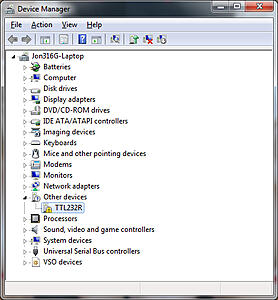
4) Double-click on the 'TTL232R' device
I just received my cable and attempted this install on my Win7 machines.
It took a "work-around" but I managed to get it working on both Win7 32-bit and 64-bit.
This is not a DIY for the whole update procedure, there are other postings on that.
This is simply the driver work-around until true Win7 drivers are released.
1) After you've downloaded that WebXXPress Updater and installed the USB BootLoader, plug in the update cable. You'll see a message saying the driver failed to install.
2) Go to the Control Panel and click on 'Hardware and Sound'

3) Under 'Devices and Printers' click on 'Device Manager'

4) Double-click on the 'TTL232R' device

Last edited by Jon316G; Mar 12, 2010 at 01:36 AM.
Thread Starter
Grasshopper
iTrader: (1)
Joined: Dec 2006
Posts: 6,779
Likes: 50
From: Streetsboro, OH
5) Click on 'Update Driver'

6) Click on 'Browse My Computer For Driver Software'

7) Click on 'Browse'

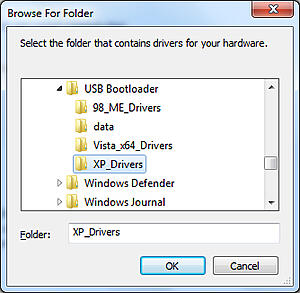
8) Navigate to the "USB Bootloader" directory (C:\Program Files\USB Bootloader\)
Select the 'XP_Drivers' for 32-bit or 'Vista_x64_drivers' for 64-bit
Once you choose the appropriate folder, click 'OK'
9)Click 'Next'


6) Click on 'Browse My Computer For Driver Software'

7) Click on 'Browse'

8) Navigate to the "USB Bootloader" directory (C:\Program Files\USB Bootloader\)
Select the 'XP_Drivers' for 32-bit or 'Vista_x64_drivers' for 64-bit
Once you choose the appropriate folder, click 'OK'

9)Click 'Next'

Last edited by Jon316G; Mar 12, 2010 at 01:43 AM.
Thread Starter
Grasshopper
iTrader: (1)
Joined: Dec 2006
Posts: 6,779
Likes: 50
From: Streetsboro, OH
10) Click 'Close'
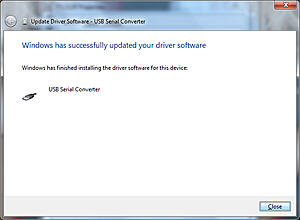
11) Click 'Close'

12) You'll notice that "USB Serial Converter" is now installed, but "USB Serial Port" appears under Other Devices.

13) Double-click "USB Serial Port" and repeat steps 5-11 for this device.
You'll then see the device successfully installed (don't worry about the COM port number... yours might be different)

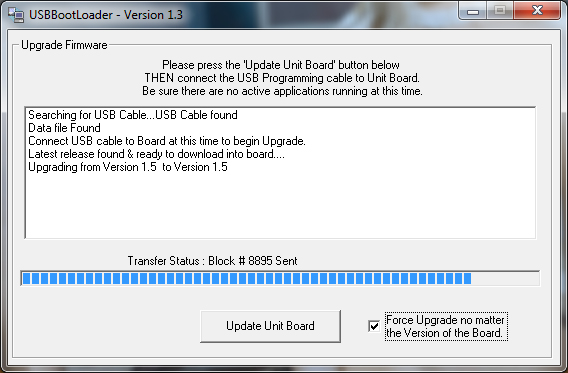
14) Now you're ready to run the Bootloader application to update the Axxess Adapter.


11) Click 'Close'

12) You'll notice that "USB Serial Converter" is now installed, but "USB Serial Port" appears under Other Devices.

13) Double-click "USB Serial Port" and repeat steps 5-11 for this device.
You'll then see the device successfully installed (don't worry about the COM port number... yours might be different)
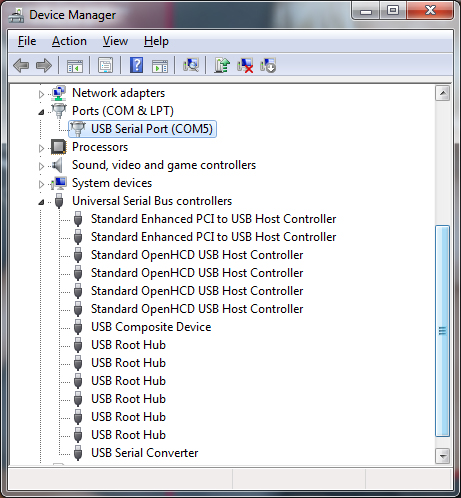
14) Now you're ready to run the Bootloader application to update the Axxess Adapter.
Last edited by Jon316G; Mar 12, 2010 at 01:53 AM.

Thread
Thread Starter
Forum
Replies
Last Post
Digitz0070
Series I Aftermarket Performance Modifications
55
Jul 25, 2017 08:40 PM
Learners_Permit
Series I Interior, Audio, and Electronics
8
Sep 27, 2015 07:38 PM
Evan Gray
Series I Trouble Shooting
0
Sep 26, 2015 12:30 PM
Digitz0070
Series I Aftermarket Performance Modifications
5
Sep 25, 2015 10:58 PM
