


PC to Stock Navi Screen HELP


Thread Starter
Still spining
Joined: Feb 2003
Posts: 986
Likes: 0
From: Miramar FL.
PC to Stock Navi Screen HELP
Ok guy I need help. I just purchased a Stock Navi Screen assembly from Ebay. It is just the screen no cables or DVD unit. I want to connect it directly to a PC. I have the pinouts of the screen but have no idea how to proceed. Help.

Attracts tree branches
Joined: Jun 2004
Posts: 5,940
Likes: 3
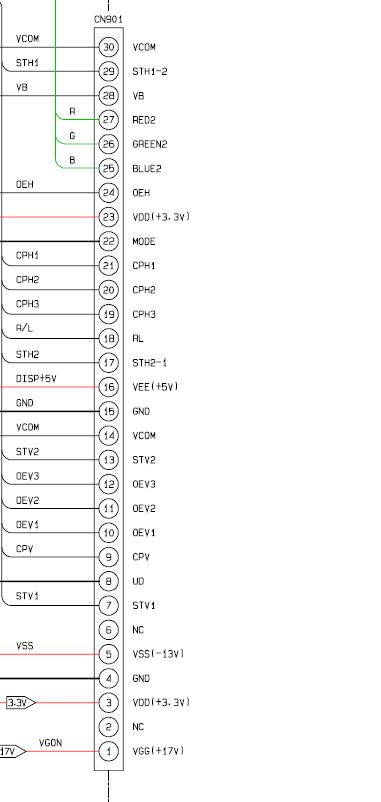
actually that pinnout is just from the NAV out (to the screen) the screen has many more inputs you will need to connect...I attached the correct one
but sorry to be the bearer of bad news but it doesn't matter much anyhow
you can't directly connect it to a PC unless you want a really crappy picture...most graphics cards are unable to output RGB seperate S (not HV) in a higher resolution and higher color bit at the same time
Antichrist PM tried over a year ago and things never turned out...you need a specialized converter that is able to control the frequency...problem is they are close to a grand...the other option is PC video out, to Video to RGBs Conversion with converting unit but the quality will never be great the picture will be muddled
also you are going to have to create the correct voltage for the Nav screen which is no small task (see diagram)
for all this hassle you are much better off removing the LCD screen from the housing, and replacing it with a 7inch lilput screen that will have higher resolution great color representation and will be plug and play, heck if you want you could get the touch screen version and really have a sweet setup...then just hookup the correct voltage for the up and down of the monitor house
but sorry to be the bearer of bad news but it doesn't matter much anyhow
you can't directly connect it to a PC unless you want a really crappy picture...most graphics cards are unable to output RGB seperate S (not HV) in a higher resolution and higher color bit at the same time
Antichrist PM tried over a year ago and things never turned out...you need a specialized converter that is able to control the frequency...problem is they are close to a grand...the other option is PC video out, to Video to RGBs Conversion with converting unit but the quality will never be great the picture will be muddled
also you are going to have to create the correct voltage for the Nav screen which is no small task (see diagram)
for all this hassle you are much better off removing the LCD screen from the housing, and replacing it with a 7inch lilput screen that will have higher resolution great color representation and will be plug and play, heck if you want you could get the touch screen version and really have a sweet setup...then just hookup the correct voltage for the up and down of the monitor house

Attracts tree branches
Joined: Jun 2004
Posts: 5,940
Likes: 3
Originally Posted by Rotary Rasp
You are better off just replacing the stock LCD with a Xenarc.
Just my $.02
Just my $.02

Attracts tree branches
Joined: Jun 2004
Posts: 5,940
Likes: 3
Originally Posted by zoom44
Mags you need to get over here and do whatever you just said to my car

oh and here is the thread....(scroll down)
https://www.rx8club.com/showthread.php?t=72166

503wtq Boosted Bimmer
iTrader: (2)
Joined: Oct 2004
Posts: 3,038
Likes: 0
From: Los Angeles, California
Thread Starter
Still spining
Joined: Feb 2003
Posts: 986
Likes: 0
From: Miramar FL.
Thanks guys. I will replace it with an aftermarket screen soon I just want to mess with this first so I can save the cash for a badass screen. Which screen do you recommend. I want a touchscreen and i want the best for NAV,DVD,PS2,CAMS etc.
Thread Starter
Still spining
Joined: Feb 2003
Posts: 986
Likes: 0
From: Miramar FL.
Originally Posted by jefferrari
lucky you... if you decide to sell it, let me know.
company blocked ebay....
company blocked ebay....

Registered
Joined: Apr 2005
Posts: 54
Likes: 0
From: Portland, OR
Originally Posted by RotorGeek
Keep looking on ebay they pop up every now and then. I have been looking for over a year and i got lucky.
stupid company blocked ebay... and I don't want to stare at the monitor after work. Or should I say that I enjoy using work time to do other stuff. :fawk:
Thread Starter
Still spining
Joined: Feb 2003
Posts: 986
Likes: 0
From: Miramar FL.
Which is better the Liliput 619GL or the 629GL. What do do think about the VIA VT-310D mobo. I will create another thread once I get all the pieces for my CarPC. I will also make a DYI


Attracts tree branches
Joined: Jun 2004
Posts: 5,940
Likes: 3
Originally Posted by RotorGeek
I meant DIY. what do you think is the best mobo for car pc apps
here is a good place to start though as these are low power pcs, quite, cool, and they sell a nice enclosure
sure you can put a P4 or amd 64 in the car but the power required is ridiculous plus you want to put in a dc to dc power supply this is the place to go (where I picked up the powersupply for my xbox which required severe modification for PC applications it won't be severe):
http://www.mini-box.com/s.nl/sc.8/category.101/.f

Remember the number 1 and 2 problems of car PC designs:
1) Power.. if you draw too much, or keep the machine on w/ the engine off you'll kill the battery. You need to power the thing down (sleep even draws too much w/ many desktop motherboards) soon after the cars ignition is reset.. (but you want a few second delay so that if you get a temporary glitch i.e. someone killed the engine and is restarting the car.
2) Temperature! Standard PCs are only designed for household temp ranges. You need an industrial type of motherboard to handle the heat extremes in a car. -20F in the winter.. 180F in the summer... And this ignores the problems of hard disks/rotating media that will very unhappy w/ those extremes!
I suggest you look at PC104 style systems (or other embedded/industrial form factors) if you are going to stick w/ x86. You will have a more robust end result. Also compact flash for executables + rotating media for storage is a good mechanism. With a proper thermometer system, you can keep the disk _OFF_ until the temp range is correct!
1) Power.. if you draw too much, or keep the machine on w/ the engine off you'll kill the battery. You need to power the thing down (sleep even draws too much w/ many desktop motherboards) soon after the cars ignition is reset.. (but you want a few second delay so that if you get a temporary glitch i.e. someone killed the engine and is restarting the car.
2) Temperature! Standard PCs are only designed for household temp ranges. You need an industrial type of motherboard to handle the heat extremes in a car. -20F in the winter.. 180F in the summer... And this ignores the problems of hard disks/rotating media that will very unhappy w/ those extremes!
I suggest you look at PC104 style systems (or other embedded/industrial form factors) if you are going to stick w/ x86. You will have a more robust end result. Also compact flash for executables + rotating media for storage is a good mechanism. With a proper thermometer system, you can keep the disk _OFF_ until the temp range is correct!
Last edited by fray; Nov 4, 2005 at 10:21 AM.
Attracts tree branches
Joined: Jun 2004
Posts: 5,940
Likes: 3
The M1 ATX powersupply of the site I linked to is a 90watt PSU that has a built in relay so you can have it power down at ignition and stay on even while the engine starts up (outstanding voltage regulation)...simply connect the power to a direct line (not ignition based) and the activation wire (white) to the center console or in the fuse box...then connect the cable to the motherboard
while powered down it draws no power on the battery due to the relay and allows for the soft shutdowns and start ups
to be specific:
the nice thing is you setup the relay for a few second delay so that it is a soft shut down and then setup windows for hibernate so you return to the same state later
while powered down it draws no power on the battery due to the relay and allows for the soft shutdowns and start ups
to be specific:
the nice thing is you setup the relay for a few second delay so that it is a soft shut down and then setup windows for hibernate so you return to the same state later
Thread Starter
Still spining
Joined: Feb 2003
Posts: 986
Likes: 0
From: Miramar FL.
This is the stuff i will most likey buy unless someone here has had a bad experience with them
Power supply
http://www.logicsupply.com/product_i...roducts_id/370
Motherboard
http://www.logicsupply.com/product_i...roducts_id/209
Screen
http://www.logicsupply.com/product_i...roducts_id/193
I allready have 1gb ddr ram and I might use a spare glove box and put everything in there.
Recommendations on the audio hook up to our headunit.
Power supply
http://www.logicsupply.com/product_i...roducts_id/370
Motherboard
http://www.logicsupply.com/product_i...roducts_id/209
Screen
http://www.logicsupply.com/product_i...roducts_id/193
I allready have 1gb ddr ram and I might use a spare glove box and put everything in there.
Recommendations on the audio hook up to our headunit.
503wtq Boosted Bimmer
iTrader: (2)
Joined: Oct 2004
Posts: 3,038
Likes: 0
From: Los Angeles, California
I went with a VIA EPIA PD10000
It is more than fast enough for most apps, but don't expect to play doom 3 on it.
The Opus PSU is good if you have the money, I went with the M1. If you use a mini itx board, 120 watts is an overkill.
If you plan on mounting it in the glove box, you'll need a low power processor, otherwise prepare of over heating issuses.
It is more than fast enough for most apps, but don't expect to play doom 3 on it.
The Opus PSU is good if you have the money, I went with the M1. If you use a mini itx board, 120 watts is an overkill.
If you plan on mounting it in the glove box, you'll need a low power processor, otherwise prepare of over heating issuses.
Last edited by Rotary Rasp; Nov 4, 2005 at 11:51 AM.
RotorGeek, operating range is pretty typical.. 32F to 120F. If you live in a mild climate it should be fine. If the computer is kept in the passanger compartment it should be fine [as long as you don't turn it on right away]. But be careful w/ the trunk..
Direct sun can easily bring the temp up to 120F or higher very quickly.
The screen you chose looks reasonable.
Direct sun can easily bring the temp up to 120F or higher very quickly.
The screen you chose looks reasonable.


