eXentric
12-09-2003, 11:25 AM
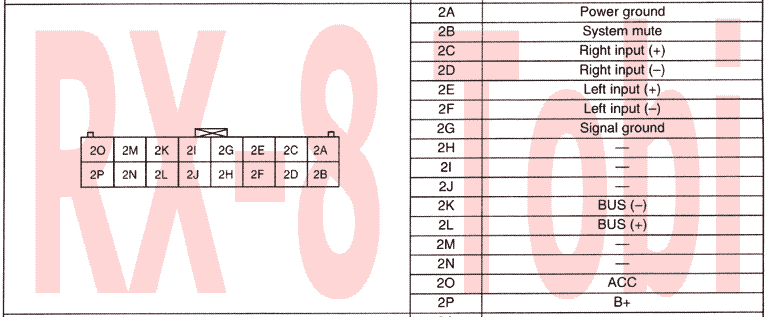
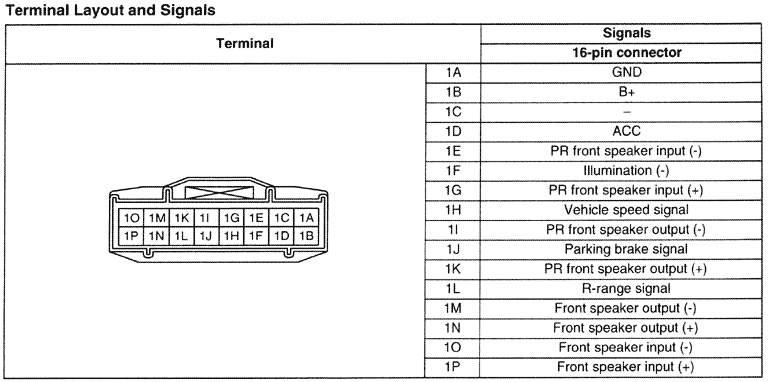
I wanted to start a thread dedicated directly to this port. It seems as though there is information strewn all over different threads so I wanted to consolidate it.
|
View Full Version : Engineers: Can this be hacked? eXentric 12-09-2003, 11:25 AM I wanted to start a thread dedicated directly to this port. It seems as though there is information strewn all over different threads so I wanted to consolidate it. eXentric 12-09-2003, 11:26 AM The diagram eXentric 12-09-2003, 11:26 AM Port and diagram eXentric 12-09-2003, 11:27 AM This port is used for NAV and AV Tuner. Notice how it piggybacks on both the NAV unit (for display) and the audio unit (for... well... you guessed it.) There are a few problems left here: [list=1] Which wire corrosponds to which signal? How does the head unit handle input selection here? [/list=1] There is no button on the front of the unit for "TV Tuner" or "Aux", so how does the TV tuner get selection? Is one of the wires some kind of 'trigger' that tells the head unit the TV tuner has been turned on? Does it just mix the audio with whatever else is playing (like the voice directions from the NAV unit)? I think that's unlikely. If someone was willing to take the head unit apart, there might be some clues in there. But I'm not skilled enough to understand the clues even if I did take mine apart. So, any skilled takers on this one? oosik 12-09-2003, 08:20 PM what unit is that plug installed on? oosik 12-09-2003, 08:24 PM I guess that's the radio it's attached to as it looks like an antenna connection right next to it. Kind of hard to say without knowing where the connections are going to inside the respective boxes? eXentric 12-09-2003, 09:33 PM Not sure I follow your question, but lets see if I can answer it anyway. This port is on the back of our stock head units. It is the port that the factory navigation unit connects to. In Japan, I believe, there is an option for a TV tuner (or at leat it looks like Mazda had plans for it anyway). The TV Tuner in the wiring diagrams piggybacks on the NAV and the regular stock head unit. This would mean that there is the possibility for AUX input into the head unit via this port. The problem is that so little is known about it. This port has been mentioned before in other threads, but it has been mostly abandoned from what I've seen. That's why I wanted to give it its own thread to see if we can stir up enough interest in it. Does that help? Sputnik 12-10-2003, 12:56 PM Taking the stock head unit apart and following the connections will be of little help with today's electronics. One thing that I do notice on the diagram is that there are no power/ground wires shown (they would show which fuse setup the power goes to and the ground icon). Since the "TV" box is square (as opposed to the LCD UNIT, which has the squiggle line on one side, meaning not all connections are shown), that tells me that two of those wires are used for power and ground. And they way that the wires from the TV to the LCD units are lined up (notice that two are used as shields, if I'm not mistaken), the power/ground should come from the head unit itself. So, to start, I'd say break out the multi-meter, and see if you can at least find the power wire, and maybe the ground. And I would try the O and P pins first (or 2O and 2P pins on the shown diagram). Especially since they are NOT used for the US NAV connection (I got that from another diagram). Next, notice how the other pins for the TV tuner are A through F, and how the U.S. NAV unit only uses pins A, B, D, and E (from the other schematic). Now, the signal to activate that input could merely be grounding or sending voltage to one of those pins, or it could be a serial code sent through two pins. If it's merely a ground/voltage thing, you should be able to use a multimeter, and see how the pins react when the NAV unit sends voice to the head unit. Lastly, you can get a headphone or ear bud or something, and try the different pins (A-F) in different combinations while the NAV unit is sending voice to the head unit, and with some more trial and error, you might be able to determine which pins are actually sending the voice signal (earbuds or headphones for something like a walkman can be powered by pre-amp level wires). If I remember correctly, the NAV only sends voice through the left channel (please correct me if I'm wrong). The fact that the US NAV unit uses two fewer pins than the TV tuner might give us a clue as to which wires are which. BTW, can anyone with access to the full electrical manual tell us where the X-10 connector is? I found X-9, and some others on another posted diagram, but not X-10. ---jps eXentric 12-10-2003, 01:33 PM Sputnik, Thats exactly the kind of information I was hoping to start collecting. A few things: Can you please scan and attach the 'other schematic' you keep referring to? I could attempt to locate voltage on the pins you specified, but I personally don't have the NAV unit (nor know anyone that does) so I won't be able to try any of your other suggestions. I'm hoping someone that does have the nav would get involved here... eXentric 12-10-2003, 01:40 PM Also, you are correct that the voice only comes through the left channel. However, it doesn't completely dis-engage whatever else is playing but rather turns the original source down while the voice is talking. (At least this is what I've read). So NAV voice may or may not be the proper left channel. RX-8-Tobi 12-10-2003, 03:13 PM Hello friends, http://www.tobias-albert.de/rx8_myst_con.gif maybe that helps... :p Think of me if the AUX-IN will work! :D eXentric, tell us what you can find out! Never heared about TV tuner in RX-8! Tell more about it. rgds Tobi Rx-Appreci-8 12-10-2003, 07:39 PM Wow. I kinda like that diagram Tobi posted! Tobi do you have something similar for the other radio (CD/MP3/Cassette) connectors? eXentric 12-10-2003, 09:45 PM Think of me if the AUX-IN will work! Holy crap man, that's a gold mine. Any chance you'll tell us where you ended up with that information? I think any credit for Aux on this port is heavily due to you at this point... H, I, J, M and N are all listed as '-'. Does that mean 'not connected' or 'unknown'? Assuming they mean N/C, then I don't see any kind of 'input selection' pin here. This means that I'm going to have to agree with the notion that there is some kind of BUS code sent to tell the unit to switch to this input. This is unfortunate if it is in fact the case. I don't have any kind of logic analyzer nor do I have the NAV unit or TV tuner to try and capture the bus logic over 2K and 2L. Soooo damn close. SO close. eXentric 12-10-2003, 09:50 PM Wait a minute... I just thought of something. I saw 2G before, but I was thinking it was the commons between 2C and 2E (signal +). But there are already two 'signal -' pins (2D and 2F). Could it possibly mean that grounding 2G would select this port as an input? Any other ideas as to what 'signal ground' would mean if there are already 'signal -' pins? Rx-Appreci-8 12-10-2003, 11:23 PM eXentric - No doubt about it - Tobi is one righteous dude! :cool: The --- indication on pins 2H, 2I, 2J, 2M, 2N is fairly standard nomenclature for "no connect" or at least "don't connect". The connector also appears to be a great spot to pick up 12V B+ power, ACC and ground connections for low power 12V audio accessories such as a SAT radio or cell phone hands free adapter. The OEM appears to be using "differential" signaling for the audio inputs to improve noise immunity. Differential signaling is just a higher quality (more noise immune) way of sending a standard audio signal from one location to another. Normally the input+ and input- signals are both active and have opposite polarity. The signal ground (pin 2G) is still the shield ground for both left and right channels and connects to the cable shield. If you cut into the cable leading up to, say, the right channel of the radio head you would see a wire connected to input+ (2C), another wire connected to input- (2D) and both wires in the cable will be surrounded by a grounding shield that connects to signal ground pin 2G. The left channel hooks up the same way and its ground shield also connects to pin 2G. Many (most) audio devices (e.g. the XM Commander) have standard non-differential audio outputs so we either have to add circuitry to convert the single ended signal to a differential signal or we "fudge" the differential input to make it accept the standard audio source with some loss in noise immunity (note: loss of noise immunity does not necessarily mean increased noise if one is very careful about grounding and cable runs.) Hopefully by fudging the differential input to accept a standard audio source we end up with no more noise than if the OEM radio head inputs had already been single ended. We can test by wiring the center connector of the XM Commander's RCA jack output to the input+ pin (2C) of the RX-8 radio and the outer ring of the RCA jack through the shield of a shielded cable to BOTH the input- (2D) AND the Signal Ground 2G on the RX-8 radio. As you correctly pointed out, connecting valid audio signals to pins 2C/2D/2G (Right) and 2E/2F/2G (Left) probably won't make the radio automatically switch over to use these input signals without correctly synthesizing the computer "chit chat" on the BUS- and BUS+ lines. I had my radio out a few weeks ago to install my XM Commander and Cell Phone hands free adapter but I forgot how the optional cassette player hooked up to the radio head. I don't recall that my NAV hooked up here but now my memory is fuzzy. Is the connector Tobi documented also the interface for the cassette player or is there another plug/jack for that? It might be interesting to monitor the BUS+/BUS- signals to learn the "language" exchanged between radio head and an accessory such as the cassette player. It may turn out to be complicated, but should be highly repeatable and therefore synthesizable by a single chip PIC or stamp processor with proper interface circuitry. I am also interested in the "system mute" input on that connector. I was looking for a system mute radio input because my Nokia Bluetooth hands free device outputs a signal to mute the radio during a call. I didn't know where to hook it before, but now I have some experimenting to do when I get back from Christmas Vacation. eXentric - I am really glad you started this thread. Tobi - thanks! No doubt the two of you have moved us much closer to obtaining the AUX-in function that many require and perhaps when someone figure out, or finds documentation for, BUS signal protocol we will also learn that the radio head simply passes text through from the accessory to the display. bobclevenger 12-11-2003, 02:59 AM I am interested in this thread and have the nav system. I don't know where anyone else is located, but I am in Ontario, Calif. I'd love to work on getting an aux-in working. RX-8-Tobi 12-11-2003, 07:43 AM Hi friends, I knew you would love that list... :D Well, I got it from a Mazda Service Manual Preinformation. All "-" should mean "not connected". Yes, the symmetrical inputs are strange. Looks kinda High-Voltage Input like standard speaker signals. I guess signal ground just means "grounded shield". eXentric, have a look on your connector and diagram. It says there is no BUS signal. Maybe we do not have to check a digital signal cos there is none. ;) Maybe the input is activated by connecting system mute (2B) to ground. I also proposed an aux-in for the RX-7 FD stock headunit. But as I do not have the stock radio, I never could try whether it really works. I also do not have RX-8 at the moment. Slowly they arrive in Germany these days. But nevertheless, we are not that brave to dissassemble new things like you US boys. :p Check the FD related AUX-input suggestions: scroll to bottom of: http://www.tobias-albert.de/ta_rx7/rx7_fd_hifi/int_oem/rx7_fd_hifi_int_oem.html The list of that connector is my contribution to the AUX-IN. As I do not have RX-8 to try myself, that is your job, guys! ;) Sorry appreci8, that manual I do have is not going much into detail, not a signle word about the "internal" connectors of the modular audio components. rgds Tobi dcfc3s 12-11-2003, 10:31 AM Check this out - http://www.hks-power.co.jp/products/electronics/monitor/tvnavi.html I *think* I've seen somewhere an RX-8 application for a product of this type. Basically it's a pigtail that plugs between the monitor and the navigtation unit and lets you switch to a different input (TV, DVD, etc.). These switch doolies are actually pretty popular/common in Japan. Sitting in dead-stop traffic makes you want to watch a movie or some TV :). Anyhow, thought I'd throw that out. If you do some digging, I'm sure it wouldn't be hard to find one that's designed for the '8. Dale dcfc3s 12-11-2003, 10:33 AM Well, HKS DOES make it for the RX-8 - http://www.hks-power.co.jp/products/electronics/monitor/tvnavi_pdf/mazda/rx8.pdf That's the installation manual. Dale eXentric 12-11-2003, 11:12 AM This is all incredibly interesting and such a wealth of knowledge. I checked out that PDF on the TV module. I'm trying to get someone to translate some of it for me. What I want to know is if the harnas can be used as an AUX input without having their NAV and TV system. One other thing to consider is where the hell else would we get this connector (the physical plug)? It doesn't appear to be anything standard... RX-8-Tobi, I see what you mean about 2K and 2L being *'d out on the diagram for the A/V tuner. I also followed your links to the other AUX-IN port that you contributed to. This really has my hopes up that pin 2B (System Mute) might be the same as pin 11 in your other adapter and disable the system but enable the AUX. I've got to go see my dealer this Saturday (my alternator belt is frayed after only 2000 miles?). I'll see if there is any way I can get that plug, but I seriously doubt it. If I can get that plug, I'll pull my head unit out and start toying with it... Sputnik 12-11-2003, 11:31 AM Don't get carried away folks. Like Tobi mentioned, the diagram shows that only pins A-F and O-P are used with the TV tuner interface. Therefore, the bus does not appear to be used in this particular situation. Neither does it appear that the signal ground pin is used. That is, as long as the head units are the same. This does match, though, because the diagram attached to this thread does not show any of the wires going to the audio unit acting as a shield (but notice that there are some shields going from the Tuner to the LCD). And according to the diagram, the B+, ACC, and ground leads are pins A-C on the connector on the Tuner unit itself. Because of the possible differences in head units, someone still needs to test out those pinouts that Tobi listed. If someone with NAV could also confirm that when the NAV voice is active, does music still come through the left channel, or is the reported "mixing" of music and NAV voice simply a matter of the NAV voice coming out of the left channel, and music coming out of the right channels? As far as the HKS stuff, we need to determine whether it interfaces with the audio input, or just interfaces with the video output only. ---jps RX-8-Tobi 12-11-2003, 01:08 PM Hi friends, well, unfortunately "my" list does not show whether the power pins are INs or OUTs. I guess the ACC and +B are OUTs from the view of the headunit. Maybe to power the (planned but never built?!) tv unit. eXentric, I will call you eX from now on, too much two write for a German. :P eX, I fear you will not get the connector. It is not a standard connector. Forget about Mazda dealer. I am sure they will not know anything. If anyone has good connections to the electric industry (esp. in Japan, China), should be possible to find a source where we can get "virgin" connectors. Mazda surely does not produce them on their own nor do the connectors grow on the trees. :P Here also is the connector that you can find at the nav unit: http://www.tobias-albert.de/rx8_nav_con.gif Not sure whether it can help. But at least it doesn't hurt to have a look on it. It's on you now to try out the AUX-IN "in the line of fire", your RX-8! I do not have one...so far. ;) rgds Tobi eXentric 12-11-2003, 02:12 PM Tobi, That last diagram confuses me a bit... It looks like the same port that we've been addressing... but the pins don't match up with your other diagram do they? For example, in your first post 2P is B+, but in this latest diagram 1B is B+. Does this mean that wires are twisted in the cable or what? I'm frustrated at this point because I think I could really get some good testing done this weekend, but I'm lacking the plug. I just don't know if I want to try and get in there with coiled wires and try and tap on the pins -- I'd be afraid I'd short something out with my clumbsy fingers. I wonder if I could somehow fabricate a plug with molding clay or something... Any suggestions? Rx-Appreci-8 12-11-2003, 02:44 PM Doesn't Canzoomer's PCM mod go in line between OEM wiring and the PCM. I know it's a different connector, but maybe he knows where to get Mazda compatible connectors. RX-8-Tobi 12-11-2003, 03:40 PM eX, if it confuses you, just forget it :p pc8, who is Canzoo and what did he make with PCM in the rx8? maybe good electronic shops could have those special connectors, dunno. rgds Tobi Omicron 12-11-2003, 04:08 PM Originally posted by Rx-Appreci-8 No doubt the two of you have moved us all a giant leap closer to getting the AUX-in function we want and maybe even how to put messages on the dash display if we learn that the radio head just passes ascii text directly up from the selected accessory across the BUS interface. No that would be COOL info to have. Just imagine the possibilities! Caller ID on cellular calls... radar detector output... :D Originally posted by eXentric I'm frustrated at this point because I think I could really get some good testing done this weekend, but I'm lacking the plug. I just don't know if I want to try and get in there with coiled wires and try and tap on the pins -- I'd be afraid I'd short something out with my clumbsy fingers. I wonder if I could somehow fabricate a plug with molding clay or something... Any suggestions? Insulated, micro-sized aligator clips should allow you to get at the connector pins without shorting anything out... eXentric 12-11-2003, 04:52 PM The nano-robotics store down the street from me just closed down. Any ideas where else I could look for those things!? :p Rx-Appreci-8 12-11-2003, 05:10 PM RX-8-Tobi To answer your question, Canzoomer is an incredibly prolific contributor to this forum. You can purchase RX-8 accessories from him including a custom performance tuning kit that helps the RX-8 get back the lost horsepower. Check out these threads http://www.rx8club.com/showthread.php?s=&threadid=14823 http://www.rx8club.com/showthread.php?s=&threadid=15950 bobclevenger 12-12-2003, 03:02 AM Originally posted by Sputnik If someone with NAV could also confirm that when the NAV voice is active, does music still come through the left channel, or is the reported "mixing" of music and NAV voice simply a matter of the NAV voice coming out of the left channel, and music coming out of the right channels? <waving hand in air> I can do that. In fact I was curious about that and already did it. I adjusted the balance all the way to the left and waited for my extremely verbose nav system to sound off. The left channel music was completely muted (silenced) while the nav was talking. Rx-Appreci-8 12-12-2003, 08:41 AM Thanks Bob, that's interesting. Now I'm wondering if the System Mute signal in Tobi's diagram mutes both L & R channels or just left. If I am going to use it with my hands free cell phone adapter I need to to mute both left AND right channels. I guess I'll pull it all apart again after Christmas and check. I want a decent NAV, radio, display and steering wheel button interconnect schematic (that makes sense to me) so badly that I'm going to probably need to unwrap the harness and ohm/trace out a schematic myself. :( Brett Sputnik 12-12-2003, 11:37 AM Originally posted by eXentric That last diagram confuses me a bit... It looks like the same port that we've been addressing... but the pins don't match up with your other diagram do they? For example, in your first post 2P is B+, but in this latest diagram 1B is B+. Does this mean that wires are twisted in the cable or what? That is the connector on the NAV unit, not the head unit. This is not a straight through cable that only goes from the NAV unit to the Head unit. So what is one pin on the Head unit will not line up with which pin is used on the TV Tuner, or the NAV unit, etc. etc. Previously, it has been VERY difficult for consumers to get connectors like that, and it's even harder to get only one or two connectors (instead of in bulk). Mazda part dealers normally don't carry the connectors separately, but the whole wire bundle instead. Now, if we find out that this works, one of the vendors might be able to get something in bulk and put together a pigtail adapter like Canzoomers, but in the meantime, we'd almost have to tap into the existing wires instead of putting together another connector. ---jps Rx-Appreci-8 12-12-2003, 12:22 PM Bob & Sputnik You inspired me to play with my NAV voice on my drive to work this morning. As Bob stated, the NAV completely mutes the channel, but it isn't just a L/R thing as I originally thought because as I play with the fader and the balance, the NAV voice only affects the left FRONT speaker in my car (no change to left rear or right front or rear). Apparently the NAV either seizes the line to the front left speaker or it seizes the channel after the preamp put before the main amp for the front left channel. I'm assuming AFTER the preamp because the radio head volume control changes FM/AM/CD/cassette volume but doesn't affect the volume of the NAV voice. eXentric 12-12-2003, 01:40 PM Thats kind of what I expected since the most recent diagram has speaker in and speaker out pins. I think the nav just hijacks the line-level controls en-route to the amplifier. Can someone with a Nav clearify where the nav unit itself hooks up? Does it connect only to the small port that we've been discussing or does it also somehow tap in-line between the head unit and the rear amplifier? I'm going to try some way to make a pin header this weekend (hopefully) I don't have any ideas as of yet other then messing with connectors I already have or trying to fabricate one out of hardening clay or wood. If someone with a NAV is willing to tap into their exisiting header, please do so and let us know. Thanks! bobclevenger 12-13-2003, 01:13 AM Originally posted by eXentric If someone with a NAV is willing to tap into their exisiting header, please do so and let us know.Thanks! I have the nav and I am willing to experiment. I will have to wait for two things though. First, I'm still trying to get my nav to work right (voice feedback won't shut off) and it's going in to the dealer AGAIN on Monday -- I can't play with it until the dealer gets it fixed. Second, I need good instructions on how to remove the nav unit (and/or the stereo head unit) without breaking anything. I don't think that's TOO much to ask.:D eXentric 12-13-2003, 09:38 PM Well, here's my best effort. I bought some modeling clay from a local craft / hobby shop and molded a pin header. After baking it for about 40 minutes and letting it cool, I used a Dremel and a very small bit to widen the wire holes. eXentric 12-13-2003, 09:40 PM After that, I got out a 9-pin female serial port kit from Radio Shack. I pulled out the female pins and had to squash them a bit with needle-nose pliers so that they'd make a good connection. Next I used the diagrams in this thread to put wires on the right pins. eXentric 12-13-2003, 09:41 PM Finally, I slid the pin header I made down over the wires to make sure that none of the pins would ground against each other. eXentric 12-13-2003, 09:46 PM I took it back out to the car and wired everything up. I tried only the left signal + and - connected to a small RCA Lyra MP3 player. I tried shorting 'system mute' (2B) to 'power ground' (2A), 'signal ground' (2G) and to the radios chasis. No combination would cause the head unit to mute or to switch to the playing Lyra. I even tried mirroring my pinouts just in case the diagram was for the cable and not for the back of the head unit (I know this was kind of silly). I also noticed that 2G is a N/C pin on the big diagram. So, at this point I'm really pretty down on my luck. I'm wondering how someone with a nav unit up and running would fare. I'm also wondering if the 'system mute' pin (2B) requires a logic signal (like 5 or 12v) to trigger it rather then grounding it. I didn't have time tonight to test that theory (and I'm a little scared to at that). So, that's where I'm at. I guess I'm waiting to hear from one of the NAV owners and I welcome any further thoughts. Thanks all, eXe eXentric 12-13-2003, 09:58 PM Bob, Please try this thread (http://www.rx8club.com/showthread.php?s=&threadid=7644) for good instructions on removing the head unit. This is all you really should need to mess with, since the port were interested connects here. I guess you could mess with it at the nav unit itself, but that may or may not work for everyone. Either way, any additional information is good. Thanks LRTRX8 12-14-2003, 01:22 AM I know this is a stretch but does anyone have access to the internal schematics of the head unit. IF the area could be located where all of the inputs (CD/FM, etc..) connect prior to the amp this is where we need to be... If we could find this area on the board we could tap in with and AUX input and a custom switch that would switch to the AUX jack... ,Lewis RX-8-Tobi 12-14-2003, 03:56 AM eX, I like your home-made connector. Really looks cool! :p Bad luck that it does not activate the AUX-INs so far. :( Maybe try to connect the system mute to power (+B or acc). That could be the solution then. I know it is a bit dangerous. Maybe using a low current fuse in the test-cable between the two pins could add a bit more safety. Good work so far! Has anyone of you the true Workshop Manual? As I told you, the "Service Highlights" doesn't go much into detail. No audio wiring diagrams at all. Tobi Yuhki 12-14-2003, 07:02 AM Originally posted by eXentric Bob, Please try this thread (http://www.rx8club.com/showthread.php?s=&threadid=7644) for good instructions on removing the head unit. This is all you really should need to mess with, since the port were interested connects here. I guess you could mess with it at the nav unit itself, but that may or may not work for everyone. Either way, any additional information is good. Thanks This thread is very interesting and very fun to read :) For how to remvove audio unit, I summarized in the following link. http://www.geocities.jp/lase3p/RX-8/diy/remove_audio_en.htm English is not my mother language, so please correct me if I am using bad English in the above link. RX-8-Tobi 12-14-2003, 07:16 AM Hey Yuhki, great link! I am also not native speaking English, so I am not the guy to correct your site. :p The US boys still are sleeping or have some more important stuff at the moment in the news. :p As you are from Japan, maybe you can tell us where to get the radio connectors? But of course first of all we have to find out how to activate the AUX-IN. Greetings from Germany to Japan. Tobi Rx-Appreci-8 12-14-2003, 09:03 AM Hey guys! eXentric, well done. If you DO decide to connect the mute pin to +5 volts or vehicle voltage (12-13.5V) be sure to minimize initiial risk (until we know exactly what is on the other side of that pin) by connecting through a protective resistor -- say, 10K ohms to start off. If it is sourcing into digital logic with high input impedence you should see the voltage on the mute pin go almost all the way up. Initially, 10K ohms will limit the current to 5 / 10,000 = 0.5 milliamps (max) or 13.5 / 10,000 = 1.35 milliamps (max) even if the mute pin is a dead short (not likely). The worst case power dissipation through the resistor would only be V*V / R = 13*13 / 10,000 = ~0.02W so any small, inexpensive resistor would do fine. Sputnik 12-14-2003, 11:47 AM Originally posted by eXentric I took it back out to the car and wired everything up. I tried only the left signal + and - connected to a small RCA Lyra MP3 player. I tried shorting 'system mute' (2B) to 'power ground' (2A), 'signal ground' (2G) and to the radios chasis. No combination would cause the head unit to mute or to switch to the playing Lyra... So, that's where I'm at. I guess I'm waiting to hear from one of the NAV owners and I welcome any further thoughts. Have you taken a multi-meter to verify that the O and P are in fact B+ and ACC outputs, and that A is actually a ground? ---jps eXentric 12-14-2003, 04:45 PM I'll try to make note of all these suggestions and requests and take care of them. Unfortunately, it may be a while before I can get to it (at least next weekend). Unfortunately, the holidays here are always extremely busy and I have family coming from across the states for this one. It's going to be very big for me. But I will do my best to get to it as soon as possible. Hopefully someone can take up for my unfortunate slack over the next little while. eXe bobclevenger 12-14-2003, 08:18 PM Originally posted by Yuhki This thread is very interesting and very fun to read :) For how to remvove audio unit, I summarized in the following link. http://www.geocities.jp/lase3p/RX-8/diy/remove_audio_en.htmGreat directions, Yuhki. It is good to see that in other parts of the world Mazda has provided automatic temperature control! Good for you. English is not my mother language, so please correct me if I am using bad English in the above link. Your English is very good. There are very few things on your page that a teacher would correct! BTW, in America we call it an "ash tray" not a "cigar box" but I understand what you mean. Tamas 12-15-2003, 03:50 AM Originally posted by RX-8-Tobi Has anyone of you the true Workshop Manual? As I told you, the "Service Highlights" doesn't go much into detail. No audio wiring diagrams at all. I do... however, the whole wiring chapter is almost 6 MB in size. I'm not sure how could I send it to those who can make something out of it. The darn thing contains all wiring schematics of the car. I was able to find the mentioned plug diagrams but not being an electrical engineer, it really confuses me :p bobclevenger 12-15-2003, 04:36 AM Originally posted by Tamas I do... however, the whole wiring chapter is almost 6 MB in size. I'm not sure how could I send it to those who can make something out of it. You have it in electronic format? If so, could you upload it to my ftp site? The darn thing contains all wiring schematics of the car. I was able to find the mentioned plug diagrams but not being an electrical engineer, it really confuses me :p Don't feel bad -- those things confuse engineers too! Tamas 12-15-2003, 04:52 AM Originally posted by bobclevenger You have it in electronic format? If so, could you upload it to my ftp site? I suppose so... can you make it available for other "hackers" to access? bobclevenger 12-15-2003, 05:26 AM Originally posted by Tamas I suppose so... can you make it available for other "hackers" to access? Certainly! I will put it up on my ftp site in the directory that anyone may login to. I will announce it here too. I will e-mail you the upload login info. bobclevenger 12-15-2003, 05:31 AM Tamas: Oops, can't e-mail you. Check your PM's instead. eXentric 12-15-2003, 09:17 AM I will put it up on my ftp site in the directory that anyone may login to This is excellent news. Please let us know as soon as it's available. Thank you everyone who has and continues to contribute to this effort. RX-8-Tobi 12-15-2003, 09:23 AM Hey Tamas, good news. But 6MB is fucking huge! Well, give i to Bobby and I will download it. Knowing a bit about digital imaging, I am sure I can make it SMALLER and after that I can upload it to my homepage if you give me the "license". :p rgds Tobi Tamas 12-15-2003, 11:37 AM I don't have any sort of license :) I got the whole service manual from another forum member in PDF format. I don't really have the right to distribute it any further unless I ask him first - but I suppose for the sake of this hacking attempt, uploading the wiring chapter is OK :) I will try to do the upload now. Rx-Appreci-8 12-15-2003, 12:16 PM Tobi / Tamas / Bob / eXentric I sure would like to download that file as well. 6MB isn't a problem for me to download but I don't have a way to post it. bobclevenger 12-15-2003, 04:12 PM Originally posted by Rx-Appreci-8 Tobi / Tamas / Bob / eXentric I sure would like to download that file as well. 6MB isn't a problem for me to download but I don't have a way to post it. It's already posted! info is in this (http://www.rx8club.com/showthread.php?s=&threadid=16678) thread. And 6MB is tiny compared to what I usually serve up/down on this server --- noooo problem! eXentric 12-15-2003, 08:22 PM I've read the PDF almost front to back. Unfortunately, I don't see anything new that would help us. Did anyone catch anything I missed? I'm still trying to decide if I have enough courage to send voltage through the 'system mute' pin or if I'm going to woose out and go with the cassette module hack... Rx-Appreci-8 12-15-2003, 10:45 PM The audio schematics starting on page 84 cleared up a few things for me such as how the NAV intercepts the front left speaker only and how the steering wheel's audio control buttons hook to the audio head unit at pins 1P & 1N with a variable resistance depending on which button is depressed. Looks like I can get the audio mute function working with my cell phone hands free adapter using just a relay and resistor at 1P & 1N to simulate the mute button on the steering column. The schematic also shows how vehicle power and ACC is supplied to the radio unit at pins 1B and 1R of the big connector. WHY CAN'T WE FEED AUX SIGNALS FROM OUR ACCESSORIES DIRECTLY INTO THE MAIN AMP??? The schematic shows audio wiring w/wo NAV option and w/wo a main power amp BOSE option. For those with the main amp option, shouldn't the differential interface between radio head and main amp have signal amplitudes in the neighborhood of a LINE level signal when volume is turned up? If so, why can't we insert a toggle switch or relay between the radio head and the main amp so the main amp gets selective input from either the radio head or from an AUX source. I think it would be worthwhile getting in the trunk with an oscilloscope and measuring at least one of the four differential audio signals between the radio and the main amp to see how closely they match a normal audio output from an MP3 player or SAT Radio, etc. We still have the differential vs. single ended issue and we may need to add some amplification or attenuation and perhaps even impedance matching. On the other hand we might be able to connect the MP3 output directly to the + input to the main amp and ground the - input signal to see if we get acceptable audio. If the relative amplitudes are way off, we could tailor a custom preamp to feed AUX IN from our MP3 players directly into the main amp through a selective switch. If this would work at lease we would not have to get into all the computer handshaking issues we discussed earlier or the "run a dummy tape in the cassette player" for the cassette hack option. I won't be able to tear into my car until after Christmas. At that time I could certainly get in the trunk with a portable oscilloscope and measure the signal level between radio head output and main amp input to see how much gain or attenuation is needed (unless Bob or someone else does it sooner). Page 89 shows that the main amp is located in the trunk between the two speakers. This looks like an ideal location for a quick test. I'm optimistic that an AUX-IN solution exists without completely reverse engineering the cassette or radio head (which still might be fun to do). Brett Tamas 12-16-2003, 12:51 AM OK, all of you hackers... please have mercy on us with the base sound system (and no electrical engineering degree :)) - we too need our AUX input to the base head unit that has no external amp... bobclevenger 12-16-2003, 01:08 AM Originally posted by Tamas OK, all of you hackers... please have mercy on us with the base sound system (and no electrical engineering degree :)) - we too need our AUX input to the base head unit that has no external amp... Speaking for myself only, I completely understand, and I think that a proper solution will end up putting the Aux In into the audio head unit, because that's where all the controls are. The question is just how do we do it? We're working on it! RX-8-Tobi 12-16-2003, 04:59 AM pc8, WHY CAN'T WE FEED AUX SIGNALS FROM OUR ACCESSORIES DIRECTLY INTO THE MAIN AMP??? We all want a universal solution that also works for all guys w/o BOSE. If this would work at lease we would not have to get into all the computer handshaking issues we discussed earlier or the "run a dummy tape in the cassette player" for the cassette hack option. I also do not like that solution. :p rgds Tobi Rx-Appreci-8 12-16-2003, 07:13 AM I agree. Never mind. :cool: Although the Mazda wiring diagram ends at the large J3 connector and vehicle wiring to J3 is different depending on the base / BOSE / NAV option, it DOES clearly show what is necessary to remove the entire radio / cd / cassette / display from the vehicle so it can be powered / operated / tested on a workbench. That's a BIG plus to me. It doesn't appear that the radio head hooks to another vehicle computer bus via J3 so the BUS+ / BUS- signal appearing on the other connector seems far less intimidating to me now. In the mean time I ordered a "sacrificial" cassette player the other day for my own hacking purposes. It would be nice to know what's going on with that BUS+ / BUS- interface. Maybe an OEM radio / cassette / CD player schematic will still turn up. regards, Brett eXentric 12-16-2003, 10:49 AM page 84 cleared up a few things for me such as how the NAV intercepts the front left speaker only I didn't catch that. Can you elaborate? the steering wheel's audio control buttons hook to the audio head unit at pins 1P & 1N with a variable resistance I did catch that, but I didn't find any resistance values listed, did you? I'm know this can easily be determined with an ohm meter though. WHY CAN'T WE FEED AUX SIGNALS FROM OUR ACCESSORIES DIRECTLY INTO THE MAIN AMP??? Technically, I think you can. Check out this thread (http://www.rx8club.com/showthread.php?s=&threadid=16214) where we tapped the signal comming from the head unit. I'm still running my subs this way as of today, but I'm considering playing around with a Hi/Low converter to see how bad it sounds in comparison. My problem is that I have to have the gain turned up all the way on my amp to get sufficient volume out of songs that aren't really 'boomy'. So, I would assume that if you tried an input selection switch here and tried to route sound into the amp, it would work. But I think you would have to use extremely low volume levels or you would overdrive the stock amp. However, I don't like the post-head unit solution either. I think there needs to be a pre-head unit answer to this problem. I actually like the way my head unit fits and may not ever replace it (even if there is an aftermarket mount). So I would like to see the answer routed through the stock unit. radio / cd / cassette / display ... can be powered / operated / tested on a workbench Now that is sweet. Do you think you'll actually figure out something on the display itself? sacrificial" cassette player ... It would be nice to know what's going on with that BUS Agreed. And if you have the hardware / know-how, by all means, PLEASE check this out. My dream would be to have a chip that interaces to this connector and provides RCA jacks and a USB port. The RCA jacks are obvious, but when I plug that USB port into my computer it would show up as a HID device (triggered from the steering wheel controls) and another device that could be written to to put text on the display panel. I actually think that would be possible through that cassette BUS, but it would require some serious engineering to do something like that. It's just a dream ;) KEEP THIS STUFF COMMING!!! I'm holding off on the cassette module for now. This is just TOO interesting. eXe Rx-Appreci-8 12-16-2003, 02:41 PM > page 84 cleared up a few things for me such as how the NAV intercepts the front left speaker only >>I didn't catch that. Can you elaborate? I see 4 cases depicted... Case 1 (Base Radio only) pg 84-85 Pg 84-85 shows the Base Radio only option where 4 channels from the audio unit directly drive 4 speaker locations. Note: the left front speaker is driven directly from pins 1A/1C on audio unit. Case 2 (Base Radio + NAV) pg 92-97 Pg 92 - 97 shows the base radio + NAV (NO BOSE) case where all 4 speaker channels except 1A/1C go directly to speakers (as in case 1) However, the left front channel signal from radio head pins 1A/1C now go to NAV unit pins 1P/1O (pg 96) then through NAV and out NAV pins 1N/1M to front left speaker. NAV takes over this speaker when the lady wants to talk. Case 3 (Base Radio + MAIN Amp) pg 86-91 Pg 86-91 shows the base radio feeding 5 channels (4 plus center) to the MAIN AMPLIFIER. I assume 1A/1C is still the front / left channel and goes to main amp pins 1P/1N then to the front left speaker Case 4 (Base radio + NAV + MAIN AMP) pg 98-107 Page 98 – 107 shows 4 of the 5 channels feeding the MAIN AMP except left front channel pins 1A/1C go to NAV unit pins 1G/1E then out of the NAV unit on pins 1K/1I to the main amp 1P/1N Check out this thread where we tapped the signal coming from the head unit.I had not seen that thread. Thanks! Good work you two. I'll catch up eventually :confused: My problem is that I have to have the gain turned up all the way on my amp to get sufficient volume out of songs that aren't really 'boomy'.That makes sense to me if you don't connect differentially and haven't increased the gain by a factor of two. I couldn't tell exactly from the thread you gave me, but did you connect a single ended source to the main amp's input+ and ground the input- ? If so you are connecting at one half the normal amplitude that it sees if the SAME amplitude signal were to come in differentially with opposite phases. regards, Brett eXentric 12-16-2003, 03:07 PM Rx-Appreci-8, I sent you a PM with a couple of questions. I'm not sending signal into my stock amp, but rather I tapped into it parallel to send it to my subwoofer amp. Anyway, if you can help me in my PM, I'll publish the results in the other thread (I don't want it to clutter up this one). Thanks! sixspeed 12-30-2003, 09:55 AM How's this going guys? Just wondered if any of you had managed to find out any more.. Mostly after a way of hooking in a hands-free unit at the moment, but plugging my Zen MP3 player in would be a bonus! -andy- eXentric 12-30-2003, 11:34 AM I haven't made any progress myself. I'm kind of hoping someone with a little more electronics knowledge will step up to the plate here. I'm just a little scared to start putting voltage on pins. Also, you might be interested in this thread (http://www.rx8club.com/showthread.php?s=&threadid=17396). If the guys really do pull it off, it should be sweet. cauf 01-03-2004, 07:35 AM hello, In belgium whe are following this topic with great interest ebcause there are many mazda 6 here. I think you better work with the interior connector between the tape deck and the main console. The conn is easy to make from dubbel sided circuit board. ( with a saw and dremel ) The main advantage is the fact ( I think !! ) that there is no BUS communication between the tape deck and the main unit and the selection should be a simpel DC level ( 5 or 12V ) signal. Hacking in the BUS communication on the other connectors will be extremely difficult. Has anyone already measured the signals on this conn because I dont have a tape deck. It should be no more than audio out L and R ,12V,gnd,mute, dashlight and selection. Greetings ( sorry for my english ) Icanrel-8 01-04-2004, 12:17 AM Originally posted by Rx-Appreci-8 eXentric - ...Many (most) audio devices (e.g. the XM Commander) have standard non-differential audio outputs so we either have to add circuitry to convert the single ended signal to a differential signal or we "fudge" the differential input to make it accept the standard audio source with some loss in noise immunity (note: loss of noise immunity does not necessarily mean increased noise if one is very careful about grounding and cable runs.) Hopefully by fudging the differential input to accept a standard audio source we end up with no more noise than if the OEM radio head inputs had already been single ended. We can test by wiring the center connector of the XM Commander's RCA jack output to the input+ pin (2C) of the RX-8 radio and the outer ring of the RCA jack through the shield of a shielded cable to BOTH the input- (2D) AND the Signal Ground 2G on the RX-8 radio. Wait, wait!-- I saw this one.. um, you just open up the back of Commander Data's head, where the blinky lights are, and then use the carbide node isolater dealy to reset the.... :D :D Nah, I'm sorry guys, just funnin' with you. It is very cool that you are sorting this kind of thing out for our benefit. I'm a bear of very little brain that tried reading this thread, and my head almost exploded, and I just got silly. No offense intended. :) Rx-Appreci-8 01-04-2004, 08:49 AM LOL I know what you mean Icanrel-8! As far as jargon goes that particular discussion got worse too, so we took it off-line to avoid putting other forum members to sleep. But I think you might actually be onto something with your "carbide node isolater" concept! :) Icanrel-8 01-04-2004, 02:59 PM Now I'm really sorry. Just because it was over my head, you all felt run off. :( I think it is cool that you were figuring out the vehicle's flux capacitor or whatever, because the dealer is never gonna share that kind of hacking if they even knew how. And I may not want to do whatever it is you're discussing (but I could any time, no really!), but this is what forum is all about. This isn't any different than posting how you got the Mazdaspeed fender flares on or coming up with a timing change that eliminates flooding. Just in a different language. I just felt like Barney Fife: Gee, Andy, I love that kinda talk. My father-in-law is the inventor of the Node Failure Restoration Tool. I have no eye-dee what the heck it does, but you gotta admire the guy. Sorry for tripping into your thread and spilling beer on your algorithms 'n stuff. Cheers! bobclevenger 01-04-2004, 06:33 PM Originally posted by Rx-Appreci-8 LOL I know what you mean Icanrel-8! As far as jargon goes that particular discussion got worse too, so we took it off-line to avoid putting other forum members to sleep. I for one would like to see the ongoing discussion on this matter. I understand some of it and am willing to help with the experimentation. I think that those who are bored by this tech talk will just stop reading this thread. YMMV. GiN 01-11-2004, 06:06 AM Good morning all - Great thread! Please allow me to contribute 2 whole cents of information regarding a/v hacking: "signal ground" is a device-generated ground or 0-volt (~1mV) commonly used as a "clean" reference voltage for shielding or "grounding". Low-voltage reference of this type prevents chance of interference as opposed to hard-grounding to the chassis. The connectors some of you seek are manufactured by AMP corporation of Japan. They make the connectors found in the majority of automobile wiring systems. Sourcing part numbers may be a tedious if not impossible task unless it is printed on the connector. Thousands of variations of these multi-pin connectors exist, and many with exclusive "secret" identification numbers. To start, one would have to request a catalog from AMP or somehow get through to customer service - which may also be impossible unless you are a manufacturer representative. Good luck! I'm trying to get a hold of complete vehicle schematics myself - if any information pops up you'll all be the first to know. cauf 01-11-2004, 09:22 AM Hallo, This is what I found out about the internal ,male, connector between tape and radio. I assume that the selection is done by pin4 and/or pin 11. I've put (by resistor 1k) 12V on them but no reaction. If anyone has more info please put it on this thread. cauf 01-11-2004, 09:24 AM Sorry, It has to be tape connector of course. jdaled 01-12-2004, 10:21 AM I came across this wiring harness a while ago, and just found it again... it seems like it might be something useful. Maybe one of you electrical engineer types could check it out? Go here: http://www.soundlinx.co.uk/, then put "mazda" in the search field. eXentric 01-12-2004, 10:25 PM At first glance, I don't think those will be very usefull because they appear to intercept the audio between the head unit and the amplifier. Although this *could* be used on the BOSE system, it would bypass the head-unit all together (which we don't want to do). Not to mention the base system doesn't have an external amplifier and an external MP3 player wouldn't have enough volume to drive the speakers directly. Thanks for the links though. Any tech tidbits help. eXe Wingnut 03-17-2004, 10:45 PM I had been following this thread with interest but it appears to have died with the beginning of OverLoad's adapter thread. Though that is very interesting, it doesn't seem to add to the knowledge of what is going on and how to crack the nut. So I opened up my Bose w/6CD changer to do the CD AUX-IN hack that ectomort showed. I couldn't stop pulling things apart so I decided to take a closer look at the guts. Below is the hardware that I found and links to the datasheets for the chips. I can provide pictures, but all they really show are the chips I list below. For now I want to get my car back up and running with my XM radio tied into the CD AUX-In hack so I am putting it back together except I may also run a couple of wires to a few connectors for SYS MUTE and BUS+ and BUS- to later take a look at what is going on. This is the heart of the system it includes the display protocols and CAN bus information as well: Fujitsu Proprietary 16-bit Microcontroller (Chip Labeled MB90549G): http://www.fma.fujitsu.com/pdf/e713703.pdf ST Digitally Controlled Audio Processor (Chip Labeled TDA7437): http://www.st.com/stonline/books/pdf/docs/4290.pdf Sanyo PLL Frequency Synthesizer for Electronic Tuning (Chip Labeled LC72135): http://service.semic.sanyo.co.jp/semi/ds_pdf_e/LC72135M.pdf JRC Dual High Current Op Amp (Chip Labeled 4556A): http://www.njr.co.jp/pdf/ae/ae04051.pdf The only other device I saw was what I presume is a crystal oscillator at 7.2000MHz. There was discussion before about differential inputs, etc. but I think the inputs are just line level. I think the L+ and L-/ R+ and R- are really just meaning L in and L out... This only appears on the 16 pin connector on the back. The other internal 15 pin connector between the CD player and Bose just has line level L, R, and signal ground. I presume the same for the same 15 pin tape connector on the bottom. Labeled on th PC board for the 15 pin connector from Bose to CD is: L ...............S GND R ...............SYS MUTE ACC ...............TEXT DO TEXT CL ...............NC EJECT ...............P GND P GND ...............+B +B ...............BUS GND BUS+ Similar to cauf's diagram but maybe explains why a probe read +5V on one pin and GND on several others. Hope this helps spur someones interest. Wingnut Edit: Also, the only chip on the CD palyers pc board that has the interface to the head units is a NEC chip numbered 780053050. I found what I think is the chip from NEC's site: uPD780053 8-Bit Single-Chip Microcontroller http://www.necel.com/nesdis/image/U12013EJ3V2UD00.pdf TheDosDog 03-17-2004, 10:59 PM I noticed in one of the Japanese accessory brochures that there is a JDM backup camera that mounts beside the CHSL in the decklid. Wouldn't the Nav screen be the logical display? CactusGeorge 03-18-2004, 10:22 AM I don't have much on hand in the way of testing equipment, but I took some pictures of the circuit board and ohmed out some traces. There are four NJM4556A-AM dual op amps. According to the ohm meter, LF-, RF-, LR- and RR- are independent traces. My guess is that each 4556A handles one channel and produces a differential signal between the outputs of the two op amps. None of the "-" outputs appear to be connected to ground. Pictures to follow. CactusGeorge 03-18-2004, 10:23 AM For what it's worth--can't really make out much detail... CactusGeorge 03-18-2004, 10:24 AM Focusing on the audio section... mbkowns 05-07-2004, 04:31 PM Diggin it up from the grave but anyway check this out Connect this to that magic port... http://home.earthlink.net/~mbk5/web/op1.JPG then connect this for aux-in http://home.earthlink.net/~mbk5/web/op2.JPG I wonder if it will work http://home.earthlink.net/~mbk5/web/op3.JPG It said it doesn't work for mazda 6 odd becuase the stereo in both is alike or same as far as I was concerned. Diagram http://www.discountcarstereo.com/mazpc-alp.pdf eXentric 05-10-2004, 04:14 PM I was able to obtain more information on the P.I.E. Alpine Module (http://store.yahoo.com/logjam/piemazpcalp.html). The tech support guy for P.I.E. was actually very informative. According to him, the module will work just fine in the RX8 using the exact port we have been looking at all this time. Apparently, you can issue the following commands through this port: Prev. Track Next Track Prev. Disc Next Disc Shuffle (Random) On / Off The way you get the factory head unit to switch to the external cd changer is to hit the 'CD' button twice! I think he mentioned other commands, but I don't recall them. I asked him about using the Alpine analog RCA cable (http://www.logjamelectronics.com/piealpmrca.html) and he said it isn't possible. Apparently, their module just acts as a translater between the stock head unit and the Alpine CD changer. If no changer is attached, the requests sent from the head unit go unanswered and the head unit will not switch to that input. In addition, if you unplug the cable while its already playing, the head unit will go into an error mode waiting for for the changer to become available again. If it doesn't come back online, the head unit will return to FM. At least that's what the guy told me. He did say that they had plans for an AUX module, but that they hadn't even started working on it yet. :( That module would have to 'appear' to the head unit to be an external CD changer. So, at least there is some more information. This port can in fact be used, but we don't know how. I'm assuming that someone with a supported Alpine CD changer and a logic analyzer could purchase this PIE module and watch the communication that goes on between the head unit and the P.I.E. module. Someone could probably even record those signals and play them back and make a module to do this. But alas, that individual is not me :( :( :( Regards Yuhki 05-10-2004, 06:00 PM Maybe, this could be a nice solution for iPod user, because ALPINE annouced that they will release AI-NET iPod interface module within 2004 in U.S.( I am not sure in Japan:( ) ( I am not iPod user though ;) ) http://response.jp/issue/2004/0114/article56941_1.images/60675.html Japan8 05-10-2004, 06:05 PM You might want to try MP3Car site. They've cracked various systems command structure... like Clarion and Pioneer I think. Try searching there or looking through the audio section. mbkowns 05-10-2004, 06:24 PM Still a great find etheir way : ) OverLOAD 05-10-2004, 09:31 PM Well.. presumably, this port would have the same bus connection as the rest of the system, since we've captured the bus messages from the CDC/MP3 CD/SCD using the tape port. The only difference is that the messages we have from the tape module only enable the audio inputs from the tape module. It might be a different message to enable to audio input source from the rear plug. Cn anyone with NAV confirm/deny that this is in fact the plug used with the NAV system? A bit of information about the bus, for those who want to know. it's a 300 baud (yeah, really slow) bi-directional open drain type bus. It's signalling methodology is based on the differential in signal short time and most messages fall between 16 bits and 32 bits for the tape module. The message structure has a very basic type of header/encapsulation, and some messages have what appears to be a checksum, that I can't currently resolve. However, this bus is pretty much across the whole head unit, and seems to have control to quite a lot of things. Regards, OverLOAD bobclevenger 05-10-2004, 11:24 PM Originally posted by OverLOAD It might be a different message to enable to audio input source from the rear plug. Cn anyone with NAV confirm/deny that this is in fact the plug used with the NAV system? I have the nav system and the Bose. That socket (16-pin, located next to the antenna jack) is not used on my car. I suspect that it MAY be used for the TV system for JDM cars. Can any of our Japanese members confirm or deny? OK,now I'll go put my car back together. :) jdaled 05-11-2004, 10:54 AM I found this yesterday while searching around again... http://www.fosketts.net/miata/audiopins/index.html It refers to the Miata systems in particular, but the information on the newer Miatas (2001/2002 onward) seems to describe the same system that is now used in the 8... and the 6, 3... I know this information is already out there in a couple places, but I thought this was a nicely organized collection of relevant information, all in one place. :) eXentric 05-11-2004, 03:13 PM Well, that is a good wealth of information on that page. That guy's done his homework. Thanks for including it. I also noticed that he mentioned a possible Sirrius Satellite option for new RX8's. It would be quite interesting to see what that device does, and I agree that this port would make sense for that application. OverLOAD, thanks for sharing some of the protocol information. Assuming our diagrams are correct and pins K and L are data - and data + respectively, is there any way you would be willing to attempt a shot at messing with this port? You mentioned that it would be easier to obtain a connector that works with this port and I agree. Could this port be the way to complete the custom AUX in project? I would be willing to send some cash up frot or even consider purchasing and sending you the P.I.E. module if you would be willing to attempt to hack the bus on this port. I'm sure a few others would help me come up with a bit of petty cash if it means we get our module. If OverLOAD isn't interested, and / or if there is anyone else in the Houston area with some electronics expertise, I'd really like to try and attack this port. I'm a software engineer and I have a tiny bit of microcontroller coding knowledge, but not really enough to make a whack at this. I just feel that we're so close. OverLOAD already understands a good portion of the protocol the head unit speaks, and it's obvious that this port can be used for auxillary sound. It's also obvious that there is a data bus available on the this port. I just have to believe that we (OverLOAD) would already be 80% of the way though hacking this port. If he's interested, I think we should support his efforts at looking at this port as much as possible. If he isn't intersted, hopefully he'll be willing to share his knowledge of the protocol and someone else can step in. Anyone reading this thread or the other desparately needs AUX in, and there has to be away to do it. Whether it's inside the head unit or out. mbkowns 05-11-2004, 05:41 PM No one gave me credit for finding the PIE module... I think its time overload made a website for this aux-module and we could paypal donations to boost the project along. Overload money is money get the ball rolling :) eXentric 05-11-2004, 09:32 PM No one gave me credit for finding the PIE module... What kind of credit would you like mbkowns? In OverLOADs thread you made a comment with a similar tone. oddly I got no reply on my post... Are we all not attempting to acheive the same goal? Many of us have spent hours of our personal time pouring over technical documents or removing our head units and attempting custom wire jobs. OverLOAD has even gone so far as to attempt to make good headway at hacking the head unit communication protocol - a feat not easily acheivable by probably 98% of the users on this board. Even so, I have yet to hear him or anyone else in the history of thread complain that they haven't gotten credit where credit is due. We're all working toward the same goal and the satisfaction we will all receive will be a working AUX-IN solution when it is finally available. And virtually every person that has posted to these two threads will have contributed in some way to making that happen. Shouldn't that be satisfaction enough? eXe mbkowns 05-11-2004, 09:39 PM all i was saying is no one said thanks for the link ... jesus .... Omicron 05-12-2004, 11:37 AM Originally posted by mbkowns No one gave me credit for finding the PIE module... Thanks for finding the link to the info on the PIE module, mbkowns, it's a nice contribution to this project! :D OverLOAD 05-15-2004, 12:56 PM The use of the external port is something that I'm definately interested in figuring out. It won't be as simple as just plugging in the aux-module to the port though, I believe. I think that the tape module specifically tells the HU to turn on the audio input from the lower module bay, like the CDC and mp3 cd tell it to enable to upper audio plug. In order to figure out how to make it turn on the external audio port (and yes, it should be possible, even easy to make the aux-module plug in here instead). We'd probably just reverse engineer the input from the alpine CDC over the external bus plug to see what message it uses to turn it on. Looks very do-able. I believe that the same internal bus line connects back to this location too. I'll consult the wiring diagrams to see what the pinout is and list it back here. Regards, OVerLOAD OverLOAD 05-15-2004, 01:11 PM p.s. thought I'd attach this. Even though this doesn't seem to be the same connector, it's probably physically possible to plug it in the same place.. eXentric 05-17-2004, 03:38 PM reverse engineer the input from the alpine CDC over the external bus plug to see what message it uses to turn it on That's what I figured, but keep this in mind: From what I've heard, it doesn't look like there's any way for the external module to get the HU to select a particular input. The PIE technical contact told me that their module is strictly on a reply basis. In other words, when you press the CD button twice, the HU sends a command over the bus and something on the external port must reply with a specific response. Otherwise the head unit just ignores the double CD tap. I'm pretty sure this is exactly the way the internal cassette works, so I probably just misread what you said. But, the command will obviously be different because we are talking about a different port and as I understand it (correct me if I'm wrong) the buss is a common buss no matter where you tap into it (CD, Cassette, back port, etc). OverLOAD can easily obtain the PIE module, but does anyone have an Alpine 6-disc changer we could lend to OverLOADto hack the protocol? The mentioned ones are the CHM-S630 (http://logjamelectronics.com/alpchms630.html) or CHA-S634 (http://www.logjamelectronics.com/alpinechas634.html) but it says almost any one will work. Or do you even need that OverLOAD? OverLOAD 05-17-2004, 07:57 PM eXentric, From the messages I've hacked already, I can force the HU to turn on tape mode. I can simulate HU event mesasges, as well as replies from any device. The timing on some devices is slightly different, but I believe that its from spec variances rather than from origin of the message. I can send a message in normal MP3CD/CD/tape or CDC mode to force it to change to any other mode without pushing a button. It's relatively trivial, just send the origin message that the HU expects to see from the device on it's start message. I don't want the PIE module yet... but it might make for an interesting find if someone can get the JDM tv tuner. Regards, OverLOAD eXentric 05-17-2004, 10:52 PM From the messages I've hacked already, I can force the HU to turn on tape mode. Yes, of course, that makes perfect sense. How else would the CD player be able to switch to CD when you inserted one? The same holds true I'm sure for the cassette module. Don't know why that didn't hit me before. Currious, though, if the external CD changer would be able to initate the same system 'takeover' command. What event would trigger that? The insertion of the 6-disc cartridge? Is there anything else that I or anyone can offer in relation to this port? What's the next step for you going this route (or is it tight-lipped time again? If it is, I understand.) OverLOAD 05-18-2004, 06:22 AM I obviously don't want to give everything away, since the potential success of the product i'm developing depends on it, but I am willing to share a lot more of the information I've found out than most (companies) would. If it were a Mazda CD changer, with individually readable discs that were ejected seperately through the magazine, much like the internal CDC, then a single disk insertion should send the bus message to take over the HU output. It would have to tell the HU that it was an external CDC connected to the rear port, if thats where it was connected, so just re-wiring a CDC to plug into the rear port probably wouldn't do it. There are several bits in the CD changer messages that represent various things such as mute vs play. Some of them appear to be unused from the settings I've seen. It's very possible that just toggling a different bit will enable the rear port audio input. really rather simple. The Upper module units (CD, mp3 CD & CDC) don't use any checksum value at the end of their messages, so it's very easy to 'forge' new ones. The Tape module however uses a special checksum that I can't figure out, so I have to use pre-defined messages to substitute that device. The only problem with substituting devices in the upper slot, is that messages destined for the device of the same type in the upper slot would also respond if they were the same type as what I was emulating.. Hence my device emulates the tape module, and goes in the lower slot to not have any conflicts with other hardware configurations. There may yet be another way around it yet though.. Regards, OverLOAD eXentric 05-18-2004, 09:14 AM That's excellent information OverLOAD and thank you for sharing. When I asked if there was anything that I or anyone can offer in relation to this port, I was mainly asking if there's anything we could do to help. I know you're already working on this dilligently and it certainly sounds like you have all the tools you need, but I figured it couldn't hurt to ask. Thanks again for that info. Don't know if you want to share any info on the protocol (and I wouldn't blame you if you didn't), but it does seem like there are some very knowledgable people on this forum and I thought that perhaps we could help you crack the checksum problem if you really wanted it solved. It sounds like that may not be a showstopper, however. At any rate, I've got my hopes up again. Good work thus far. I know most people probably don't understand the full effort you have already made to get you to this point. Regards, eXe Ped Xing 05-18-2004, 10:08 AM Originally posted by jdaled I found this yesterday while searching around again... http://www.fosketts.net/miata/audiopins/index.html I know this information is already out there in a couple places, but I thought this was a nicely organized collection of relevant information, all in one place. Thanks, man! That would be me... Let me contribute a little more. According to my '02 Miata workshop manual, the device codes for different devices are as follows: 00 - Cassette deck (lower module) 03 - CD player (upper module) 05 - CD changer (external type) 06 - CD changer (upper module) 07 - MD player (lower module) 09 - Base unit Now, this is for external error reporting. But I have a suspicion that it might be the same on the system bus. Overload, does this help at all? Also, I have it on good authority that the Sirius box attaches to the unused 16-pin port (J-02) on the back that we are discussing. It is triggered by the SAT button on the head unit, and probably has another device code. Maybe it's number 8? So far, I know of the Japanese TV, the Sirius box, and the external CD changer that use this port. None of these necessarily triggers the switch by itself, but they might. My concern is with pre-04 units since I have an '03 Miata and want an aux input! It doesn't have the SAT button, and the screen can't display complex text like the '04 units can. But it probably does work with the external CD changer. Hopefully whatever we get will work for the '01-'03 Miatas and other cars (like my '02 MPV which also has this head unit). Cheers! Stephen OverLOAD 05-18-2004, 06:08 PM Well, I can't confirm much, My base unit messages are totally different. The base number that the unit uses is in the message, but it's not the same. In fact, none of the number you have match up. In the numbers that you have, I also have these: 08 - base unit 18 28 38 58 68 78 88 e8 So put CDC, MP3 CD, SCD, Tape, MD, External CDC, TV tuner and Satalite and you have all eight used up. what is which is a good question though, I can only confirm about 4 of those codes for particular devices. Who knows, they could still have generic uses too. Regards, OverLOAD OverLOAD 05-20-2004, 10:21 PM Well, www.pie.net seem to have found a connector for this slot. Someone said it's an AMP connector. Anyone care to dig? I think there might be some merit in getting the PIE module, so I will. They have one that looks promising. a Pioneer CDC / Pioneer XM changer controller. btw, all you people out there who really want XM input, this sounds like a nice easy way to do it. I also took some snaps of the Mazda6 bose HU, it's very different from the RX-8 HU... I don't know if that pic above was a bose or non-bose radio, but there are many differences. The only thing that is glaringly the same, is the NEC 8-bit microcontroller. I've found similar data from nec's website on their 100-pin 8-bit 78K series 8-bit microcontrollers, and some look similar, but the part number on the M6 HU doesn't match up to anything on their site. I need to dig a little deeper. At least I know what the micro is capable of. It's got a lot of program memory, and it's not code-updatable (single write only).. so anyone who had hopes a while ago of getting their own text on the screen would only be able to do so by replacing the chip with a similar one, with the code altered. I'll see what PIE can do, I can get my hands on a pioneer CDC pretty easily. Regards, OverLOAD ps. by getting your own text on the screen, I mean that there is no way to push your own text to the display, and no way to change the default start up message. OverLOAD 05-22-2004, 10:13 PM p.s. I did some diggin on tyco's page. This looks very close to the external connector. I've confirmed that 0.090 pitch should be about right. AMP part # 368184-1 It's kind of close, but still not quite a match. I'm going to try using two blocks of 1/10th inch headers to get into the connector. I think it'll work ok. O bureau13 05-22-2004, 11:26 PM OverLOAD, I'm not sure I'm understanding this right...does this mean there isn't a way to put ID3 tag info on the screen from a future iPod connection using your aux module? I thought that had been discussed at one point as a possibility. And we know the stock MP3 player can put ID3 tag info up there...or is that different because its a pre-defined message type with some "user defined" data blocks (i.e. the text)? jds Originally posted by OverLOAD ps. by getting your own text on the screen, I mean that there is no way to push your own text to the display, and no way to change the default start up message. eXentric 05-23-2004, 09:12 AM a way to put ID3 tag info on the screen OverLOAD correct me if I'm wrong, but if I've understood this all correctly, the text problem is a problem with the ports we're using. There are essentially three ports in the system that are available for us to tinker with. The top port (which holds the CD / MP3 / 6DISC), the bottom port (Cassette or MiniDisc) and the port on the back side of the unit (TV Tuner, external changer, future XM radio, etc). The problem is that only the top port (where the MP3 player goes) is able to display text. The other ports like the Cassette port (which is the port where OverLOAD was originally looking to connect) can only get pre-defined messages to pop up on the display. In other words, for your country there are some pre-defined messages for "PLAY" and "FAST FORWARD" etc. Did I explain that right OverLOAD? If that is correct, does that mean that the top port has a separate data channel that the other ports do not possess? Or is it that the head unit ignores text requests when any port other then the top one is selected? Or does it the exact device ID of the MP3 player have to be the active device for text to be displayed? Or do you not want to say for sure :P OverLOAD 05-23-2004, 09:21 AM Ok, to clarify, Each of the ports has the capability to display text on the screen, if it's emulating a MP3 CD player. You still have to push the display button the get it to come up the first time. You can't force it to change display modes other than by pushing the display button. It only will update the text, when you track-up/down to the next song. The start-up message "mazda RX-8" is fixed in ROM, it can not be altered without replacing the micro. a 100 pin QFP is not up everyones alley, nor is re-flashing one and editing the values you specifically want. If you are emulating tape mode, or CDC or SCD mode, you can't push text to the screen. Only when you are emulating a mp3 CD, can you put text on the display. This may be different for the sirius input that's coming, but I don't think that it's that easy to accomplish. The text clock and data lines are much more complex than the bus line. It wil be quite an exercise to emulate that, and at this point, we've got enough to do without tackling that as well.. so we've put it off for a future project. Regards, OverLOAD ps. eXentric, the part about the pre-defined messages is indeed correct. as all the devices have their messages pre-defined in the micro. OverLOAD 05-23-2004, 04:41 PM Some of you may be interested in this... it's the HU from a bose M6 radio.. Regards, OverLOAD eXentric 05-23-2004, 10:20 PM Thanks for the pic OverLOAD. I will be currious to see what comes of the Sirrius radio. Part of the 'Big thing' about satellite radio is the ability to see what (and who) is playing. It would be interesting to see a factory-standard option without this feature, but it wouldn't be the first time. My father owns a Dodge truck with the factory Sirrius radio and it doesn't display any metadata. If he chose the next audio upgrade it would have though. I for one would love that option, but it isn't as important as sound and steering wheel controls to me. I do plan to have a touch screen installed so the text display isn't as important. Others, I'm sure, would really like such a feature. At any rate, thanks for sharing. Glad to keep getting some updates, even if the end still seems a ways away. Ped Xing 05-24-2004, 08:11 AM The Mazda Miata/M6/M3/RX8 Sirius does indeed display artist, track, and such on the screen. This was in the press release. Although it's only conjecture that the unit will use the rear port (which I've been calling J-02), it's pretty likely that it will. So we conclude that the rear port can display random text strings. However, this does me no good since the '03 Miata head unit cannot display text at all. Stephen RAM 05-24-2004, 12:29 PM FYI 2005 Tribute Accessories Satellite Radio Receiver Kit 2005 Tribute Suggested Retail: 924.70 Our Price : 740.00 You Save : 184.70 SIRIUS, Mazda part # 0000-81-G01 eXentric 05-24-2004, 12:33 PM Do you have a URL? RAM 05-28-2004, 02:16 PM FYI update: Price change in record time. This is the price for the TRIBUTE version. Suggested Retail: 399.00 Our Price : 320.00 You Save : 79.00 Quantity : SIRIUS, Mazda part # 0000-81-G01 vt_hokie2008 07-28-2004, 08:09 PM I have a mp3 player that I want to hardwire in, so what would be the best way for me to do that? I have bose and 6 disc changer, but no cassette player. I would love to have the mp3 text on the HU, but is that possible right now? bobclevenger 07-28-2004, 10:25 PM Check out this thread (http://www.rx8club.com/showthread.php?t=31969&highlight=PIE) for an aux-in solution that works for most of us 8 owners. Then all you need are line-level output connectors (ar a line-level stereo output connector) on your player to connect to the PIE unit. Sorry, but no present solution for the RX-8 shows tag info from an external source. vt_hokie2008 07-29-2004, 03:07 PM I've seen that, but I'd rather just splice some wires and wire it in that way. I'd like to put $80 towards something else since money is kinda LOW. Any wire I can cut and solder to do this? Tamas 07-29-2004, 03:35 PM Search for the stock CD player hack by ectomort on this forum - that might be what you're looking for. bobclevenger 07-29-2004, 03:58 PM There is no place you can just tap into for an aux-in without buying something else -- either the tape unit to hack or the PIE unit or Overload's module which is still in development. You COULD tap into the amp inputs directly but then your mp3 player would be ON all the time and you'd have no volume control -- volume would be at max all the time. Yeah, I would have preferred not blowing the best part of a C-note on the PIE solution, but it was the cheapest option right now. eXentric 08-06-2004, 01:12 PM Thanks to MazdaManiac for the pics and diagrams: http://www.mazdamaniac.com/images/rx8/electronics/J-02.gif http://www.mazdamaniac.com/images/rx8/electronics/J-02.jpg http://www.mazdamaniac.com/images/rx8/electronics/dia.gif I just got my P.I.E. module. I haven't even had a chance to connect it yet (I'm at work), but I couldn't keep from opening it up. I found a few intersting things: Only BUS+ [L] is connected. BUS- [K] is NOT. Left Input+ [E] and Right Input+ [C] are connected, but Left Input- [F] and Right Input- [D] are NOT. Signal Ground [G] IS connected, suggesting that the head unit can handle both differential AND non-differential input??? The unit draws its logic power from Power ACC [O] and / or Power B+ [P] (both of which are connected). Power ground [A] is connected. System Mute [B] is also connected! Could it be that people having trouble with their PIE modules cutting out could snip this wire (or pull the pin out)??? This is the white wire in the bundle of wires going to the head unit from the PIE module if someone wants to try. Tamas 08-06-2004, 04:38 PM Only BUS+ [L] is connected. BUS- [K] is NOT. It probably uses A (power ground) for - Left Input+ [E] and Right Input+ [C] are connected, but Left Input- [F] and Right Input- [D] are NOT. Can it be that this also uses A for - ? System Mute [B] is also connected! Could it be that people having trouble with their PIE modules cutting out could snip this wire (or pull the pin out)??? This is the white wire in the bundle of wires going to the head unit from the PIE module if someone wants to try. Not on mine. B is NOT connected. The white wire goes to A which is Power Ground. So people, don't disconnect/cut the white wire :p bobclevenger 08-06-2004, 05:34 PM System Mute [B] is also connected! Could it be that people having trouble with their PIE modules cutting out could snip this wire (or pull the pin out)??? This is the white wire in the bundle of wires going to the head unit from the PIE module if someone wants to try. Not on mine. B is NOT connected. The white wire goes to A which is Power Ground. So people, don't disconnect/cut the white wire :p It seems that we have evidence that not all PIE units are the same. Curiouser and curiouser. Tamas, does your PIE unit work? Tamas 08-06-2004, 05:50 PM Don't know yet - I just received it today and I'm not sure if I'll have time to take the car apart to try it. This might have to wait until next weekend - I'll certainly post my result. Bob, how many wires do you have connected in the PIE connector? I have seven... do you have eight? And then what color wire goes to A in your case? bobclevenger 08-06-2004, 09:28 PM Heck, I didn't even look at it that closely, and I really don't want to take my car apart again right now -- I just now finished putting it back together! I'll be trying another PIE unit (one that doesn't work on another RX-8) on my car early next week and believe me, I'll be looking for differences as well as seeing if the non-working PIE unit works on my 8 or not. That ought to at least give us some more data. bobclevenger 08-10-2004, 12:00 AM Don't know yet - I just received it today and I'm not sure if I'll have time to take the car apart to try it. This might have to wait until next weekend - I'll certainly post my result. Bob, how many wires do you have connected in the PIE connector? I have seven... do you have eight? And then what color wire goes to A in your case?OK, I have the beast apart now. I now have two PIE adapter sets on hand: mine which always worked for me and Thew's which won't work for him. They are both identically wired and both work in my car. There MUST be something different in the cars that work with this setup! They both have seven wires and they are connected as follows: A - White B - N/C C - Brown D - N/C E - Blue F - N/C G - Orange H - N/C I - N/C J - N/C K - N/C L - N/C M - N/C N - N/C O - Black P - Red OverLOAD 08-13-2004, 07:47 PM We've got cross-posts on several threads about this, but there is some signigicance here. FMS contracts out the actual manufacture of the HU to three sepate companies: Pioneer, Clarion & Sanyo. It's quite possible, and likely that those with the FMS (Sanyo) branded HU like me, have the problem where the PIE stops ever 30 seconds after switching into CDC mode, and those with other MFGr HU's don't quite adhere to the spec, and work. Either way, We're getting closer to done.. Regards, OverLOAD Slims8 01-05-2006, 10:30 PM bump OverLOAD 01-06-2006, 06:52 AM There's a guy who did a bit of work and figured out how most of the important pieces here: http://mazda.davidoshea.homelinux.net/radio/ We've got quite a bit more info then he has, but he's definitely on the right track. Regards, OverLOAD |