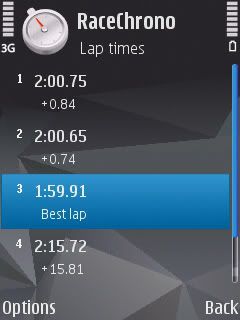
View Full Version : RaceChrono - Free GPS lap timers for you track dudes (beta project)


timbo
08-28-2007, 06:53 AM
For those of you who track, have a Nokia Symbian Series 60 smartphone (e-series, 6120 classic...) and a B/t GPS, THIS (http://www.racechrono.com/?lang=en) looks like a very handy piece of kit. One of the VW boys tested it at WPR this week and says it worked a treat.

takahashi
08-28-2007, 07:52 AM
AHhhhhhhhhhhhhhhhhhhhhhhhhhhhhhhhhhhhhhhhhhhhhhhhh hhhhhhhhhhhhhhhhhhhhhhhhhhhhhhhhhhhhhhhhhhhhhhhhh

Thanks Timbo :kiss:

I love my N95 even more!

takahashi
08-28-2007, 08:15 AM
Damn I need an external bluetooth GPS receiver.... thanks Timbo :mad:

timbo
08-28-2007, 04:40 PM
taka, the N95 has an internal GPS, which can work apparently, albeit buggy at this stage. The developers are on the case, so keep an eye on the RaceChrono forum. But an external GPS is probably faster and more accurate. They don't cost much. :)

takahashi
08-28-2007, 05:18 PM
Tried it. It will not. And the website said so in their forum :(. Good GPS receiver is about $150. I will borrow one and test it before committing myself.
auzoom
08-28-2007, 06:02 PM
Interesting. This is a screenshot of something I was working on last year but for windows mobile. Its just basic lap timing and data logging at the moment. Just waiting on a few spare days to work on mapping.

takahashi
08-30-2007, 05:51 AM
I got the BT GPS receiver. It looks good and the trap is easy to set. Traps can be made to a split area or the start/finish line.

Will do more testing.

Glenn that will be useful for you haha

takahashi
08-30-2007, 10:02 AM
http://discussion.forum.nokia.com/forum/showthread.php?t=112497

Found this - very interesting

And yes, there's always the question of accuracy when it comes to timing anything. After extensive testing, we feel really confident on RaceChrono's accuracy. Our tests together with commercial lap timers have showed an accuracy of between +- 0.03-0.10 seconds with a cheap 5 Hz receiver. Switching to an ordinary 1 Hz SirfStar3 receiver RaceChrono was still very accurate - on the level of +- 0.10-0.15 seconds. Keep in mind however that accuracy is fully dependent on the quality of your GPS receiver and signal reception. There is also an experimental performance testing feature in RaceChrono, but at the moment we would not rely too much on the individual results it gives.

Not bad. 0.15sec will pass me. ... hopefully -0.15 haha

auzoom
09-01-2007, 08:40 PM
dude, whats up with the "wow man" posts?

Revolver
09-02-2007, 12:42 AM
It's the accent - he's trying to say woman... :lol2:

auzoom
09-02-2007, 07:07 AM
lol now everyone is going to be saying...wtf are we on about?

takahashi
09-02-2007, 07:16 AM
Well it is free. And I am going to have it "test run" next Saturday during my first Philip Island. It needs a bluetooth GPS receiver and the program is free to download. It is developed by a few track nuts and IT guru in Finland and I am sure they have done some great stuff.
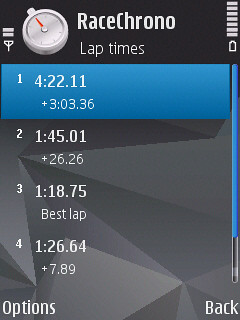
http://farm2.static.flickr.com/1134/1301868949_bc7edfa13c.jpg
Here is the lap times from my around the lab run, in a courier car. Haha .
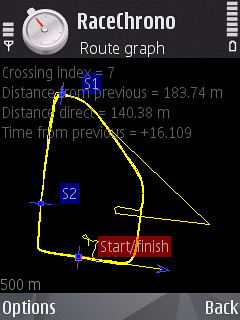
http://farm2.static.flickr.com/1140/1301869703_94c3fd3b48.jpg
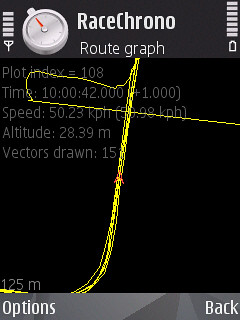
This is the map around the block, with the start/finish line and S1 being set on the route (in the car). However, I found out later at home that I can set another trap when the session is finished. See the mark I set at S2. When the new trap S2 is set. I can even get a sector time from that. I can also delete any trap I previously set. So I think when I am out of the course for the first time. I can go back to the pits to set them out and match them with the official map
http://farm2.static.flickr.com/1062/1302746464_60b06a4139.jpg http://farm2.static.flickr.com/1234/1302746950_c968e8df99.jpg
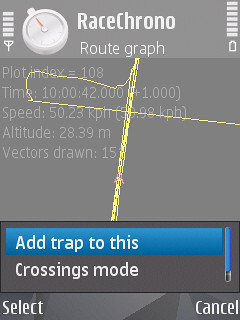
As you can see here. I set the cursor over in that. Press the ENTER button to go to this screen, and if I select the "Add trap to this" function. It will add me another trap.

Let me try this cf my AIMS unit on Saturday. fun!

MattRX
09-05-2007, 04:27 PM
Hi Taka

I hope you have a blast at Phillip Island. That is by far the best track I have driven.

I have not been there for a few years and wouldn't mind having another go. How about a Phillip Island RX8 drive day!!

Matt

auzoom
09-05-2007, 04:57 PM
Unfortunately PI costs over $15000 to hire on a weekday. Therefore the economy of scale makes it something scary and a reason why WRX club days average 60-70 people. Much as I love tracking, thats not an atmosphere I am interested in tracking and at the moment its hard enough solidifying 30 people for a track day at Winton.

There is of course Nationals ;)

Cheers

Andrew

takahashi
09-05-2007, 05:10 PM
It is NOT the price I am concerning. If you tight asses can pull up the money, it can happen. BUT the problem is the strict restriction of having marshall EVERY available spots. AND it is CAMS so you have to have fire extinguisher and bonnet tie (as in AROCA I am going on Saturday).

I am going as more as a field trip for possible PI day, and my first time being there. Will report back.

BTW - Luke Oneill is thinking of getting a day there. It will be expensive ~$500 with the format they have done at Sandown. You have to have done their day to do it. It is very preliminary but this is what he is thinking.

EDIT:
Ok with some help from the main site. I went and brought the iBlue bluetooth GPS receiver.

Use it on the weekend. It is good. The accuracy is better than I thought. It is within .10 of my AIMS timer which is as good as anything on earth.
http://i97.photobucket.com/albums/l230/taka_rx8/6103e7a4.jpg
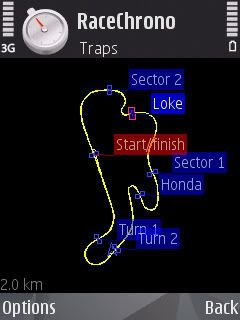
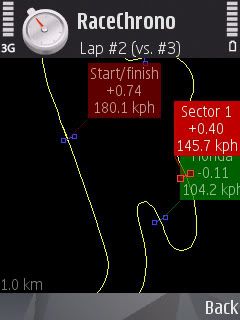
This shows the Phillip Island circuit.
http://i97.photobucket.com/albums/l230/taka_rx8/dd58d704.jpg http://i97.photobucket.com/albums/l230/taka_rx8/020678a7.jpg
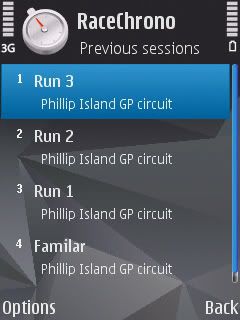
This show the lap times... it is quite comprehensive. And you can analyse each lap showing all the speed around each corner too.
http://i97.photobucket.com/albums/l230/taka_rx8/b14ef348.jpg
You can set the trap as you go or afterwards. You can set a trap retrospectively to show how much difference in each corner so you can improve~~~!!!!!!!!!!

Top toy.

Ottog
09-24-2007, 06:01 AM
For those of us that don't have a bluetooth Nokia phone you might like to check out this link.

http://www.dsetechnology.co.uk/index.html

The product is called TrakPal. It's written for Windows based PDA's with Bluetooth (i don't know if it will work if the GPS receiver is internal).

At $20US it's packed full of features. Click on the support link off the home page to see the full range of screens and instructions.

I've picked up a copy and plan to put it through its paces at Winton.


Cheers.... Otto

PS: Taka/Andrew do either of you have a GPS trace map of Winton that you can share? It would be good to have it pre-loaded and the waypoints defined in advance.

auzoom
09-24-2007, 06:09 AM
No but I am going to go down for the practise day prior so may be able to get it for you.

Cheers

Andrew

Ottog
09-24-2007, 06:11 AM
Cool, be great if you can.

Cheers.... Otto

auzoom
09-24-2007, 07:05 AM
Worst case the friday before but maybe this one.

Also, here are a couple of other PocketPC based apps
http://www.handango.com/ampp/store/PlatformProductDetail.jsp?siteId=1208&jid=AFB8AFXBBF9X53452B727E38AA9244A7&platformId=2&productType=2&productId=213137&sectionId=3756&catalog=30&topSectionId=1423

http://www.mobiletopsoft.com/pocket-pc/download-gps-performance-1-01-000.html

Cheers

Andrew

auzoom
09-25-2007, 03:39 AM
Arghhh we need to start a petition to get Winton Raceway added to google earth :(

takahashi
09-25-2007, 03:55 AM
It only take one lap for me to write the map. Setting trap can be done on the pit lane.

auzoom
09-25-2007, 04:35 AM
aaaaa yeah...not quite what I was getting at. Thos pics of broadford...I got them from google earth. With the logging data you collect you can plot them against google earth as well.

takahashi
08-11-2008, 09:14 PM
A quick update on the racechrono. I like it so much that I sign up as a beta tester. It is still a free program.

More since v0.50:

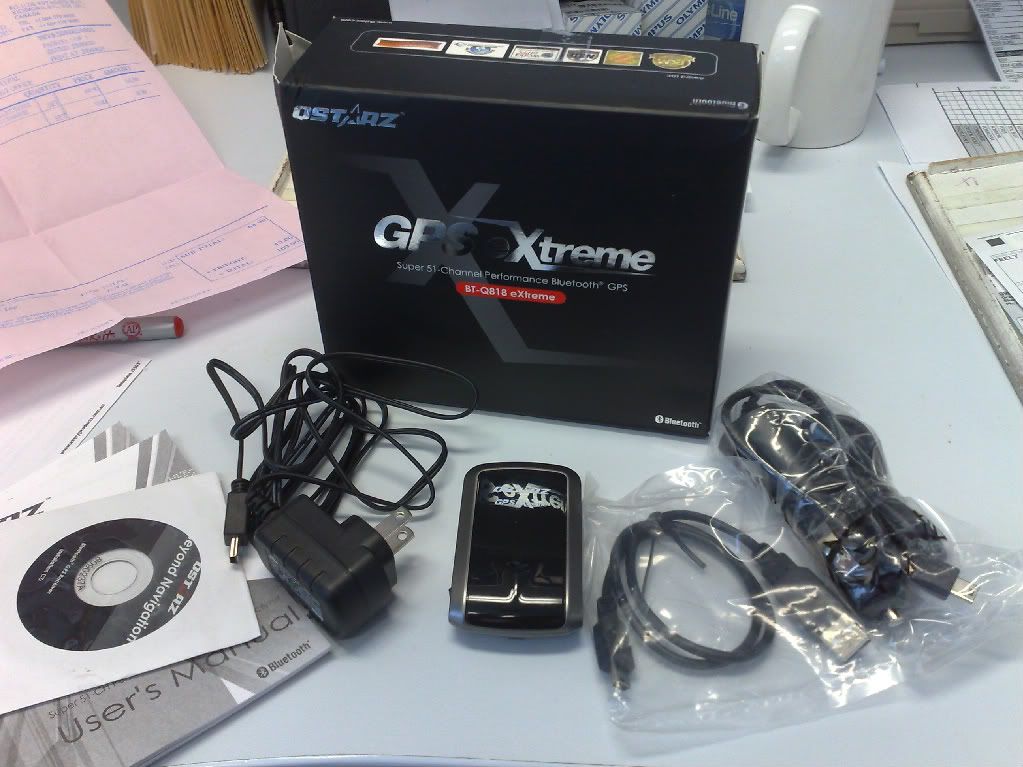
1. The BT GPS is now 5Hz
http://i97.photobucket.com/albums/l230/taka_rx8/03072008385.jpg

Most of us are in 5Hz GPS which is still $100 from eBay/web purchase. I got mine from eBay in Canada. One Melbourne dude selling his lot in eBay for $10 more. I brought stuff from him b4.

5Hz get 5 sets of location PER SECOND! So it is so accurate that you won't believe. The professional Driftbox or Racelogic Vbox is 10Hz (although there is optional 100Hz from Vbox). And the cheapest one is over $500, RRP is $1200 ($900 I think for performance box).

2. OBD-II ability:
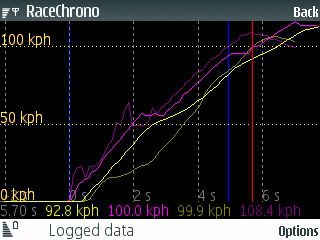
If you have a OBD bluetooth scanner you can make it happen. I logged a file and send it to the developer. He said that the 8 CAN Bus can scan 8 data set per second (with the OBDkey from www.obdkey.com). Now you can see in your phone of the graph with RPM and throttle along with GPS speed. However, it cannot be exported YET!

example:
Yellow line is GPS speed and purple is OBD speed. You can add anything available from ECU to the racechrono. But at this stage you cannot export it, but it is coming.
http://i97.photobucket.com/albums/l230/taka_rx8/e3911e74.jpg

3. The lap timer screen is more impressive now
You have the standard one as usual. But also:

Bit board like screen
http://www.racechrono.com/blog_screens/Screenshot0352.png

The optimal lap calculated from the session’s best sector times can be seen at the top of the lap time list. I will let these screenshots to do rest of the talking:
http://www.racechrono.com/blog_screens/beta_v0900_1.png

Press ‘Open’ to view selected sector in map view:
http://www.racechrono.com/blog_screens/beta_v0900_2.png

Press ‘Open’ again to view selected sector in graph view:
http://www.racechrono.com/blog_screens/beta_v0900_3.png


Toggle view mode with ‘#’ between Sectors, Splits, Trap speeds and High/Low speeds. Here’s the High/Low display mode:
http://www.racechrono.com/blog_screens/beta_v0900_4.png

And opened to map view:
http://www.racechrono.com/blog_screens/beta_v0900_5.png

How convince are you now? :) :lol2: :squint: :eyetwitch

timbo
08-12-2008, 07:01 AM
Thanks for the update, taka. It's a great piece of software, even in the preceding versions. Clearly, I'll have to get OBDkey :uhh:

takahashi
09-06-2008, 03:16 AM
I have successfully changed my old iBlue GPS to 5Hz

http://www.gpspassion.com/FORUMSEN/topic.asp?TOPIC_ID=81990

I use 1/2W 1K ohm as suggest. I don't even solder it in.

Use the QstarzGPSview.exe and change it to 5Hz like my Qstarz 818 extreme.

hehe. Anyone want mine. I will sell it at $110 now. Or do your one for free if you pay for the postage. If I fuck it up, I will pay for it with my iBlue. hehe.

MY Racing 221
09-07-2008, 08:36 AM
I've been using this for a good 6 months now. Absolutely love it - accuracy is right on par with the official times as recorded by my Dorian timer.

THere are people I race against who can't get over the fact that this is free software, when they have paid $1500+ for GPS data logging and this does just as good a job.

A real 'no brainer' if you've got a S60 Nokia.

I love being able to see my corner speeds, and top speeds etc. as I've not got a speedo in the race car. Just awesome!

takahashi
09-08-2008, 02:32 AM
I just realised Lakeside is in the list of the track!

Who put that in?

Black-8
09-08-2008, 02:45 AM
Anyone know of a similar apps for iPhone? I've looked around, and GPS Kit ($12.99) is probably the best/closest thing to this, but have anyone actually tried it?

takahashi
09-08-2008, 07:57 AM
There is something that Drewman told me about. dynolicious. But it only does 0-100.

There is nothing yet until there is a better GPS. The bluetooth is different in the iPhone and the current BT GPS cannot be used, or something, according to racechrono.

I love the iPhone but this program makes me think of the N96 more. :)

assdon
09-11-2008, 02:46 AM
:bowdown:......................................... .................................................. .................................................. .................................................. .................................................. .................................................. ..................
Oh, it good art .................................................. .................................................. .................................................. ..............................................
do you think?
.................................................. .................................................. .................................................. .................................................. ......................

takahashi
09-22-2008, 06:57 PM
Updates:

OBD function are now every full on and it is going to fix a few minor bugs and be able to plot/export graphs with that.

But more exciting addition for the beta testers is this!

http://www.racechrono.com/news/?p=89&lang=en

Accelerometer logging.

I will have to see how good the N95 accelerometer is, then we will see if the figure is ok to be used to log. So far it is only use the GPS to calculate the force (which is very inaccurate).

It can also be exported and used in TrackVision, which is a video editing software to combine data and video. So you have a video with dashboard on it. F1 style!

takahashi
10-08-2008, 01:19 AM
Significant updates

http://i97.photobucket.com/albums/l230/taka_rx8/RaceChrono2AVI-1.jpg

If you have played RaceChrono (http://www.racechrono.com) enough, you will love this program. This is the TrackVision (http://www.trackvision.net) for the RaceChrono (http://www.racechrono.com), and for developer to call it RaceChrono2AVI (download HERE (http://dl.getdropbox.com/u/109708/RaceChrono2AVI.zip)). This program uses the .csv files export from RaceChrono and use it to generate a moving AVI file. Once you have a video files of your GPS and OBD data. Then, all you have to do is to use a movie maker to combine a picture in picture video. I use Sony Vegas MovPlatinum 7.

A few bugs at this stage:

1) I cannot use single lap files. All lap files are used at this stage.

2) The capture does not work in all Windows Themes. I use the Classic theme to reduce the top of the bar and it works perfectly. </p>

*******both the above has been solved and a new beta V0.1.15 has come out (8/10/2008)*********

The end result:

http://www.youtube.com/v/2Ugk1KTusnM&fmt=18

MY Racing 221
10-08-2008, 04:11 PM
Thanks for that Taka, will be giving that a go for sure!

takahashi
10-14-2008, 08:06 PM
Update for RaceChrono2AVI program:

Now a customized cockpit can be used!

http://dl.getdropbox.com/u/109708/VirtualCockpit1.jpg

7sins
10-15-2008, 09:01 AM
RaceChrono users-
Which phones are you using? I read the site doc about s60 versions, but I'm curious to see what you have. I'll be buying a deactivated /used phone to try it since I'm locked into a cdma provider through my work.

takahashi
10-15-2008, 04:50 PM
I use N95, the silver one.

Get that or N85 8Gb which has a bigger screen. As long as it is the 3rd generation S60 phone, it will be ok.

MattRX
10-17-2008, 11:56 PM
Sorry to hijack the thread here, but if anyone is interested in a similar product for windows phones (or any other Win CE device) try http://www.chronogps.com/. I am running it on my hacked MIO gps.

When time permitts I want to have a good play with both and see what I like best.

CYA

Matt

7sins
10-18-2008, 08:02 AM
Did you post the wrong link? That is the same software we've been discussing.

takahashi
10-22-2008, 11:08 PM
Matt we don't understand you :)

Guys, custom gauges are available. And I have even made a RX-8 gauge for it. Download the Zip file and install it on the C:\program files\Racechrono2AVI
gauges\ folder.

Download here (http://dl.getdropbox.com/u/109708/setupRaceChrono2AVI_0-3-10Beta.exe) for the lastest beta version.

http://www.rx8club.com/attachment.php?attachmentid=128045&stc=1&d=1224734881

7sins
10-24-2008, 08:56 PM
Any ideas why RaceChronoAVI2 crashes when I try to open a .csv file? I can navigate and open or import it, but when I try to select the start lap (only lap 4 is visible even though there are 5 laps) it crashes with an overload message. I'm using Windows XP via VMWare on an Intel MacBook Pro.

takahashi
10-24-2008, 10:17 PM
What version of RaceChrono software did you export the .csv file in.

I may or may not have said the current RaceChrono2AVI program is developed using the RaceChrono beta v1.02 software. Join the beta group and get a signed copy of RaceChrono. It will work then.

EDIT: Check the .csv files attached with the program and check yours... see if there is difference in terms of where the data is located in the columns. This may give you clues to adjust it to make your current file works.

7sins
10-24-2008, 10:30 PM
Ah, version 1.00. I emailed the beta request Wednesday. No reply back yet. I'll check on the other ideas. Thanks.

takahashi
10-24-2008, 11:32 PM
Have you email RaceChrono your IMEI code (dial *#06# to see it).

Or your phone is a 2nd generation S60 phone; I think you may need a 3rd gen phone (N95 or similar to use it)

7sins
10-25-2008, 09:27 AM
Have you email RaceChrono your IMEI code (dial *#06# to see it).

Or your phone is a 2nd generation S60 phone; I think you may need a 3rd gen phone (N95 or similar to use it)

Yes that is what I did. My phone is an N75 with S60 3rd Edition . I'm Furai on the RaceChrono forum.

7sins
10-25-2008, 05:11 PM
Got the RaceChrono 1.02 beta a few minutes ago. I'm using (attempting anyway) to use RaceChronoAVI2 0.2.3 beta.

I exported a new csv. All my laps are visible from the "start lap" menu. When I try to select one it crashes with an error 6 overload message. I tried selecting the first and 4th laps of my test session. As soon as I select a lap it crashes.

I changed XP to the classic theme and that has not helped. Should I be changing something from the default when I export from RaceChrono?

I see that my route is recognized so that is positive news.

takahashi
10-25-2008, 05:44 PM
Make sure you have the latest beta. I found a bug on the best lap display to Giorgio and he fixed it straight away.

When you export, make sure you have choice of the scope (all laps, best lap, or the selected lap), Type is .csv, BUT the CSV seperator should be standard. Not still not working. Time to email Giorgio with the .csv file in zip file format. There may be a bug that you have discovered (but I doubt it since most of us get it working at least).

7sins
10-25-2008, 09:50 PM
You were right. I did not have the latest version of RC2AVI. Its playing and producing AVIs ofmy csv file now.

Do you have any specific compression tips or hints?

takahashi
10-26-2008, 12:32 AM
I am using the Microsoft Video 1 suggested by Giorgio but Uncompressed video work as well but it gets like 100Mb a lap that it is not funny :). I rather work with 100Mb per session :). I have not tried DivX yet but I think avi works better with Sony Vegas.

takahashi
10-28-2008, 10:24 PM
There is custom set up of the background now

RaceChrono2AVI Ver 0.3.20 Beta with manual (http://dl.getdropbox.com/u/109708/RaceChrono2AVI.zip)

http://i97.photobucket.com/albums/l230/taka_rx8/16d4aaf5.jpg

I customised the RX-8 cockpit over my tea break.

Will upload the files later, and perheps update the first post.

7sins
10-31-2008, 01:29 PM
Takahashi-

What mount is that you are using for the phone? Do you have close up photo of it?

takahashi
10-31-2008, 04:59 PM
I do.

http://i97.photobucket.com/albums/l230/taka_rx8/058a91ac.jpg

I decided against a 5 dollar one and go for the 10 dollar model which the bracket is made for N95 and has a clip that security lock the phone in. I found it is harder to take it out than putting it in. I am currently perfecting my skill to dismount the phone with one hand. :D:

7sins
10-31-2008, 09:01 PM
Sorry, can't quite make it all out. Is that an arm with suction cup mount to the windshield or does it attach to the vent?

Black-8
10-31-2008, 10:13 PM
it's suction cup mounted to the windscreen.

takahashi
10-31-2008, 10:46 PM
Sorry, can't quite make it all out. Is that an arm with suction cup mount to the windshield or does it attach to the vent?

Sorry it is suction cup... I don't thing vent is strong enough to mount that.

http://i97.photobucket.com/albums/l230/taka_rx8/battery/88b0bd29.jpg

For extra security, the arm is placed on the dash and race tape go over it. It will never move and measure the G forces better.

7sins
11-01-2008, 06:31 AM
Unfortunately for me that won't pass tech in most clubs around me. Obviously it's been working though.

takahashi
11-01-2008, 06:54 AM
Suction cups are stronger than vent clips!

Most tech are 60 year old stubborn guys who don't know anything. Of course it works! Next year I am going CAMS to earn an official license and change all the rules.

When it is tapped down, most dudes will be ok. The reason against window suction camera is that in the event of crash and windows breaks, that shit will fly anywhere and potentially damage you.

I also have the 5Hz GPS on the dash, velcroed in. It never flies... hey I crashed twice with the GPS in that position and it did not move a mm... hehe

MY Racing 221
11-02-2008, 03:38 PM
Suction cups are stronger than vent clips!

Most tech are 60 year old stubborn guys who don't know anything. Of course it works! Next year I am going CAMS to earn an official license and change all the rules.


Regardless, there's still no point arguing with any CAMS scrut unless you have the relevant CAMS documentation to back up your point.

Good on you for being willing to put your hand up though and become a CAMS volunteer.

takahashi
11-02-2008, 05:28 PM
I will do it next year. Perfect way to meet for people with alike interest.

I won't argue, I just remove it and sneak it in in later sessions. :).

In fact I have the same set up (*even bigger) to many CAMS event... never been told to take it off.

They never check eTag btw... I have a few times testing them. They never check it.

takahashi
11-06-2008, 05:17 PM
Update:

There is update on the new beta version v0.3.27 beta (http://dl.getdropbox.com/u/109708/RaceChrono2AVI.zip)

Update includes:
- Speed Smoothing
- new interface for customization of digital display and gauges.
- Digital displays can change foreground and background colors and can been bring to front.
- Also gauges can been bring to front.
- Program window got caption again and can be moved only using the caption.
- A new digital display for the "best lap so far", it will show the best lap only when it will reach and will blink for 10 seconds.
- Track gauge will not clear any more the original background before drawing the gps track, look at the varano track gauge for an example.
- Avoiding absolute path in cfg files.
- "ON AIR" icon shown when avi recording is active.

I have subsequently updated the dashboard

http://i97.photobucket.com/albums/l230/taka_rx8/rx8dash_by_taka.jpg

http://i97.photobucket.com/albums/l230/taka_rx8/rx8dash_by_taka2.jpg

A YouTube video demonstration:
http://www.youtube.com/watch?v=hdva3bA3PBc&fmt=18

Configuration can be download below. And copy the files to the RaceChrono2AVI/cfg/ folder. A copy has sent to ledogme so later it will be included in the set up.

MattRX
11-06-2008, 05:38 PM
Sorry to hijack the thread here, but if anyone is interested in a similar product for windows phones (or any other Win CE device) try http://www.racechrono.com/. I am running it on my hacked MIO gps.

When time permitts I want to have a good play with both and see what I like best.

CYA

Matt

Sorry guys, I think my brain went to sleep. Try http://www.chronogps.com/.

After playing with both programs I much prefer the Nokia based Race Chrono. But it's free if anyone wants to try it out.

Sorry for the confusion.

Matt

7sins
12-02-2008, 11:49 PM
takahashi-

I'm having a very difficult time synching the in track video to the video from RCAVI2. Maybe the interpolation is throwing it off since it is just a 1hz receiver? I don't think Sony Vegas is stumbling on the different frame rates.

takahashi
12-03-2008, 04:27 AM
I think it will be hard if there is missed data on the GPS data acquisition. Make sure you have enough satellite and there is no bluetooth interference.

If you use internal GPS for that, you will fine you sync in one corner but not the next. It is just because the GPS is inferior and not accurately getting the data. But doing lap time it is still acceptable.

7sins
12-03-2008, 07:24 AM
It is an external receiver, but it is just 1HZ. I'm hoping for a 5hz OBDII for Christmas. That I hope will make it more precise. There is just too much going on in hard braking zones for it to interpolate, bbut yes it seems to smooth out during the predictable progressive straights.

Thumper3322
10-29-2009, 12:27 PM
so what is the best BEST phone for this?

7sins
10-29-2009, 01:07 PM
The phone does not matter as much as the GPS receiver.

Thumper3322
10-29-2009, 01:15 PM
fair enough, then best GPS receiver or all in one?

takahashi
10-29-2009, 08:28 PM
There is no one unit does it all yet. But I think they are planning to do it. Then, unfortunately, will not be a hobby project anymore.

Anyhow, for phone I still think Nokia/other phones with Symbion S3 software (N series or E series Nokia) are the best. I now use Nokia E71 because the battery lasts longer than N95 or N97. N97 has known to be not as stable.

I have no comment on Windows mobile.

For GPS receiver, I have 90% of us are using Qstarz Extreme. It is 5Hz (after you set it via a simple computer program). There are 10Hz or even 20Hz but they are so expensive that IMHO defeating the purpose of simple and cheap kit for lap timing.

jakeGTR
05-12-2010, 10:07 AM
Hey guys, just read the post... very informative.

Have you seen the new one?
www.racechrono.com.au (http://www.racechrono.com.au)

timbo
05-12-2010, 07:23 PM
Nice try, Jake, but that's a different product and much more expensive!

takahashi
05-12-2010, 09:20 PM
Different product as they made the touchscreen into production. The designer were involve in it.

Why do you need that when you have a phone in the first place. My N95 is useless otherwise.

jakeGTR
05-13-2010, 04:55 AM
Nice try, Jake, but that's a different product and much more expensive!

Yeah, I know... But it's pretty sweet!

mdr
05-21-2010, 08:52 AM
Waiting for them to port this thing to the Nokia N900.
But looks like it will still be a few moths away.

Dunc
06-26-2010, 12:12 PM
Update for RaceChrono2AVI program:

Now a customized cockpit can be used!

http://dl.getdropbox.com/u/109708/VirtualCockpit1.jpg
I'm having some issues with the RaceChrono2AVI program. I have data in an excel file that was logged from my external GPS receiver. Anyways, it seems like I am missing a "start animation now" type of button that I can see in your picture that's quoted. I've tried several versions and none seem to have this button. I can't move the gray box area in the lower left and I'm also tried adjusting my screens resolution. I also tried clicking on that "Start/Finish" thing but it doesn't do anything. It just another image I can drag & drop around like the gauges.

Any tips on what I should do? Do you have the installation file for the version you are using since clearly you have that "start" button? Thanks for any help!
.
.
.
.
.
Here is what my screen shot looks like:

Dunc
06-26-2010, 12:52 PM
Figures....I tried racechrono on a different computer (laptop this time) and it worked. I'm not sure why trying it on my laptop vs the desktop was different but I was able to see more of the program and the key buttons at the bottom I really needed to see in order to get this rolling.

takahashi
06-26-2010, 06:26 PM
Not sure why isn't doing that.

The data you exported has to be from racechrono program since it needs a specific format in th e correct column in order to make it work.

rotarenvy
06-26-2010, 06:59 PM
anyone know where to buy a blutooth GPS reciver? there are so many versions of the Qstarz BT-Q818X and I don't want to buy one that doesn't work.

I have only found the BT-Q818X from canada and the US. will they work in Australia?

takahashi
06-26-2010, 07:16 PM
No gps in Australia will not work because it will make negative reading down under....

Yeah right....

Of course it will work. I think I bright mine from eBay from a guy in Canada.

rotarenvy
06-26-2010, 07:25 PM
maybe a GPS receiver is universal as the Datum info and coordinate system is in the software :dunno:

takahashi
06-26-2010, 10:25 PM
Of course it will work. All gps system is the same. My iPad ain't southern hemisphere specific either.

jakeGTR
06-27-2010, 03:38 AM
anyone know where to buy a blutooth GPS reciver? there are so many versions of the Qstarz BT-Q818X and I don't want to buy one that doesn't work.

I have only found the BT-Q818X from canada and the US. will they work in Australia?

Yep, they do work in Aus. I'm the official RaceChrono rep for Australia and I sell them for use specifically with RaceChrono.

Check here: http://www.roostindustries.com/gps_lap_timers_qstarz.php