


Yet Another iPod Adapter Post - Which to get?


Thread Starter
Registered
Joined: Sep 2005
Posts: 266
Likes: 0
From: Redmond, WA
Yet Another iPod Adapter Post - Which to get?
I've spent quite a while searching, but no one seems to have the same set of wants that I have, so I'm hoping for yet more information.
I have an 80gb ipod, very full of music, all very anally sorted by artist and album and tagged. I don't use playlists, I just listen to albums (or singles).
With that in mind, which of the various ipod adapters is going to give me the easiest use without having to resort to the scrollwheel/looking at the ipod? Or am I just going to have to give in and use the scrollwheel? I'm really hoping to get whatever kind of functionality out of the stock in-dash LCD and steering wheel controls, but if I can't, I can't. In the end, I just want to be able to access my music via the simplest method possible.
I have an 80gb ipod, very full of music, all very anally sorted by artist and album and tagged. I don't use playlists, I just listen to albums (or singles).
With that in mind, which of the various ipod adapters is going to give me the easiest use without having to resort to the scrollwheel/looking at the ipod? Or am I just going to have to give in and use the scrollwheel? I'm really hoping to get whatever kind of functionality out of the stock in-dash LCD and steering wheel controls, but if I can't, I can't. In the end, I just want to be able to access my music via the simplest method possible.


Extraordinary Engineering
Joined: Oct 2005
Posts: 4,733
Likes: 14
From: Burls On
My description of the OEM unit from my IPOD post in the Canada forum
If you want to select a menu you hold down the cd change button (up or down) for one second or more. The number scrolls but you ignore that. When you release the button the time counter shows the menu number for a second or so before the next song starts counting.
The cd change button also is used to change the list number within the menu you selected. The list is changed if you press the button for less than one second. The only issue here is if you hit the cd button twice in one second it will change the menu instead of the list so you have to change lists slowly.
The menu numbers are documented in the manual and the list in each menu is selected in the order programmed on your IPOD
By selecting the artist menu you could flip through them with the cd change button.
I hope that helps!
If you want to select a menu you hold down the cd change button (up or down) for one second or more. The number scrolls but you ignore that. When you release the button the time counter shows the menu number for a second or so before the next song starts counting.
The cd change button also is used to change the list number within the menu you selected. The list is changed if you press the button for less than one second. The only issue here is if you hit the cd button twice in one second it will change the menu instead of the list so you have to change lists slowly.
The menu numbers are documented in the manual and the list in each menu is selected in the order programmed on your IPOD
By selecting the artist menu you could flip through them with the cd change button.
I hope that helps!
Extraordinary Engineering
Joined: Oct 2005
Posts: 4,733
Likes: 14
From: Burls On
Originally Posted by CodingParadox
Can you view the currently selected artist on the in dash led then, scrolling that way?
The good part is that the OEM unit is solid and reliable.
A power user like you might want to look at Phatbox.
I zoom therefore I am.
Joined: Mar 2007
Posts: 4,919
Likes: 12
From: San Jose, CA
Originally Posted by CodingParadox
Does the audiolink have text display?
Nothing of real value, other then how long the current track has been playing.
Audiolink is the way to go. It's easy to install. You can run the cable to your glove box or center console. It sounds great and allows you control through the steering wheel.
I have mine currently mounted in the glove box but will be moving it once i can find an 8pin mini din cable extender. I'll have it in the secret compartment behind the drink holder.
Thread Starter
Registered
Joined: Sep 2005
Posts: 266
Likes: 0
From: Redmond, WA
So, in summary, neither of them have anything resembling useful text display, but at least the audiolink lets you retain use of the ipod controls, while the OEM takes it away? Bleh. Neither of those are particularly appealing.

RX-8 Enthusiast
Joined: Jul 2006
Posts: 277
Likes: 2
From: Boston Area, MA
true, but even with text display, what youre asking for is still a little bit ludacris...
i mean, i have at least 500 artists on my ipod... it'd be dangerous to try to scroll through those, even if it was displayed on the dash.
i mean, i have at least 500 artists on my ipod... it'd be dangerous to try to scroll through those, even if it was displayed on the dash.
Thread Starter
Registered
Joined: Sep 2005
Posts: 266
Likes: 0
From: Redmond, WA
Not really. Hold down button for 2 seconds - look up, see "D-something", scroll down some more, see "F-something", then slow down and go to the right one. Not hard. A lot safer than looking down at the damn ipod as I scroll through it on the road, no?

Registered
Joined: Apr 2004
Posts: 394
Likes: 0
From: Massachusetts
I got the audiolink and its great. Has an extra audio input that i'm hoping will plug right into my Navigation unit. I'd like to see current track information scrolling through the built in display on the radio, but no dice. However that doesn't effect the audio quality so in the end who cares. I suggest you get the audiolink, and get one of those mounts that hold your ipod right next to your radio, so you can easily scroll through your music, find what you want, hit play, then step on the gas cause you just ran over 6 kids while you were looking at your ipod instead of the road.

Registered
Joined: Oct 2006
Posts: 57
Likes: 0
From: New Jersey
Harman Kardon Drive+Play. Hands down the best iPod control around. Displays the same menu as the iPod and the control **** mimics the scroll wheel. I have my display mounted up above my RV mirror and the control **** is mounted (with double-sided tape) just in front of the seat heater switches. I also use the Auxmod by Sylfex as my input. The D+P also has an external input, so I attached am extension to that, routed to the cupholders. (This way I can plug other stuff into it, like an XM tuner or cellphone)
My 2C.
My 2C.

^NieL
Joined: Oct 2005
Posts: 2,560
Likes: 1
From: santa clara ,ca
Originally Posted by Phiend
Harman Kardon Drive+Play. Hands down the best iPod control around. Displays the same menu as the iPod and the control **** mimics the scroll wheel. I have my display mounted up above my RV mirror and the control **** is mounted (with double-sided tape) just in front of the seat heater switches. I also use the Auxmod by Sylfex as my input. The D+P also has an external input, so I attached am extension to that, routed to the cupholders. (This way I can plug other stuff into it, like an XM tuner or cellphone)
My 2C.
My 2C.

Registered User
Joined: Feb 2007
Posts: 11
Likes: 0
What about the Harman Kardon Drive + Play 2?
It is not out yet but I will be getting one I think once it is released when I get my rx8.
http://www.harmankardon.com/drive-1/
Click on the one on the right hand side
It is not out yet but I will be getting one I think once it is released when I get my rx8.
http://www.harmankardon.com/drive-1/
Click on the one on the right hand side

Skeet skeet skeet
Joined: Jun 2006
Posts: 393
Likes: 0
From: making my way to the ATL
Originally Posted by laythor
I have mine currently mounted in the glove box but will be moving it once i can find an 8pin mini din cable extender. I'll have it in the secret compartment behind the drink holder.
Adrenaline Junkie
Joined: Mar 2007
Posts: 17
Likes: 0
From: Kansas City, MO
I have the DiCE system installed, and my iPod rests in the hideaway console behind the drink holders.
It does not display the artist/track name, but it does allow you to change songs via the steering wheel, radio or on the iPod itself. It also charges the iPod for you, and turns it off when you shut the engine off (or switch to FM/CD/etc).
Also has a separate aux input for non-iPod devices like other mp3 players, laptops or XM.
http://www.diceelectronics.com/ipod_integration.htm
It does not display the artist/track name, but it does allow you to change songs via the steering wheel, radio or on the iPod itself. It also charges the iPod for you, and turns it off when you shut the engine off (or switch to FM/CD/etc).
Also has a separate aux input for non-iPod devices like other mp3 players, laptops or XM.
http://www.diceelectronics.com/ipod_integration.htm
Thread Starter
Registered
Joined: Sep 2005
Posts: 266
Likes: 0
From: Redmond, WA
I ended up picking up an audiolink. The Drive & play looks nice too, but I noticed that there wasn't any RX-8 integration package for it, so even if I did pick it up, I'd need to use the radio link (ugh). So, I figured I'd start with an audiolink, and if I got too annoyed with having to use the ipod manually, I'd pick up a drive and play, and hook it into the aux port on the audiolink.
Got the audiolink and ipod last night. Today, tore into the center console and installed it. I'm not sure what people are talking about, the wires were long enough to run it to the hidden panel behind the cup holders, with enough extra wiring to pull it out and look at it at eye level as I'm driving to change songs.
Got the audiolink and ipod last night. Today, tore into the center console and installed it. I'm not sure what people are talking about, the wires were long enough to run it to the hidden panel behind the cup holders, with enough extra wiring to pull it out and look at it at eye level as I'm driving to change songs.

Moof
Joined: Nov 2006
Posts: 51
Likes: 0
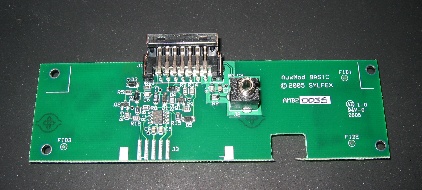
after reading similar threads to this one i ended up getting the auxmod. $60 is cheaper than anything else, as far as i've seen.
http://www.sylfex.com/products/AuxMod/
http://www.sylfex.com/products/AuxMod/

Phatbox alternative to Ipod adapters
as mentioned in:
https://www.rx8club.com/showpost.php...4&postcount=12
My $232 Phatnoise;
1. Turns on and off with car
2. Remembers last played song
3. Sorts via Artist Album Genre Playlist
4. Has steering wheel controls
5. Has radio HU controls
6. TALKS to me and recites the Artist/Album/Playlist/Genre
7. I can sort by Artist and then by Album within that Artist
8. Can quickly toggle through the alphabet AUDIBLY thru car speakers.
9. Works with Audible books
(10. Does NOT have text display either - just shows EX:1 and track time)
My eyes never leave the road and I can toggle through a wide variety of song sorting methods. It worked fantastic last year to/from a Tail of the Dragon.
I was beginning to be bummed about the advent of Ipod and OEM or aftermarket adapters. You all just made me feel a whole lot better about my choice!
https://www.rx8club.com/showpost.php...4&postcount=12
My $232 Phatnoise;
1. Turns on and off with car
2. Remembers last played song
3. Sorts via Artist Album Genre Playlist
4. Has steering wheel controls
5. Has radio HU controls
6. TALKS to me and recites the Artist/Album/Playlist/Genre
7. I can sort by Artist and then by Album within that Artist
8. Can quickly toggle through the alphabet AUDIBLY thru car speakers.
9. Works with Audible books
(10. Does NOT have text display either - just shows EX:1 and track time)
My eyes never leave the road and I can toggle through a wide variety of song sorting methods. It worked fantastic last year to/from a Tail of the Dragon.
I was beginning to be bummed about the advent of Ipod and OEM or aftermarket adapters. You all just made me feel a whole lot better about my choice!