


The new softare logs me out.


Thread Starter
Bland
Joined: Apr 2004
Posts: 856
Likes: 1
From: New Jersey
 The new softare logs me out.
I have had trouble staying logged in since the new software was implemented. Yes, I check the "remember me" box, but every so often I get logged off. It seems to happen randomly.
It most recently happened when I clicked the "back" button after viewing a thread. Also, when I launch the site, there's about a 50/50 chance I'm still logged in from my previous log in.
I'm running Firefox 3.0.5. Anyone else having issues?
It most recently happened when I clicked the "back" button after viewing a thread. Also, when I launch the site, there's about a 50/50 chance I'm still logged in from my previous log in.
I'm running Firefox 3.0.5. Anyone else having issues?


i have had the issue intermittently. i havent paid enough attention to narrow it down, but i think its likely it only happens at work on the gov/mil machines. which is no big deal. i'll pay attention tomorrow and see at home



Thread Starter
Bland
Joined: Apr 2004
Posts: 856
Likes: 1
From: New Jersey

Thread Starter
Bland
Joined: Apr 2004
Posts: 856
Likes: 1
From: New Jersey
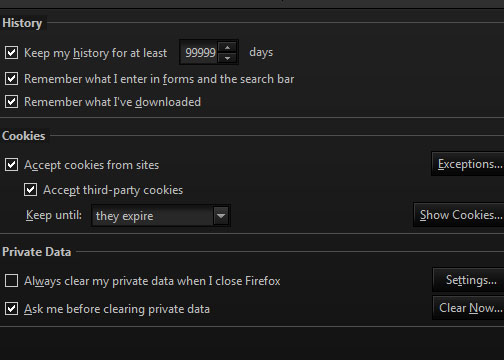
My cookies are fine. This is the only site where I experience the problem (and I'm the only one who watches **** on my computer - I hope).
I have to log in every time I visit the site, and sometimes it'll just log me out when I click on a thread. I can't tell you how annoying the ads on the side of the page area, and I can do without seeing everyone's signatures.
Dang it. I can't be the only one with this problem. I'm going to try to download the newest Firefox again.
I have to log in every time I visit the site, and sometimes it'll just log me out when I click on a thread. I can't tell you how annoying the ads on the side of the page area, and I can do without seeing everyone's signatures.
Dang it. I can't be the only one with this problem. I'm going to try to download the newest Firefox again.

Registered
Joined: Aug 2005
Posts: 222
Likes: 0
From: Champaign, IL
Same problem here with latest Firefox on a personal laptop. Sometimes opening thread links in new tabs doesn't carry over the log-in, sometimes it does. I just had several tabs open on different threads and all showed logged-in, refreshing a tab showed logged-out except for the original tab. The PC did go to sleep while the tabs were open so I don't know if that has anything to do with it. I haven't tried deleting site cookies yet.

Registered
Joined: Aug 2005
Posts: 222
Likes: 0
From: Champaign, IL
I still have to log in almost every time I go to my usercp page. I read those new posts then went to "Quick Links/Today's Posts". I usually go through the list and open each of those threads I intend to check in new tabs (Firefox), so I can get a large collection of tabs to read. I had been reading threads for a while and noticed that when I clicked to go to a "page 2" of one that I was now logged out. Going to my UserCP again prompted me to log in again. Apparently if I don't do something to show I am still active on the website, like request a page, it logs me out. I don't know how long the inactivity has to be but I would guess and hour or less. This sucks as many of the threads I read through the "Today's posts" link are going to only be one page, or the last page and don't require a page request to read more. That means I can be on-site reading quite a bit without being active for the required time. I don't know why this was changed with the new software update, but I don't like it. I don't like the login each time I visit and especially don't like the short time limit on activity. Why was this changed?


Registered
Joined: Aug 2005
Posts: 222
Likes: 0
From: Champaign, IL
Yeah, this laptop came with N360 on it and I have been planning to uninstall it, just haven't gotten around to it. Right after activating it the 32-bit version of IE failed with a corrupt folder. I had to run the 64-bit version and not everything works with it, like Flash videos (you-tube). Thanks for the info, Ill check the settings to see if anything there will fix it but I am using Firefox and it worked fine until the site update.
Thread Starter
Bland
Joined: Apr 2004
Posts: 856
Likes: 1
From: New Jersey
I'm pretty sure it is one of my settings, but the weird thing is this is the only site I have problems with and it's only on my work computer.
I'm about to update to Firefox 3.0.7. I'll report back.


I love FF IMO.
No script is great for blocking crap you don't want slowing down your browser or opening ads.
Here's the scripts I'm currently blocking:
internetbrands.com
postrelease.com
jbrlsr.com
quantserve.com
doubleclick.net
Maybe one of these I should not block to keep me logged in?
No script is great for blocking crap you don't want slowing down your browser or opening ads.
Here's the scripts I'm currently blocking:
internetbrands.com
postrelease.com
jbrlsr.com
quantserve.com
doubleclick.net
Maybe one of these I should not block to keep me logged in?


Thread
Thread Starter
Forum
Replies
Last Post
projectr13b
Series I Do It Yourself Forum
1
Sep 6, 2015 01:04 PM
