


DIY: AUX Power Outlets - How To Switch Off


Thread Starter
2009 RX-8 Sport MT
Joined: Sep 2009
Posts: 128
Likes: 4
From: Florida
DIY: AUX Power Outlets - How To Switch Off
It has always bothered me that the center console power outlet is always on. While it is a nice convenience when you have to charge your cell phone, it's a hassle for other devices that you would like to turn on and off with the cars ignition. For example, I have an ipod adapter plugged into the center console power outlet which is also connected to the aux stereo input in the center console. When you turn the car off the adapter should pause the ipod for you. The problem is the power outlet in the center console on the RX-8 is always on, therefor leaving my ipod playing nonstop all day long (unless I happen to remember to manually click pause on the ipod before getting out of the car). The solution? Use two add-a-circuits (available at your local auto part store) to swap the "hot" line from the front cigarette outlet to the center console outlet, and vise versa. Now my center console outlet turns off with the cars ignition and the outlet by the shifter is always on (useful for charging cell phone).
I would like to thank the fine folks over at mazda3revolution.com who gave me the idea of using the add-a-circuits to accomplish this (although they went about it a slightly different way).

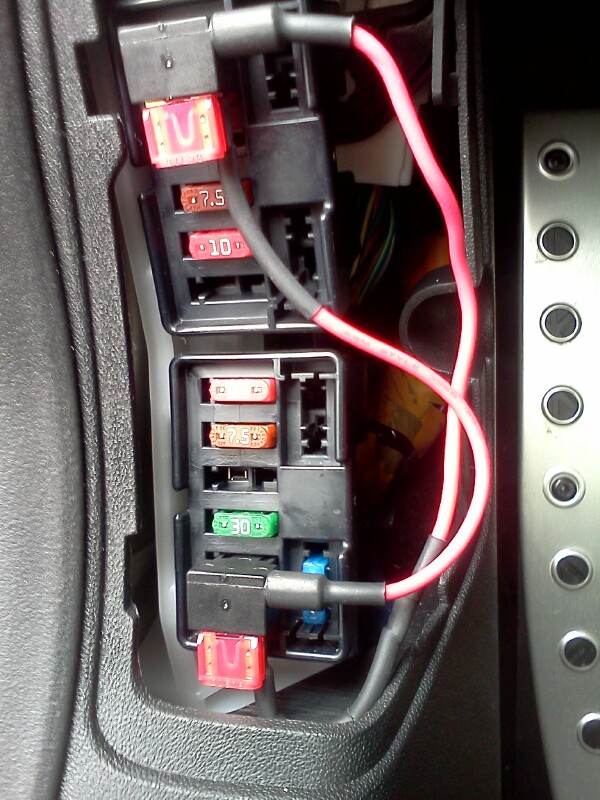
I would like to thank the fine folks over at mazda3revolution.com who gave me the idea of using the add-a-circuits to accomplish this (although they went about it a slightly different way).
Last edited by Lane03; May 10, 2011 at 02:59 PM.

Thread Starter
2009 RX-8 Sport MT
Joined: Sep 2009
Posts: 128
Likes: 4
From: Florida
Yup it's very easy to put back to stock. Just remove the two adapters and plug in two regular fuses and it's like it never happened. You could also make both outlets always on or both switched depending on how you wired it up.


Thread Starter
2009 RX-8 Sport MT
Joined: Sep 2009
Posts: 128
Likes: 4
From: Florida
For this you would tap the two red wires from the add-a-circuits together. Plug one add-a-circuit into the always on slot (with two fuses in this add-a-circuit) and the other add-a-circuit into the switched slot (only one fuse in this add-a-circuit, as this will feed power to only one leg of the add-a-fuse that is plugged into the switched slot). Use a volt meter to check everything before connecting to make sure you are routing the power where it needs to go.

Last edited by Lane03; Jun 20, 2011 at 11:41 PM.

Thread Starter
2009 RX-8 Sport MT
Joined: Sep 2009
Posts: 128
Likes: 4
From: Florida

Registered User
Joined: Dec 2012
Posts: 1
Likes: 0
From: Cincinnati
Sorry to bump an old thread (for my first post, too!), but I'm trying to get this setup working in my car and feel like I'm missing something.
I picked up this off amazon:
The first two pics in this thread show a similiar product but it looks like the wire coming off is male, but I could only find add-a-circuits with female ends. What do I need to do to connect them to one another? Did you modify them in any way?
Ultimately I'd like to have it set up so both outlets are always on the switch. Would I just wanna strip off one of the female ends, and solder the wire to the other female end?
I picked up this off amazon:

The first two pics in this thread show a similiar product but it looks like the wire coming off is male, but I could only find add-a-circuits with female ends. What do I need to do to connect them to one another? Did you modify them in any way?
Ultimately I'd like to have it set up so both outlets are always on the switch. Would I just wanna strip off one of the female ends, and solder the wire to the other female end?

Registered
Joined: Feb 2012
Posts: 12
Likes: 0
So I hate to be that guy that revives an ancient topic, but I was wondering if someone who has done this recently can provide some clarification.
How exactly did you connect the free end of each add-a-circuit to the 2nd fuse slot on the add-a-circuit head? Any chance someone has a picture of what that end looked like before you plugged it into the other add-a-circuit?
What amp fuse did you connect to the 1st fuse slot of each add-a-circuit? I think those add-a-circuits at only rated up to 10 amps, and the red fuses are usually 10, right? Those two fuses on the RX-8 normally use 15 amp fuses there, have you run into any problems with blowing those fuses?
The long and short of it is that I have no idea how to use these add-a-circuit things and really don't want to break anything. As it is now though, my car doesn't even have a fuse in that accessory slot position that's second from the bottom... My manual says it takes a 15 amp fuse there and I think I want to at least pop one in before I start fiddling around with add-a-circuits.
How exactly did you connect the free end of each add-a-circuit to the 2nd fuse slot on the add-a-circuit head? Any chance someone has a picture of what that end looked like before you plugged it into the other add-a-circuit?
What amp fuse did you connect to the 1st fuse slot of each add-a-circuit? I think those add-a-circuits at only rated up to 10 amps, and the red fuses are usually 10, right? Those two fuses on the RX-8 normally use 15 amp fuses there, have you run into any problems with blowing those fuses?
The long and short of it is that I have no idea how to use these add-a-circuit things and really don't want to break anything. As it is now though, my car doesn't even have a fuse in that accessory slot position that's second from the bottom... My manual says it takes a 15 amp fuse there and I think I want to at least pop one in before I start fiddling around with add-a-circuits.
Thread Starter
2009 RX-8 Sport MT
Joined: Sep 2009
Posts: 128
Likes: 4
From: Florida
To connect the end of the wire to the plug you may be able to find a crimp on connector at radio shack that will fit, but all I did was cut the ends off a fuse and soldered one end to each wire. Yes, you would want to use 10a fuses since that's all the add-a-circuits are rated for. They won't blow as long as what you are plugging in doesn't draw more than 10a (a phone charger uses 1a).
Disclaimer: If you don't know how to use a multimeter I would not recommend doing this mod as there is always a risk when working with electricity.
Disclaimer: If you don't know how to use a multimeter I would not recommend doing this mod as there is always a risk when working with electricity.
Last edited by Lane03; Nov 9, 2014 at 02:40 PM.
Registered
Joined: Feb 2012
Posts: 12
Likes: 0
So you just cut off both blade connectors from a mini fuse and soldered one of the two wires onto each blade? Is there a "left" one and a "right" one after you've gotten them soldered on, or does it not matter which blade goes into which part of the add-a-circuit?
The 10a mini fuses in your picture block the view for exactly how you did it, and I want to be absolutely sure of what you did before I start messing with it.
Thanks for the help by the way.
The 10a mini fuses in your picture block the view for exactly how you did it, and I want to be absolutely sure of what you did before I start messing with it.
Thanks for the help by the way.
Thread Starter
2009 RX-8 Sport MT
Joined: Sep 2009
Posts: 128
Likes: 4
From: Florida
So you just cut off both blade connectors from a mini fuse and soldered one of the two wires onto each blade? Is there a "left" one and a "right" one after you've gotten them soldered on, or does it not matter which blade goes into which part of the add-a-circuit?
The 10a mini fuses in your picture block the view for exactly how you did it, and I want to be absolutely sure of what you did before I start messing with it.
Thanks for the help by the way.
The 10a mini fuses in your picture block the view for exactly how you did it, and I want to be absolutely sure of what you did before I start messing with it.
Thanks for the help by the way.
Last edited by Lane03; Nov 9, 2014 at 09:58 PM.
Registered
Joined: Feb 2012
Posts: 12
Likes: 0
So, when looking at the add-a-circuit, the fuse plugs into the top 2 holes. The bottom right hole is connected to the blade that has been soldered to the free end of the other add-a-circuit, and the bottom left hole has nothing plugged into it at all?
Sorry for asking you the same question over and over again, but I've got nothing better to do until my add-a-circuits come in...
Sorry for asking you the same question over and over again, but I've got nothing better to do until my add-a-circuits come in...
Thread Starter
2009 RX-8 Sport MT
Joined: Sep 2009
Posts: 128
Likes: 4
From: Florida
Registered
Joined: Feb 2012
Posts: 12
Likes: 0
Well. That was a very quick response... Now if UPS could be that quick with my add-a-circuits, I'd be happy.
Seriously though Lane, I appreciate your help a lot. It's been years since you've done this and you don't even have it done to your car anymore and you still took the time the explain it to me patiently (and repeatedly). We need more helpful people like you in the world.
Thanks!
Seriously though Lane, I appreciate your help a lot. It's been years since you've done this and you don't even have it done to your car anymore and you still took the time the explain it to me patiently (and repeatedly). We need more helpful people like you in the world.
Thanks!
Thread Starter
2009 RX-8 Sport MT
Joined: Sep 2009
Posts: 128
Likes: 4
From: Florida
You're welcome. It's a good thing you sent me a PM because otherwise I never would have checked this thread, which is why I never saw Rusty's post from 2012. Hopefully he figured out the answer to his question was in post 6.

Thread
Thread Starter
Forum
Replies
Last Post
nivong
Europe For Sale/Wanted
0
Sep 2, 2015 07:54 AM
